Certificate-Based Authentication (CBA) for OAuth 2.0
Overview
Volt Foundry supports Certificate-Based Authentication (CBA) for OAuth 2.0 identity providers using the private_key_jwt client authentication method. Instead of sending a client secret, Foundry authenticates itself to the identity provider using a signed JWT assertion backed by a certificate, stored, and managed through Enterprise Key Management (EKM).
CBA removes the need to store or transmit a client secret for OAuth 2.0 identity services, aligning with enterprise security requirements.
CBA has been validated with Microsoft Entra ID.
Supported Grant Types
| Grant Type | CBA Support |
|---|---|
| Authorization Code | Supported |
| Client Credentials | Supported |
| Password | Supported |
| Extension Grant (Refresh Token) | Supported |
| JWT Bearer | Supported |
Supported Channels
- On-Premises
- Cloud
Supported Versions
- Foundry 10.0.9.0 and later
- Foundry 9.5.x
Note: CBA is not available on Foundry 9.2.x.
Prerequisites
- An Authentication Certificate credential must already exist in Enterprise Key Management. See Creating an Authentication Certificate Credential below.
- A Microsoft Entra application registration with a public certificate uploaded to it.
- For the Extension Grant (Refresh Token) flow: the
offline_accessscope must be requested during the initial authentication, and Refresh Login must be enabled on the identity service. - For the JWT Bearer flow: a delegated user access token (not a Client Credentials token) is required as the assertion value.
Creating an Authentication Certificate Credential
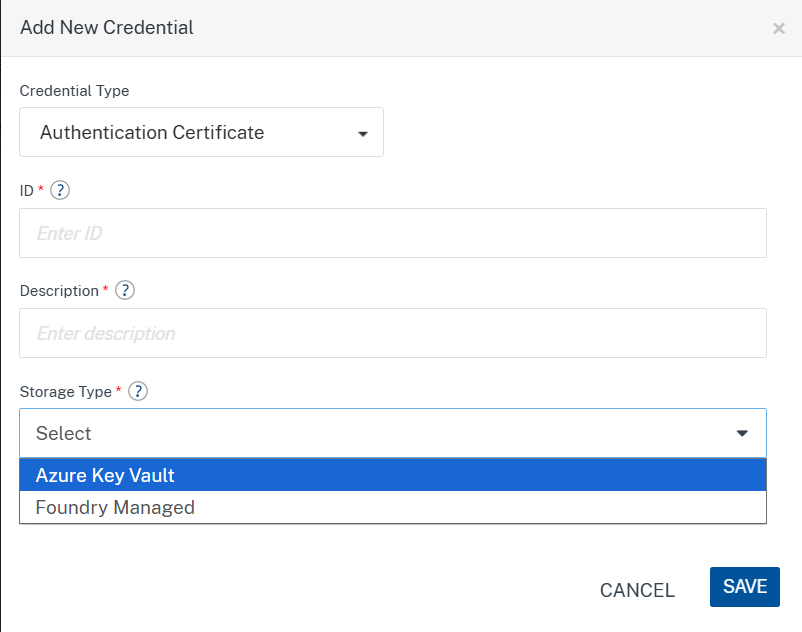
Certificates used for CBA are stored as an Authentication Certificate credential in Enterprise Key Management (EKM). Two storage types are supported: Azure Key Vault and Foundry Managed.
- Navigate to Settings > Enterprise Key Management.
- Click ADD CREDENTIALS.
-
From Credential Type, select
Authentication Certificate.
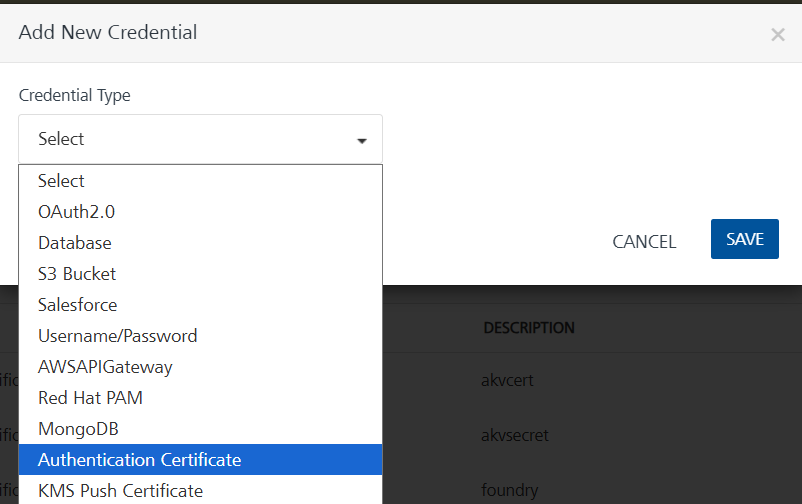
- Enter the ID and Description.
-
Select a Storage Type:
- Azure Key Vault: Use this when the certificate's private key is held in Azure Key Vault and signing is performed remotely by Key Vault.
- Foundry Managed: Use this when the certificate's private key is uploaded directly to Foundry and signing is performed locally.
Azure Key Vault
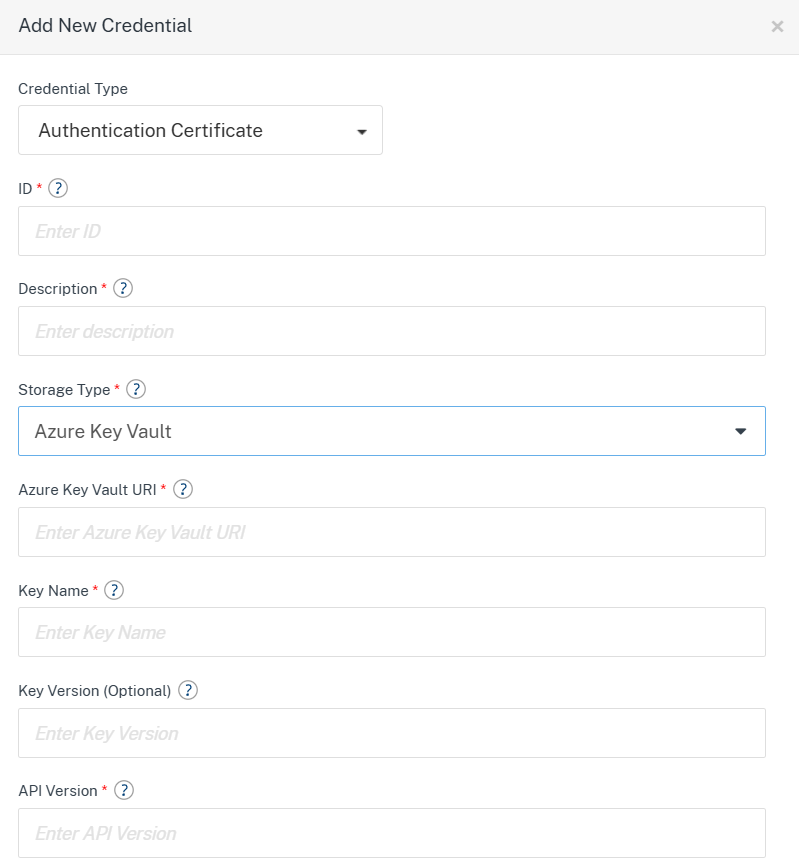
Provide the following details:
| Field | Description |
|---|---|
| Azure Key Vault URI | The vault URI, for example https://<vault-name>.vault.azure.net. |
| Key Name | Name of the key in Azure Key Vault used to sign the JWT assertion. |
| Key Version (Optional) | Specific key version to use. If left blank, the latest version is used. |
| API Version | Azure Key Vault REST API version to use. |
| Thumbprint | Certificate thumbprint of the Microsoft Entra application the access token is requested for. |
| Microsoft Entra Tenant ID | Tenant ID of the Microsoft Entra directory. |
| OAuth 2.0 Client ID | Client ID of the Microsoft Entra application the access token is requested for. |
| JWT Signing Client ID | Client ID of a secondary Microsoft Entra application used to authenticate to Azure Key Vault so Foundry can request the Sign operation. |
| Authentication Method | How Foundry authenticates to Azure Key Vault using the JWT Signing Client ID app: Client Secret or Certificate. |
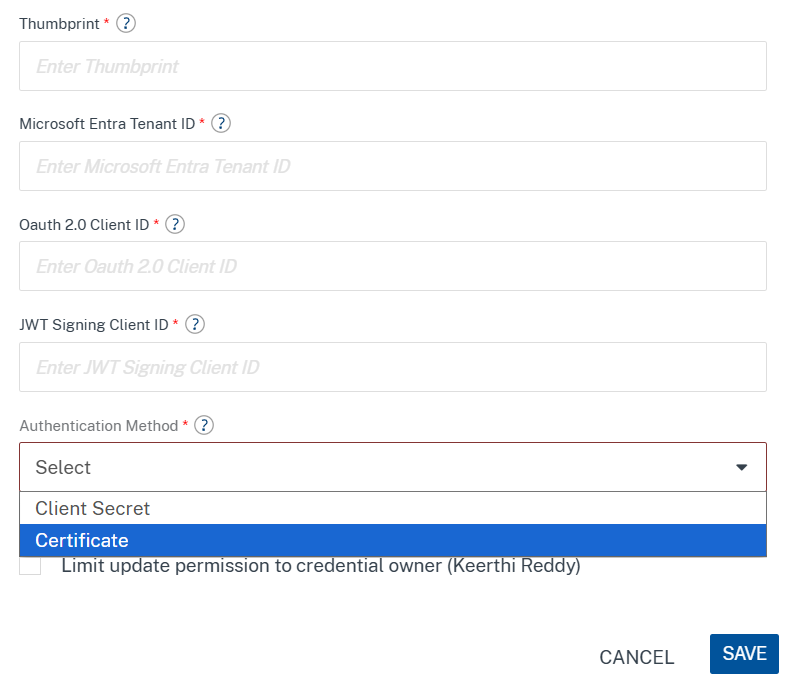
Depending on the selected Authentication Method, provide either:
- Client Secret: Enter the client secret value.
- Certificate: Upload a
.pem,.pfx, or.p12file (with its password, if applicable).
Foundry Managed
Provide the following details:
| Field | Description |
|---|---|
| OAuth 2.0 Client ID | Client ID of the Microsoft Entra application the access token is requested for. |
| Private Key | Upload the private key file (.pem, .pfx, or .p12, max 1 MB). |
| PFX/P12 Password | Required only when uploading a .pfx or .p12 file. |
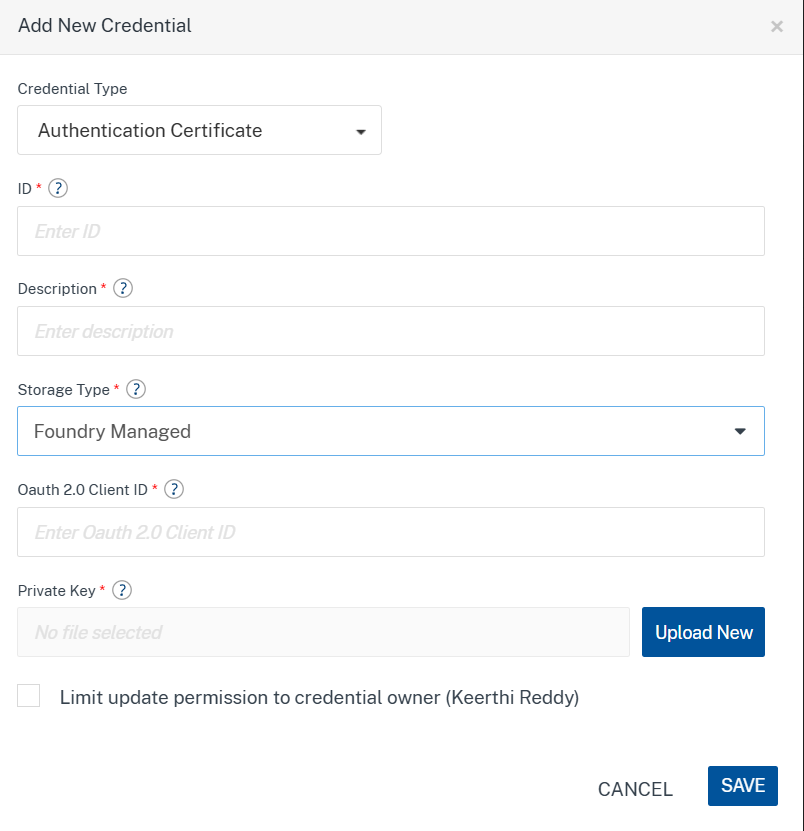
- Optionally, select Limit update permission to credential owner to restrict edits to the credential's creator.
- Click Save.
Note: Certificate file uploads for the Authentication Certificate type are limited to 1 MB and support
.pem,.pfx, and.p12formats.
Configuring an Identity Service for CBA
- Navigate to your app, go to Identity, and select or create an OAuth 2.0 provider.
-
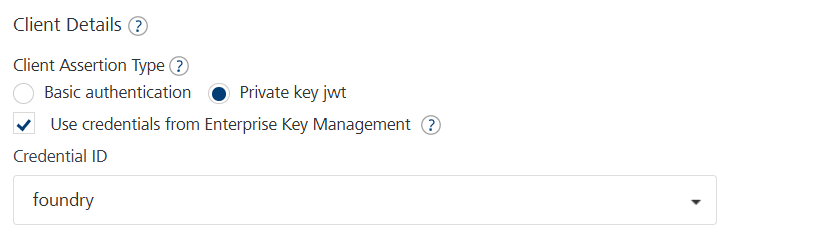
Under Client Details, set
Client Assertion Type to
Private key jwt.
(The default, Basic authentication, continues to use Client ID + Client Secret and is unaffected by this feature.) - Select Use credentials from Enterprise Key Management.
-
From Credential ID, select the
Authentication Certificate credential created earlier.
- Configure the Grant Type and any additional parameters required for that grant type (see Grant Type Configuration below).
- Save the identity provider configuration.
Note: When Private key jwt is selected with an EKM credential, the Client ID and Client Secret fields are hidden. These values are resolved automatically from the selected credential at runtime.
Grant Type Configuration
Authorization Code, Client Credentials, and Password
These grant types require no additional parameters beyond the standard identity provider configuration. Select the grant type as usual, enable Private key jwt as described above, and select the Authentication Certificate credential.
Extension Grant (Refresh Token) — "Remember Me" Scenarios
This flow is commonly used to implement a "Remember Me" experience: a previously issued refresh token, stored securely on the device, is exchanged for a new access token without repeating the full login flow.
Configuration
- Grant Type: Extension Grant
- Extension Grant:
refresh_token
Additional Parameters
| Name | Source | Value | Login Request |
|---|---|---|---|
refresh_token |
Client Specified | client_specified |
FormParam |

Note: The
offline_accessscope must be requested during the initial authentication that produced the refresh token, and Refresh Login must be enabled on the identity service. Client Credentials tokens cannot be used for this flow, since there is no associated refresh token.
Testing
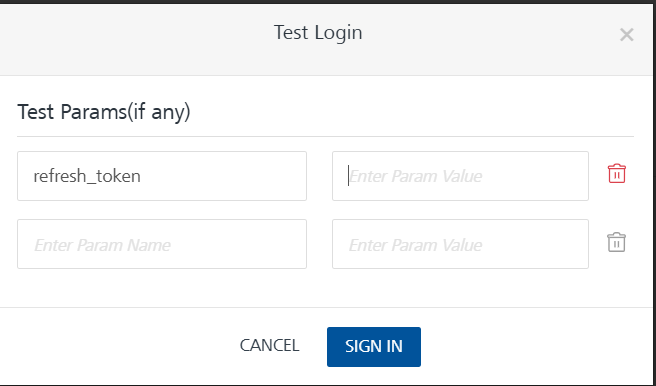
When using Test Login, supply the refresh token value against the refresh_token test parameter.
JWT Bearer — On-Behalf-Of (OBO) Scenarios
The JWT Bearer grant exchanges an existing user access token for another access token — for example, to call a downstream API on behalf of the signed-in user. With Microsoft Entra ID, this is equivalent to the OAuth 2.0 On-Behalf-Of (OBO) flow.
Configuration
- Grant Type: JWT Bearer.
- Token Identity Provider: The Authorization Code identity service that issued the original user access token.
Additional Parameters
| Name | Source | Value | Login Request |
|---|---|---|---|
requested_token_use |
Constant | on_behalf_of |
FormParam |
assertion |
Client Specified | client_specified |
FormParam |

Note: The
assertionvalue must be a delegated user access token, not a Client Credentials token. The scope should use the Application ID URI configured on the target Microsoft Entra app registration, for example:api://0dc3dadd-6092-42d0-b0ee-da5bbd854f6a/access_as_user.
Testing
When using Test Login, supply the previously obtained user access token as the assertion test parameter.
Backward Compatibility
Existing Client ID + Client Secret (Basic authentication) configurations are unaffected and continue to work without changes. CBA is opt-in per identity service, selected via Client Assertion Type. No migration is required.
Limitations
- CBA has been validated with Microsoft Entra ID. Other OAuth 2.0 providers are not covered by this release.
- The Device Code and Implicit flows are not supported with CBA.
- Extension Grant and JWT Bearer CBA support requires Foundry 10.0.9.0 or Foundry 9.5.x; it is not available on Foundry 9.2.x.
- Client Credentials tokens cannot be used as the
assertionvalue for the JWT Bearer grant, and cannot be used for the Extension Grant flow.
Notes
- Private keys associated with Authentication Certificate credentials are encrypted and securely stored, consistent with other EKM credential types.
- The Authentication Certificate credential type and its fields are managed from Settings > Enterprise Key Management. See Enterprise Key Management (EKM) for Volt Foundry for credential lifecycle operations (editing, deleting, change of ownership).
Frequently Asked Questions
Q: Do I need to change my existing OAuth 2.0 identity services to adopt CBA?
No. Existing services using Basic authentication (Client ID + Client Secret) continue to work unchanged. CBA is opt-in and enabled per identity service via Client Assertion Type.
Q: Which identity providers support CBA?
CBA has been validated with Microsoft Entra ID.
Q: Can I use CBA with the "Remember Me" / biometric login pattern?
Yes. Use the Extension Grant (Refresh Token) configuration described above.
Q: Can I use CBA to call a downstream API on behalf of a signed-in user?
Yes. Use the JWT Bearer grant configuration described above, which mirrors Microsoft Entra ID's On-Behalf-Of (OBO) pattern.