Modifying WhatsApp SMS Templates
To modify a WhatsApp SMS Template, follow these steps:
- In the SMS Template home page, under the Template Name column, click the required template.
-
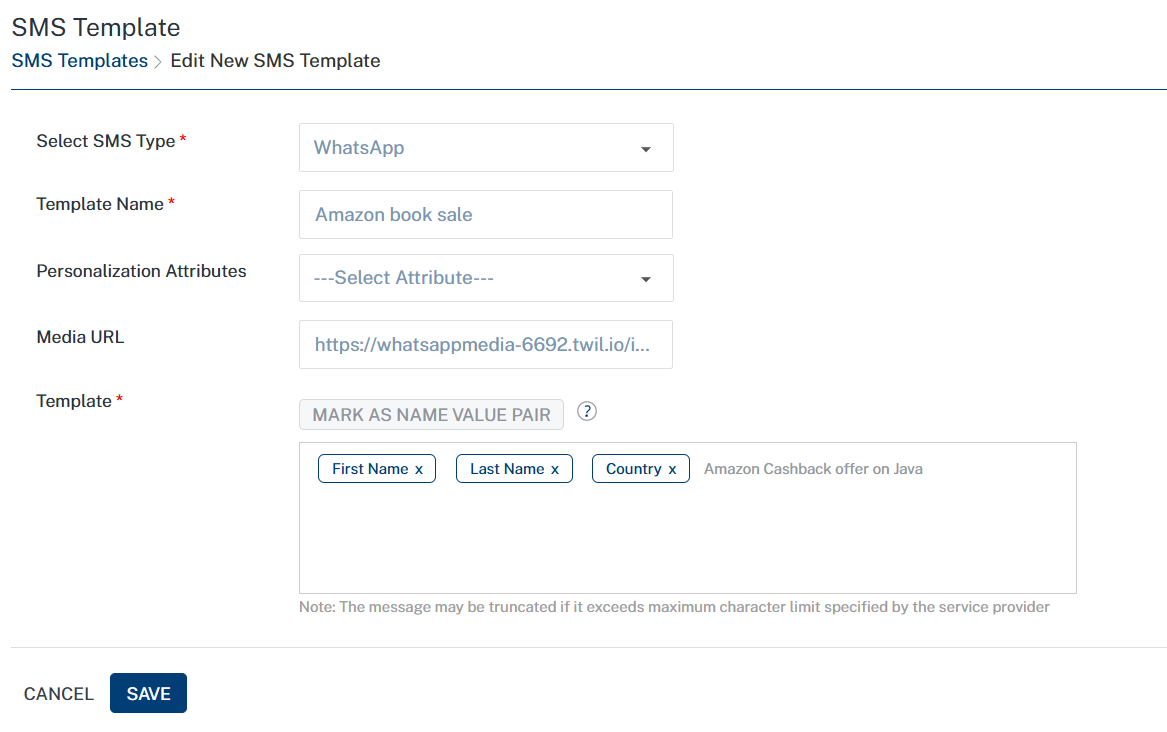
The SMS Template > Edit New SMS Template page appears.
-
You can update details for the following fields:
WhatsApp SMS Message Template Element Description Modification Allowed Template Name WhatsApp SMS template name Yes Personalization Attributes There are default personalization attributes: First name, Last name, Email, Mobile number, Country, and State Yes Mark as Name Value Pair A key-value pair is a set of two linked data items: a key, which is a unique identifier for a data type, and its value: the data such as, county:Iowa, state: wisconsin Yes Media URL Based on your requirement, provide a publicly accessible URL for multimedia files (images, documents, audio, video, or contacts) that Twilio's servers can access Yes -
Click the Cancel button to exit from the window without saving any information.
-
Click Save to continue.
The updated template appears in the list-view. The system displays the confirmation message that SMS template updated successfully.