
Creation of MongoDB Service
- Go to the location where MongoDB is installed. Refer to the Path set in the PATH environment variable. For e.g., C:\Program Files\MongoDB
- Go to Server\8.0\bin folder. for e.g., C:\Program Files\MongoDB\Server\8.0\bin.
- Locate the file named mongod.cfg and copy the file.
Figure 1. MongoDB Installation - Community Version (HA) (cont.) .png)
- Go to the mongo folder that was created earlier. Inside the directory data,
go to the config folder and paste the mongod.cfg file here.
Figure 2. MongoDB Installation - Community Version (HA) (cont.) .png)
- Open the file mongod.cfg (preferably in Notepad++ or Sublime) and follow the
following steps:Note:While editing the file, maintaining indentation is very important.
- In the storage header, change the following fields:
- dbPath: Add path till mongo\data\database
-
In the systemLog, change the following fields:
- path: Add path of mongo\data\log\mongod.log
Note:Folder mongo\data\log doesn’t have Mongod.log. This will be created automatically when mongo service is created. -
In the net, change the following fields:
- port: Enter the port you want to install MongoDB (port should be different on all servers)
- bindIpAll: true
User needs to change bindIp to bindIpAll
Note:Please do not user Port Number 27017 as it’s the default port. -
In the replication, change the following fields:
- replSetName: Enter the name of replica set (user same replica name on all servers)
Figure 3. MongoDB Installation - Community Version (HA) (cont.) .png)
Figure 4. MongoDB Installation - Community Version (HA) (cont.) 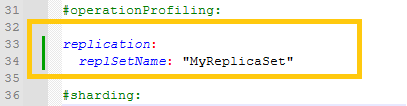
- In the storage header, change the following fields:
- Save the changes made in the file mongod.cfg.
- Open Command Prompt as Administrator and run the
following command.Note:Please ensure to enter the correct path of config file.
mongod –config “<path of the mongoDB folder you created\mongo\data\config\mongod.cfg>" --install --serviceName "MongoDBMongoDB" For e.g. mongod --config "C:\mongo\data\config\mongod.cfg" --install --serviceName "MongoDBMongoDB" - MongoDB service with the name MongoDB will be created.