- Connect to the Ansible server using any ssh Client (PuTTY) on port 22. Figure 1. Configuring Ansible Inside / CLI Wrapper on Ansible Server

- Login using the username and password.
Figure 2. Configuring Ansible Inside / CLI Wrapper on Ansible Server (Cont.)

- Enter Command.
sudo su -
- Enter the password if asked. Now you are logged in as the root
user.
Figure 3. Configuring Ansible Inside / CLI Wrapper on Ansible Server (Cont.)
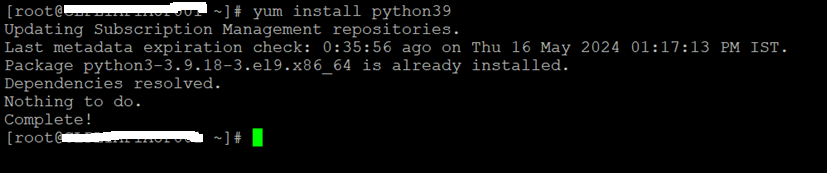
- Below are the installation steps, Enter the following commands
in terminal:
              - yum install python39
              - python3 -m pip install --upgrade pip
              - pip3 install virtualenv
              - git clone

                https://github.com/ansible/ansible-sdk.git


              - cd ansible-sdk
Figure 4. Configuring Ansible Inside / CLI Wrapper on Ansible Server (Cont.)

- Create a new file setup.py using vim or cat and paste the
following lines of code.
              #! /usr/bin/env python
              from setuptools import setup
              setup ()
Figure 5. Configuring Ansible Inside / CLI Wrapper on Ansible Server
(Cont.)

- Create a new file setup.cfg using vim or cat and paste the following lines of code:
              [metadata]
              name = ansible-sdk
              author = Ansible, Inc.
              author_email = info@ansible.com
              summary = "Consistent Ansible SDK for Python"
              home_page = https://ansible-sdk.readthedocs.io
              project_urls =
              Source = https://github.com/ansible/ansible-sdk
              description_file = README.md
              description_content_type = text/markdown
              license_files = LICENSE.md
              version = attr: ansible_sdk.__version__

              [options]
              install_requires =
              ansible-core
              ansible-runner
              receptorctl
              python_requires = >=3.9

              [files]
              packages = ansible_sdk

              [flake8]
              # W503 - Line break occurred before a binary operator
              ignore=W503
              max-line-length=160
Configuring Ansible Inside / CLI Wrapper on Ansible Server (Cont.)

- Enter the below Commands to setup the Python virtual
environment.
              virtualenv env
              source env/bin/activate
- To Install the ansible dependencies, use the following in the
same env:
          pip3.9 install ansible-core
          pip3.9 install ansible-runner
          pip3.9 install receptorctl
          pip3.9 install -e .