
Edit/Delete/Move a Task and Move Group
- The following actions can be performed on a task:
Figure 1. Task Actions 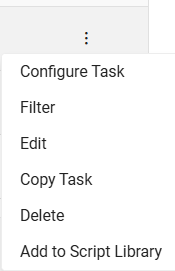
- Edit Task: You can edit the task fields like Task Name, Short task Name, Retry count and Timeout limits etc.
- Delete Task: You can delete a task from the existing list of tasks by clicking on Delete option.
-
Move Task: You can set the sequence of a task as per the requirement by using
 icon.
icon. -
Move Group: You can set the sequence of a Group as per the requirement using
 icon. Same group task will
execute parallel.
icon. Same group task will
execute parallel. -
Ungroup task: You can ungroup task by using
 icon. Users can Ungroup any task above or below the
groups.
icon. Users can Ungroup any task above or below the
groups.
- Once the Template is created, it appears in the Manage Template tab.