
Networking
- Understanding Link Pods Networking
Following is high level network flow for Link application
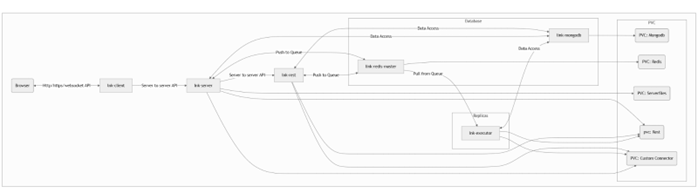 Following are the default Ports that are used For networking.
Pod For Http For https Service Port Container Port Service Port Container Port Client 80 8080/TCP 443 8443/TCP Server 8080 80/TCP 8443 8443/TCP Rest 8080 80/TCP 8443 8443/TCP Note:- Executor, Mongodb and Redis Pods are independent pods, so they don’t need to expose any port
- Client Server and Rest pods are interdependent, changing any port ,will require corresponding port mapping in other pods as well
- Exposing Services Outside the Cluster
By default, a Service is created with type: ClusterIP, making it reachable only from within the cluster. To expose it externally, you change the type.
ClusterIP (Default)- What it is: Exposes the Service on an internal-only IP.
- Use Case: Internal microservice communication.
NodePort-
What it is: Exposes the Service on a static port (e.g., 30000-32767) on every Node's IP address.
-
Use Case: Quick external access for dev/test or when you manage your own external load balancer.
Example (NodePort YAML):apiVersion: v1 kind: Service metadata: name: my-app-nodeport spec: type: NodePort # Specify the type selector: app: my-app ports: - protocol: TCP port: 80 targetPort: 8080 # nodePort: 30007 # Optional: You can specify a port, or K8s assigns oneLoadBalancer
- What it is: Provisions an external load balancer from your cloud provider (e.g., AWS ELB, GCP Load Balancer).
- How it works: Automatically creates a NodePort service and configures the cloud load balancer to send traffic to it.
- Use Case: The standard "production" way to expose a service in a cloud environment.
Example (LoadBalancer YAML):apiVersion: v1 kind: Service metadata: name: my-app-loadbalancer spec: type: LoadBalancer # Specify the type selector: app: my-app ports: - protocol: TCP port: 80 targetPort: 8080 - Using port-forward for Dev/Testkubectl port-forward is a debugging tool that creates a direct, temporary tunnel from your local machine to a resource inside the cluster. It's perfect for development and testing, allowing you to access your application on localhostNote: This method is not intended for production traffic.You can use it to forward a local port to the port of an application running in a pod or, more commonly, to a Service. When forwarding to a Service, kubectl automatically selects a backing pod.
# Generic syntax for forwarding to a Service:
# This forwards your <local-port> to the <service-port> on the Service
kubectl port-forward service/<service-name> <local-port>:<service-port>

# Specific example:
# Forwards your local port 4443 to port 443 on the 'lnkdemo-lnk-product-client' service
kubectl port-forward service/lnkdemo-lnk-product-client 4443:443
After running this command, you can access your service by navigating to httpsD://localhost:4443 in your local browser.
- Configuring Ingress
An Ingress is an L7 (HTTP/HTTPS) router that manages external access to multiple services, usually under a single IP address. It is a separate Kubernetes resource, not a Service type, and requires an Ingress Controller (such as NGINX, Traefik, or HAProxy) to be running in the cluster.
Ingress supports advanced routing features, including:
- Host-based routing:
foo.example.com→foo-service,bar.example.com→bar-service - Path-based routing:
example.com/api→api-service,example.com/ui→ui-service - SSL/TLS termination: Centralized HTTPS certificate management
Example (Working Ingress YAML):
The following example shows path-based routing, regex matching, and path rewriting for an NGINX Ingress Controller.apiVersion: networking.k8s.io/v1 kind: Ingress metadata: name: link-ingress annotations: # Tells NGINX to use regular expressions for path matching nginx.ingress.kubernetes.io/use-regex: "true" # Takes the part of the URL matched in the regex (.*) and appends it # e.g., /restdemo/users becomes /users when sent to the backend nginx.ingress.kubernetes.io/rewrite-target: /$1 spec: ingressClassName: nginx # Specifies which ingress controller to use rules: - host: mynode.local # The domain name to listen on http: paths: # Traffic for mynode.local/restdemo/... - path: /restdemo/(.*) pathType: ImplementationSpecific # Use ImplementationSpecific for regex backend: service: name: link-lnk-product-rest # routes to the 'rest' service port: number: 8080 # Traffic for mynode.local/serverdemo/... - path: /serverdemo/(.*) pathType: ImplementationSpecific backend: service: name: link-lnk-product-server # routes to the 'server' service port: number: 8080 # Catch-all for all other traffic (e.g., the frontend client) - path: /(.*) pathType: ImplementationSpecific backend: service: name: link-lnk-product-client # routes to the 'client' service port: number: 80 - Host-based routing:
- Configuring Route (Red Hat OpenShift)
Routes are the OpenShift-specific (RHOS) equivalent of Ingress. OpenShift created Routes before Ingress was a standardized feature in Kubernetes.
- What it is: A first-class OpenShift resource for L7 routing, tightly integrated with the built-in OpenShift Router (which is typically HAProxy).
- Features: Similar to Ingress (host/path routing, TLS termination), but with different resource definitions and specific OpenShift features like re-encrypt and passthrough for TLS.
Example (Route YAML):apiVersion: route.openshift.io/v1 kind: Route metadata: name: my-app-route spec: host: myapp.example.com # The router makes this host available to: kind: Service name: my-app-service # Points to the service port: targetPort: http # References the 'name' of the port in the service tls: termination: edge # Router terminates TLS - External Load Balancers / API Gateways
This category describes higher-level patterns for managing ingress traffic.
External Load Balancers
An External Load Balancer (cloud-based or on-prem, such as F5) operates outside the Kubernetes cluster and serves as the primary entry point for all incoming traffic.
Typical flow: User → External LB → Kubernetes Ingress Controller Service (NodePort/LB) → Ingress Pod → App Service → App Pod
This setup provides a stable, highly available entry point that remains independent of the cluster nodes.
API GatewaysAn API Gateway is an advanced L7 proxy offering more capabilities than a standard Ingress Controller. Many modern controllers, such as Kong, Ambassador, and Traefik, can also act as API Gateways.
Ingress Controller focus: Routing HTTP traffic from a specific host or path (X) to the appropriate service (Y).
API Gateway focus:-
Authentication and Authorization: Support for OIDC, JWT validation, etc.
-
Rate Limiting: Restrict excessive requests from users.
-
Request/Response Transformation: Modify headers or message bodies.
-
Metrics and Observability: Provide detailed API usage analytics.
-