
Security updates
Security features and enhancements in Domino 14.5.1.
Support for AES encryption in Desktop policy settings
Local Encryption settings under the Desktop Settings document now support both AES-128 and AES-256 encryption options. For more information, see step 8 in Specifying Preferences for a desktop policy.
Web Login with OIDC
- Multiple concurrent authentication attempts made by the same browser against the same internet site can now all complete successfully. In previous releases, each new authentication request's web login cookies would overwrite the cookies set by the previous request, but starting in 14.5.1 the web login cookie names are now tied to their specific authentication request.
- Improved error handling: Many error paths that returned a 500 response code and an html error page in previous releases will now correctly return a 40x response code with a JSON-encoded response body including an error and error_description.
- Web Login with OIDC will now request the profile scope by default. To disable this, set OIDC_LOGIN_REQUEST_PROFILE_SCOPE=0
- We have received reports of an OIDC provider that cannot be configured to return the email Claim in an id token. In order to support this and similar providers, 14.5.1 adds a new notes.ini variable (OIDC_LOGIN_CUSTOM_CLAIM_NAME) that can be used to configure a custom Claim name to be used in place of the email Claim for id tokens. For example, setting OIDC_LOGIN_CUSTOM_NAME_CLAIM=sub would result in the sub (Subject) Claim being used instead of the email Claim to identify the user being authenticated.
- Dynamic key updates: The cross-process cache for JSON Web Keys (JWKs) will now dynamically update the published keys for a provider after receiving a token signed with an unknown key from that provider. By default no single provider will be updated more than once every 30 seconds. This interval can be varied between 5 and 60 seconds with the OIDC_PROVIDER_CACHE_UPDATE_INTERVAL notes.ini parameter.
- The Web Login with OIDC features now log many successful and failed attempts into log.nsf.
HTTP bearerAuth with OIDC
- Trusted OIDC Provider documents in idpcat.nsf have a new field "Custom full-access scope" that can be used to customize the required scope that grants an access token the user's full access from the default of Domino.user.all. This configuration was backported via a notes.ini to 14.5.0 FP1.
- The OIDC_ALLOW_ACCESS_TOKEN_WITHOUT_SCOPE=1 notes.ini variable can now be set to entirely ignore a missing scope Claim in an access token. Since ignoring missing scope Claims can reduce the security of your environment, we recommend only setting this variable when using a provider that refuses to send the scope Claim, such as Microsoft Entra ID when using the M2M (client credentials) flow.
- Testing has confirmed that users' Notes DNs can be successfully used in place of their internet email address as the user identifier in access tokens.
- The existing SDK API SECValidateAccessToken() can be called with a new flag that allows passing the "host name" from the Trusted OIDC Provider document in the pszProviderURL parameter. Note that as of 14.5.1 this host name must have been previously loaded from idpcat into the cross-process cache to be used. See inc/bsafe.h in the SDK for details.
- A new flag, fJWT_validate_AllowEmptyScopes, has been added for the C SDK function SECValidateAccessToken. This flag is analogous to setting OIDC_ALLOW_ACCESS_TOKEN_WITHOUT_SCOPE=1 but will naturally apply to only that single validation request.
- The HTTP bearerAuth with OIDC features now log many successful and failed attempts into log.nsf.
Federated login with OIDC
- The ID vault server in 14.5.0 supported only a single Trusted OIDC provider; Domino 14.5.1 ID vault servers now support multiple Trusted OIDC providers.
- Please note that configuring multiple hostname-style "tags" in the "Bearer token (JWT) approved OIDC provider configurations" field is not supported. A single tag starting with "bearer.vault." should be configured in idpcat, and that tag in turn can be placed in the "Host names or addresses mapped to this site" field of multiple Trusted OIDC Provider documents.
- Vault scopes that include spaces and slashes are now supported. Any space characters in the vault scope should be replaced with the underscore ('_') character when configured in idpcat Trusted OIDC Provider and Registered OAuth Client documents. This enhancement requires upgrading only the ID vault server and was also backported to 14.5.0 FP1.
Domino OIDC provider
- The duration of the end user's login session with the Domino OIDC provider is now configurable via a new field in the "Domino OIDC Provider" document in idpcat.nsf. Please note that the Domino server should be restarted after any changes to Domino OIDC Provider documents or Internet Site documents. The default value of this field is 18 hours. This field determines how long the user's FailoverCookie will remain valid, and does not impact the maximum session lifetime configured for Registered OAuth Clients, which determines how long new refresh and access tokens can be acquired from a single authorization grant for a given client.
- The OIDC provider's key rotation functionality has been hardened to help prevent accidental misconfigurations.
- The authorization endpoint now supports the "prompt=none", "prompt=login",
"prompt=consent", and "max_age=<seconds>", and
"login_hint=<username>" parameters per OIDC.Core.
- prompt=none will result in a 302 error response being returned to the client's registered redirect_uri if the authorization request would have required user interaction for either authentication or consent.
- prompt=login will force the end user to log in again, even if they have a currently valid login session with the OIDC provider.
- prompt=consent will force the user to re-grant consent for the client application.
- max_age=<number of seconds> can be used by a client that wants the user to be prompted for authentication again if their current login session at the OIDC provider is more than <number of seconds> old.
- login_hint=<username> can be used by a client that wants to guide an end user to authenticate with a particular identity. See Domino OIDC provider HTTP endpoints for details.
- The configured redirectURI field in the Registered OAuth Client document now supports dynamic ephemeral ports when using the loopback device per RFC 8252 sections 7.3 and 8.3 to better support mobile and native clients. A configured loopback redirectURI in the pattern of "http://127.0.0.1/my/redirect/uri" will now match against any dynamic port "http://127.0.0.1:{port}/my/redirect/uri". Note that the OAuth client will need to send the full redirect URI, including the port in the redirect_uri parameter, and that the registered redirectURI must begin with "http://127.0.0.1/". Per the RFC, neither "https" nor "localhost" will be accepted with dynamic ports.
- Notes federated login with OIDC is now supported. See Enabling federated login with OIDC for Notes for details.
- With the Domino provider you can configure any number of custom claims that use @functions to dynamically build claim values. The Domino provider can also perform access checking and deny unauthorized users the ability to even acquire an authorization grant for their application. For more information, see Dynamic custom claims and limiting access to registered OAuth clients.
- The Domino OIDC provider now logs many successful and failed operations into log.nsf .
- Several issues when using non-ASCII characters with OIDC are resolved.
New Session methods for Domino OIDC provider
- Java: See getOIDCAccessToken (Session - Java)
- LotusScript: GetOIDCAccessToken (NotesSession - LotusScript)
Domino OIDC provider support for Verse mobile clients
Configuring HCL Verse Mobile and HCL Traveler with OIDC allows Verse Mobile users to authenticate through Domino as an OIDC provider prior to accessing the HCL Traveler services. For more information see Configuring Verse Mobile with OIDC login.
Support for proxies between Domino and the OIDC provider
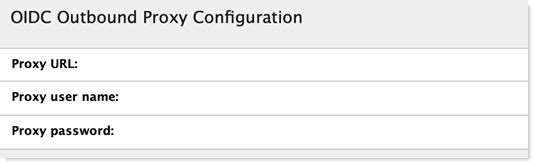
Starting in 14.5.1, Domino's Web Login with OIDC and bearerAuth features now support authenticating web proxies to mediate outbound traffic that previously prevented Domino servers from contacting their trusted OIDC providers.
In the IdP Catalog database (idpcat.nsf), there is a new section at the end of the "Trusted OIDC Provider" document labeled "OIDC Outbound Proxy Configuration." Administrators have the option to populate the fields in this section with the URL for the outbound web proxy, as well as the user name and password if any is needed to authenticate to that proxy.
CertMgr improvements
- MicroCA certificates now support shorter Certificate expiration. See Creating certificates from a micro CA, step 3f , "Validity Period" field.
- Manual/Acme flows now support an email address in the subject of the certificate. See Requesting and importing a key and certificates from a third-party CA, step 7.
Passkeys
Improved passkey management
Domino 14.5.1 offers a sustainable approach to the creation and management of passkeys: passkey metadata stored on local authenticators is kept up to date with changes made on the Domino server. For more information, see Passkey management.
Automatic passkey upgrades
Administrators can now enable automatic, opportunistic upgrades to passkeys via WebAuthn's new "Conditional Create" API. For more information, see the section "Automatically create passkeys" in Optional passkey configurations.
Cryptography
- The OpenSSL library has been updated to version 3.5.4. This is a Long Term Support (LTS) version of the library that has been submitted the CVMP for FIPS 140-3 verification. See Encryption standards for details.
- The cryptographic layer underlying Notes and Domino now leverages OpenSSL 3.5 to support multiple algorithms relevant to protect against attacks based on quantum computing, such as ML-DSA, ML-KEM, SHAKE-128, and SHAKE-256. As this field is rapidly evolving and the IETF standards are still being written, there is no end-user PQC functionality currently available for use in 14.5.1.