Configuring Domino for HTTP Strict Transport Security
The HTTP Strict Transport Security (HSTS) HTTP response header can be used by web servers to indicate that web clients should communicate with them only over HTTPS and never over HTTP.
This capability is used to help prevent web browsers from being tricked into communicating over unencrypted HTTP by attackers, but it will also prevent some common practices, such as using "mixed content" pages where some resources are served over HTTPS and some over HTTP, and performing authentication over HTTPS and then downgrading to HTTP.
Starting in Domino 9.0.1 FP3 IF2, when a Domino server is configured for SSL/TLS and the http port is disabled or set to "redirect only," the HSTS header will be sent with a one-week default setting. If the Domino server is not configured for SSL/TLS or the http port is active, the HSTS header will be sent with the max-age parameter set to zero, which disables the HSTS functionality.
Procedure
- To change the default setting for the max-age parameter (604800 seconds), you can change the value for the notes.ini setting HTTP_HSTS_MAX_AGE.
- If you need to add the "includeSubDomains" parameter (off by default) to the "Strict-Transport-Security" http header, use HTTP_HSTS_INCLUDE_SUBDOMAINS=1.
- To disable HSTS so that the Strict-Transport-Security header isn't sent, use HTTP_ENABLE_HSTS=0.
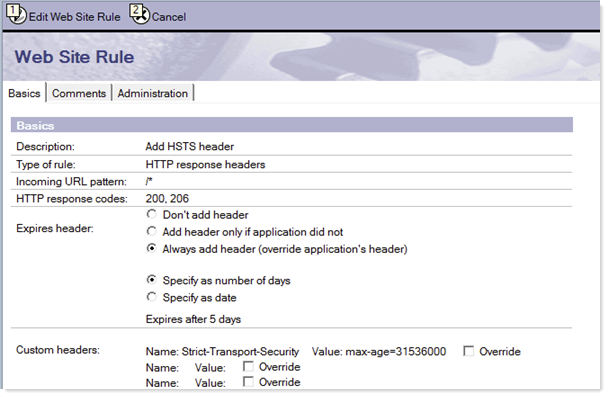
Following is an example of a web site rule adding the "Strict-Transport-Security" header with a maximum age of one year.
If you need to re-enable plaintext HTTP, replace this header's value with max-age=0 so that compliant web browsers will communicate with your web site over HTTP once again.