
Configuring trusted OIDC providers
Use the IdP Catalog application (idpcat.nsf) to configure a trusted OIDC provider.
Procedure
- Open the IdP Catalog (idpcat.nsf), and click the folder icon in the navigation to open the Workspace.
-
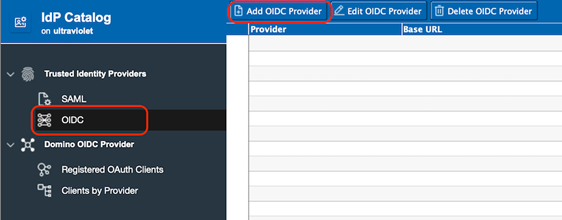
Click OIDC Provider and then click Add OIDC Provider.
-
In the OIDC Provider window, provide the following information:
-
Click on the arrow next to Host names or addresses mapped to
this site and select from the list one or more internet
sites that you want to trust this OIDC provider for
authentication.
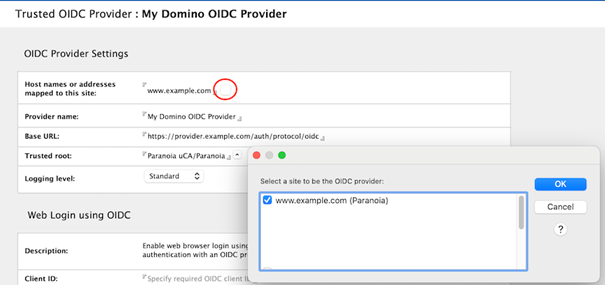 Note: Only one SAML partnership or OIDC provider can be configured for a single internet site.
-
Click on the arrow next to Host names or addresses mapped to
this site and select from the list one or more internet
sites that you want to trust this OIDC provider for
authentication.
- By default, Domino servers will connect to OIDC providers that are using a TLS certificate signed by one of the trusted roots in the cacert.pem file in the data directory. To trust a self-signed certificate or only trust a single certificate, click the arrow next to the Trusted roots field to select a trusted root that has been configured in the Certificate Store application (certstore.nsf).