
Multiple ClearCase® region support for ClearCase® Remote Client
ClearCase® Remote Client (CCRC) server supports multiple regions on a single host, while client-side users are mapped to different regions based on username and primary group settings.
ClearCase® Remote Client support for multiple DevOps Code ClearCase® regions is available on a single server.
Servers can support multiple DevOps Code ClearCase® regions on a single server and users can be mapped to different regions depending on their username (as defined by Connecting to a DevOps Code ClearCase (WAN) server), primary group preference (as passed by the Eclipse client) or default primary group on the ClearCase® Remote Client server.
See Configuring ClearTeam Explorer preferences.
Review User region map syntax.
- User-based region mapping might not work as expected, and group-based maps would be preferred.
- If multiple VOBs have tags whose name have mixed casing (for example, /vobs/ProjectVOB and /vobs/projectvob), then they might not load as expected.
Users can be mapped to different regions depending on their username and primary group setting on the client side.
A DevOps Code ClearCase® administrator can specify or modify a mapping file (from a username of a specific user or a set of users by their primary group name to be directed to a specific region) on the server.
- For Windows servers, if a group mapping is used, keep in mind that
DOMAIN\ccusergroup(domain group)andccusergroup(local group)could be evaluated differently, so map files need to be correct in usage of a local or domain group. - In previous releases, a DevOps Code ClearCase® Remote Client server could be set to support only a single DevOps Code ClearCase® region.
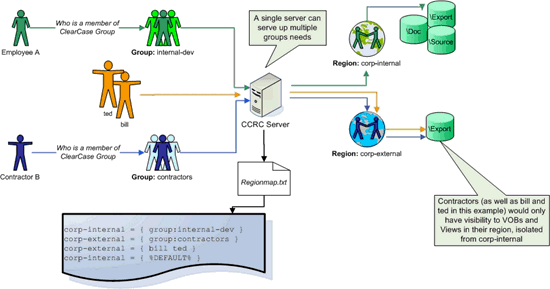
The following illustration shows how the multiple region mapping feature in ClearCase® Remote Client can be leveraged.
Known Issues
Default Region for ClearCase® Remote Client Must be Specified
Unable to create a view at "C:\ccweb\user1\user1_view_a": error detected by ClearCase® subsystem
ccweb: Error: Attempt to get host's network region failed: error detected by ClearCase® subsystem
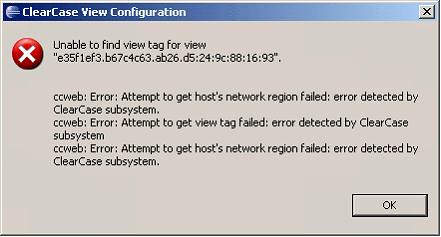
This error is an indication that the region is not set in the region map file as defined by the -user_region_mapfile specified by the RWP servers ccweb.conf file.
Example
<cc-region-tag> = { %DEFAULT% }
- Defect APAR PK60359 - CCRC region mapping doesn't work with group names that contain spaces
-
Set up ClearCase® Remote Client multi region support with a group name containing spaces used in your user_region_map file.
For example: winregion = { group:Domain Users }
- Start and Stop the DevOps Web Platform.
-
From the ClearCase® Remote Client, log out, then log in again as a user who is a member of the above group.
The following error occurs:unable to find view tag for view <uuid> Attempt to get host's network region failed: error detected by ClearCase® subsystemNote: The error message received is the same as if a region map cannot be resolved.
Defect APAR PK60359 has been investigated and the decision was made not to resolve this defect.
Workaround
To avoid the error, use a group name that does not contain spaces.
Also, note that when setting up the ccweb.conf file, if the -user_region_map file has a pathname that contains a space, the location cannot be resolved.