Product details for Ruby B2B storefront
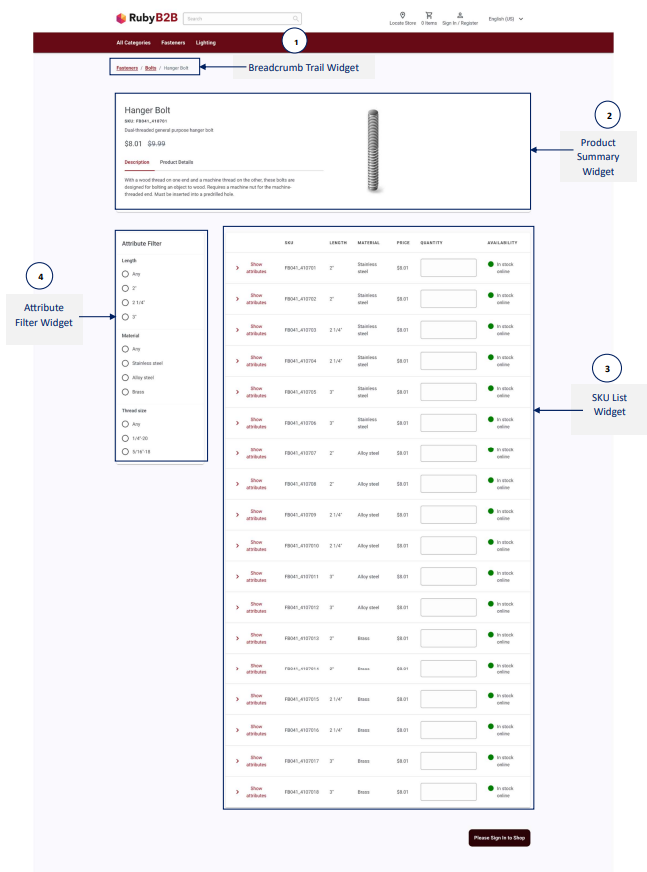
You use the Ruby B2B storefront Product Details Page (PDP) to view details about a product. The layout that is assigned to the page displays the product name, price, full image, short description, the defining attributes, and more.
The center of the layout contains the SKU List widget. Customers can view the full set of SKUs associated to a product in a table and scan the attributes quickly to pick the right combination. They can add one or more SKUs to their current order or a requisition list in a single action. To add one or more SKUs to a requisition list, click on current order or add to requisition list and select the respective requisition list.
The layout also contains several widgets that have e-Marketing Spots to display advertisements and product recommendations.
Product details page is managed in the Page Composer tool.
Widget information
The following Page Composer tool widgets are included in the default layout for the product details page:
- Breadcrumb Trail: It displays the breadcrumb trail on the catalog entry page.
- Product Summary: Displays the summary of the product on the product page. This Widget can only be used with the product page and the B2B product Page templates.
- SKU List: It displays the list of SKUs on a product page. This widget can only be used with the product page and the B2B product Page templates.
- Attribute Filter: Displays an attribute filter on the product page. It can be used with the SKU List widget. This widget can only be used with the product page and the B2B product Page templates.
For more details on Page Composer widgets, refer to Widgets for Page Composer.