Using e-Marketing spots
The React Store single page application (SPA) contains e-Marketing spots which reserve areas on store pages for displaying personalized marketing content from activities. e-Marketing spots on pages allow business users to change the content easily.
 However, from
HCL Commerce Version 9.1.7.0 and onwards, the React Store is available for Commerce Composer and you can add
the e-Marketing spots widgets directly from the Management Center. For
more information on e-Marketing Spot widgets, refer to
e-marketing Spot Widget.
However, from
HCL Commerce Version 9.1.7.0 and onwards, the React Store is available for Commerce Composer and you can add
the e-Marketing spots widgets directly from the Management Center. For
more information on e-Marketing Spot widgets, refer to
e-marketing Spot Widget.- Content
- Categories
- Catalog entries
The React Store application provides a sample presentation logic within layouts ContentRecommendationLayout, FeaturedProductLayout, ProductRecommendationLayout, and CategoryRecommendationLayout. Each ContentRecomendationLayout maps to an e-Marketing spot. You can consider the e-Marketing spots as a content template and customize the content display based on the type of content returned for the e-Marketing spot. For example, Featured Product and Product Recommendation are both e-Marketing spot that return one or more products. The featured product is displayed in the form of a large advertisement banner whereas the product recommendations are displayed as a slider list.
You must use the same eSpotName to create the e-Marketing spot in Management Center as defined by the front end developer in the React Store application.
e-Marketing spots on the reference store home page
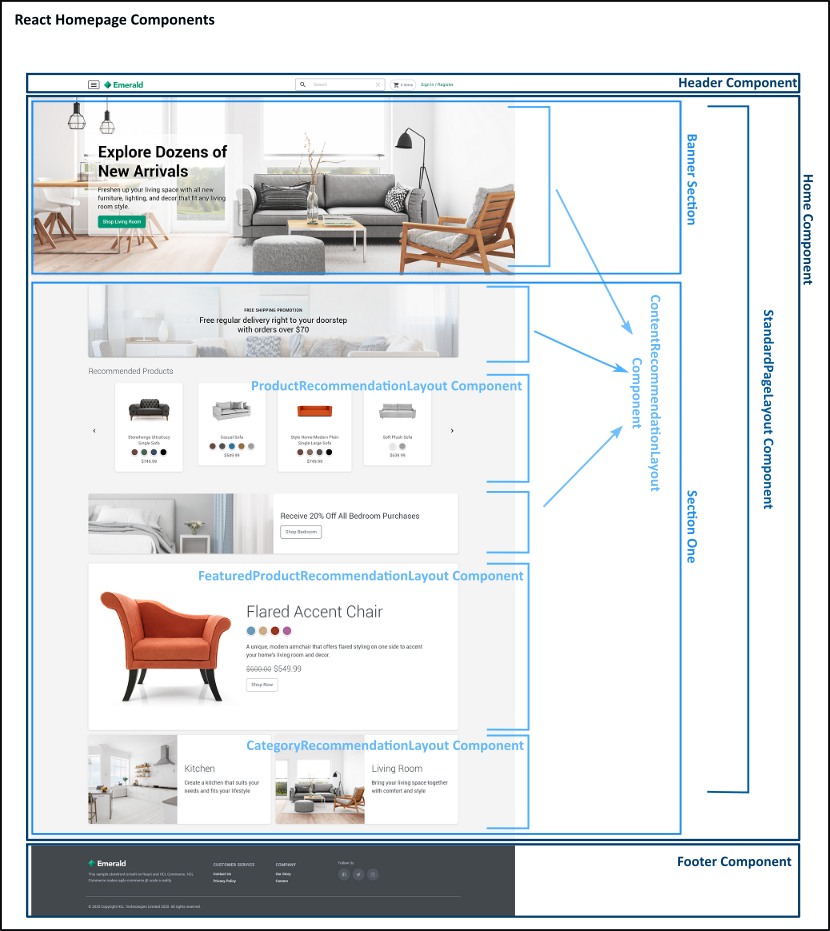
The Reference Store application home page contains several e-Marketing spots that recommend contents, products or categories. Each e-Marketing spot uses a corresponding component (i.e. ContentRecomendationLayout, ProductRecommendationLayout, FeaturedProductRecommendationLayout, or CategoryRecommendationLayout) for display, depending on the data type and required presentation. The e-Marketing spot content in the Reference Store application mainly consists of text or text that is HTML.
Home page banner
The home page banner is an e-Marketing spot that displays the content for the ContentRecomendationLayout component located in the src\components\widgets\content-recommendation folder. The banner is configured to display the contents of the e-Marketing spot named Home Hero.
Other e-Marketing spots
The e-Marketing spot names used on the home page are defined in the constants file, homeConstant.ts, that is located in the src\components\pages\home folder.
- The first e-Marketing spot displays content using the same ContentRecomendationLayout component as the home page banner.
- The second e-Marketing spot is a product recommendation that displays a list of products. This e-Marketing spot uses the ProductRecommendationLayout component to display products in a horizontal slider. When a shopper clicks a product, the Product details page opens.
- The third e-Marketing spot is also a content recommendation.
- The fourth e-Marketing spot is a product recommendation for a featured
product using the
FeaturedProductRecommendationLayout component.
Although both the second and fourth e-Marketing spots are both product recommendation type e-Marketing spots, they are displayed differently depending on the component that is used.
- The fifth e-Marketing spot uses the CategoryRecommendationLayout component to show a list of recommended categories with links to the category page.
Header and Footer
In the reference stores, the header and footer areas for the store are treated as e-Marketing spots. You can modify the content for the header and footer through the Management Center.
Reference Store application home page with components
The following image shows the various e-Marketing spots that are located on the homepage.