Configuring and running the toolkit deployment process
After you create the deployment package, you can deploy it to your development environment using additional Ant scripts provided as part of the WebSphere Commerce Build and Deployment tool.
High-level toolkit deployment process flow
The following diagram illustrates the high-level server deployment process flow:
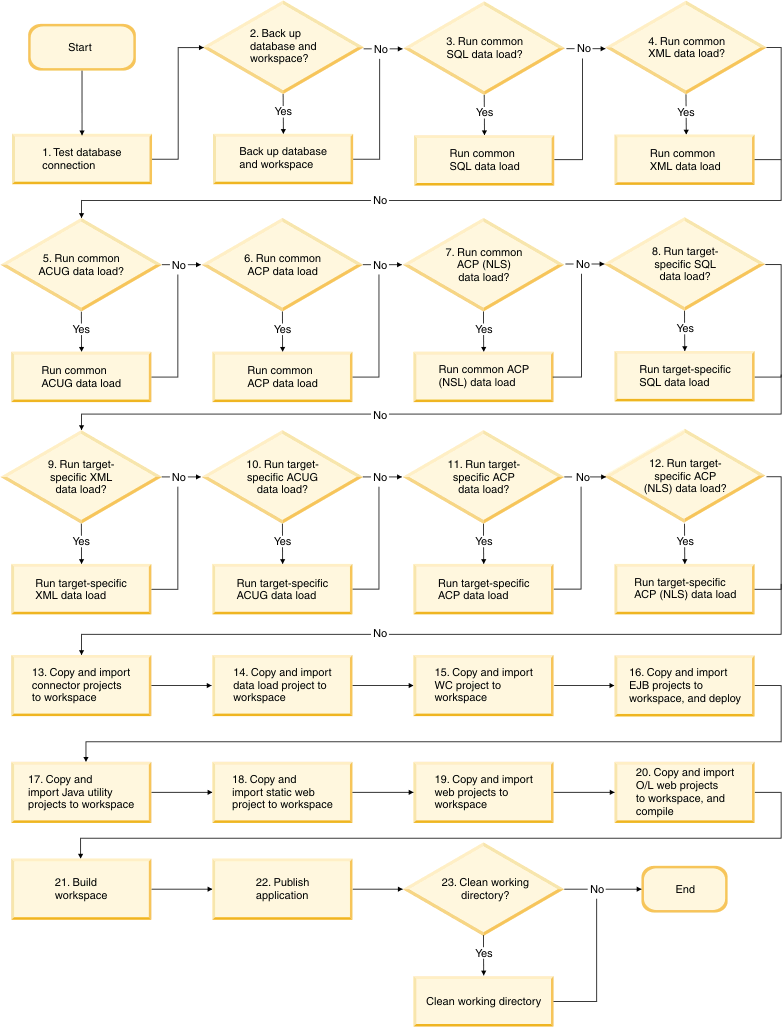
 Test the connection to the database to determine
if any of the dataload steps are set to run.
Test the connection to the database to determine
if any of the dataload steps are set to run.- If set to run, back up the Derby database and the workspace.
- If set to run, perform common SQL dataload.
- If set to run, perform common XML dataload. This result is identical
to running the
idresgentool, then running themassloadtool. - If set to run, perform common ACUG dataload. This result is identical
to running the
acugloadtool. - If set to run, perform common ACP dataload. This result is identical
to running the
acploadtool. - If set to run, perform common ACP (NLS) dataload. This result
is identical to running the
acpnlsloadtool. - If set to run, perform target-specific SQL dataload.
- If set to run, perform target-specific XML dataload. This result
is identical to running the
idresgentool, then running themassloadtool. - If set to run, perform target-specific ACUG dataload. This result
is identical to running the
acugloadtool. - If set to run, perform target-specific ACP dataload. This result
is identical to running the
acploadtool. - If set to run, perform target-specific ACP (NLS) dataload. This
result is identical to running the
acpnlsloadtool. - For each connector project (module) set to include, copy to the workspace and import/refresh.
- For the dataload project (module) set to include, copy to the workspace and import/refresh.
- For the WebSphere Commerce EAR project (module), copy assets to the workspace and import/refresh. EAR properties and XML files will be copied to the properties and xml directories in the WebSphere Commerce Developer installation directory.
- For each EJB project (module) set to include, copy to the workspace, import/refresh, and deploy.
- For each Java utility project (module) set to include, copy to the workspace and import/refresh.
- For the static Web project (module), copy to the workspace and import/refresh.
- For each Web project (module) set to include, copy to the workspace and import/refresh.
- For each OpenLaszlo Web project (module) set to include, copy to the workspace, import/refresh and compile.
- Compile the workspace.
- Publish the Websphere Commerce application to the test server.
 If set to run, clean the working directory.