
Installing and configuring BigFix Platform MCP Server
The recommended installation method is the BigFix Installation Fixlet. The Fixlet installs the service and creates its initial configuration. After installation, administrators can review or modify the configuration file and restart the service to apply the changes.
Installation
Installation is currently supported as a fresh installation only. The Installation
Fixlet, named Install BigFix MCP Server, is relevant only when the
bes-mcp-server service does not already exist. It is not
currently an upgrade or repair workflow.
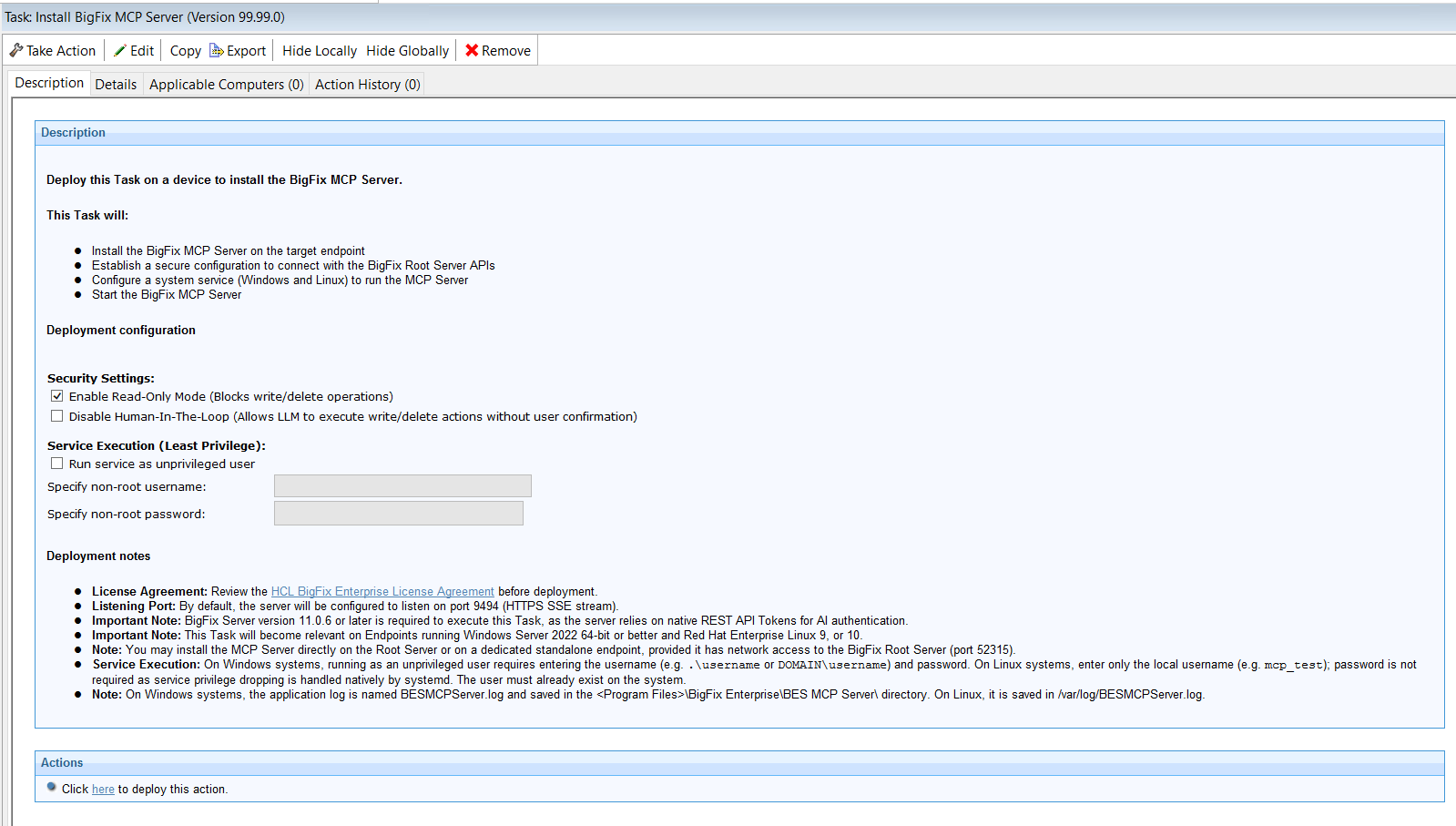
| Fixlet option | What it controls |
|---|---|
| Run service as unprivileged user | Selects the operating-system account used to run the MCP Server service. |
| Read-only mode | Enables the server-side blocking of write-capable operations. |
| Human-in-the-Loop / disable HITL | Determines whether the supported write operations require explicit user confirmation. |
Installation Fixlet options
Run service as unprivileged user
The Installation Fixlet can run the MCP Server service with a dedicated account that is not root on Linux and is not a local Administrator on Windows. The installation action itself still requires the privileges needed to install a service, create directories, and apply file permissions.
Windows: Select Run service as unprivileged user and provide the account in DOMAIN\username or MACHINE\username format. Omitting the domain or machine prefix can cause service installation to fail. The Fixlet adjusts ownership or access control on the MCP Server installation and data directories for the selected account.
Linux: Select Run service as unprivileged user and provide the existing account that will run the service. The Fixlet adjusts ownership of the required MCP Server directories.
Minimum runtime access for the service account
- Start and run the BES MCP Server service.
- Read and execute the MCP Server binary and required runtime files.
- Read and write the configured workspace and data directory.
- Create and append the configured application and audit log files.
- Read the Root Server CA certificate configured by the Installation Fixlet.
- Read the listener certificate and private key when custom MCP listener TLS files are configured.
- Open the configured listener port, normally 9494.
- Establish outbound HTTPS connections to the Root Server REST API, normally on port 52315.
Windows account rights: The account must have the Log on as a service permission. Confirm in the delivered Fixlet whether this right is assigned automatically; if it is not, it must be granted before the service starts.
Read-only mode option
When the Fixlet enables read-only mode, it writes the corresponding server configuration so that write capable operations are blocked by the MCP Server before they are sent to the Root Server. This is an execution-time control, not only guidance for the AI model. Choose read-only mode for evaluation, discovery, reporting, or environments where the MCP client must not create, update, retry, stop, or delete BigFix objects. For the complete server/client decision logic, see Read-only mode described in Using BigFix Platform MCP Server.
Human-in-the-Loop option
The HITL option controls whether supported write-capable operations require an explicit user decision through MCP Form Elicitation. In the configuration, disable_hitl: false means HITL is enabled. disable_hitl: true disables the server-configured confirmation step. Before enabling write operations with HITL, verify that the selected MCP client advertises Form Elicitation support. If the client does not support this capability, the MCP Server blocks the write operation rather than executing it without confirmation.
Trust validation between the MCP Server and the BigFix Root Server
This Fixlet field is used for Root Server trust. It specifies an absolute path on the installation target to a CA certificate or certificate file that allows the MCP Server to validate the TLS certificate presented by the Root Server REST API on port 52315. This field is not the certificate and private key presented by the MCP Server to MCP clients on port 9494.
Configuration
After the installation, a new service is available to manage the BES MCP Server process and starts automatically. The Installation Fixlet creates the initial configuration. Administrators can then review or customize the configuration by editing the configuration file and restarting the service.
- Windows: C:\Program Files\BigFix Enterprise\BES MCP Server\data\config.yaml
- Linux: /var/opt/BESMCPServer/data/config.yaml
bes-mcp-server service.Listener settings
| Field | Description | Default / notes |
|---|---|---|
| mcp_server.scheme | Protocol used by the MCP Server listener. | Default: https. HTTP should be limited to local development or tightly controlled internal environments. |
| mcp_server.port | Listening port for MCP clients. | Default: 9494. Clients must be able to reach this port. |
| mcp_server.tls.cert_path | Optional path to the TLS certificate presented by the MCP Server listener. | When supplied together with key_path, the service uses this certificate instead of generating a self-signed certificate. |
| mcp_server.tls.key_path | Optional path to the private key matching the listener certificate. | The service account must be able to read this file. |
Security runtime settings
| Field | Description | Default / notes |
|---|---|---|
| mcp_server.read_only | Enables server-side read-only enforcement. | Default: true. Write-capable operations are blocked according to generated tool metadata. |
| mcp_server.disable_hitl | Controls server-side Human-in the-Loop confirmation. | Default: false. False means HITL is enabled; true means the server-configured HITL step is disabled. |
Root Server connection settings
| Field | Description | Default / notes |
|---|---|---|
| bigfix.url | BigFix Root Server REST API base URL. | Default pattern: https://<root_server>:52315 |
| bigfix.ca_cert_path | Certificate or CA material used to validate the TLS certificate presented by the Root Server. | Normally populated by the Installation Fixlet. The service fails closed if the trust chain cannot be validated. |
Logging settings
| Field | Description | Default / notes |
|---|---|---|
| log.file_path | Path of the MCP Server application log. | Platform-specific default configured by the installer. |
| log.max_size_mb | Maximum size in MB of each log file before rotation. | Default: 100. |
| log.max_backups | Maximum number of rotated log files to retain. | Default: 3. |
| log.max_age_days | Maximum age in days of retained log files. | Default: 28. |
| log.compress | Controls compression of rotated log files. | Default: false. |
mcp_server:
  scheme: "https"
  port: "9494"
  read_only: true
  read_only_tool: []
  disable_hitl: false

tls:
  cert_path: "/path/to/mcp-listener.crt"
  key_path: "/path/to/mcp-listener.key"

bigfix:
  url: "https://root-server.example.com:52315"
  ca_cert_path: "/path/to/root-server-ca.crt"

log:
  file_path: "/path/to/log/BESMCPServer.log"
  max_size_mb: 100
  max_backups: 3
  max_age_days: 28
  compress: false
TLS and Certificates
There are two separate TLS directions. They use different certificates and must not be described as one generic custom-certificate setting.
| Connection | Certificate being validated | Configuration |
|---|---|---|
| MCP Client -> MCP Server, normally port 9494 | Certificate presented by the MCP Server listener. | mcp_server.tls.cert_path and mcp_server.tls.key_path, or an automatically generated self signed certificate. |
| MCP Server -> Root Server, normally port 52315 | Certificate presented by the Root Server REST API. | bigfix.ca_cert_path is initialized by the Installation Fixlet in config.yaml. |
Root Server trust
The MCP Server mandates TLS certificate validation for communication with the BigFix Root Server. By default, the Installation Fixlet locates the Root Server certificate from the BigFix Client installation, copies it into the MCP Server data directory, and configures bigfix.ca_cert_path. The calculated REST API port is 52315 by default.
MCP Server listener certificate
- Provide a certificate and matching private key in mcp_server.tls.cert_path and mcp_server.tls.key_path.
- Leave both fields unset and allow the service to generate a self-signed certificate automatically.
The hostname or IP used in the MCP client URL must be included in the certificate Subject Alternative Name. The certificate or its issuing CA must be trusted in the operating-system environment where the MCP client opens the connection. For VS Code Remote SSH, WSL, Codespaces, and development containers, trust must also be installed in the remote environment.
Blocking incoming MCP requests
Master Operators (MOs) can disable incoming MCP requests on the BigFix Root Server by
setting the advanced option named blockIncomingMCPRequests to 1
(enabled). Its default value is: 0 (disabled).
When enabled, requests identified as MCP requests are rejected with HTTP 403. The
BigFix Root Server identifies an MCP request by the presence of the
BES-MCP-Identifier HTTP header. For backward compatibility, the
legacy X-BES-MCP-Identifier header is also recognized. The BigFix
Root Server must be restarted after changing this setting.
On Windows, the advanced option named blockIncomingMCPRequests can
be configured from the Advanced Options tab of the BigFix
Administration Tool.
BESAdmin.sh -setadvancedoptions -update blockIncomingMCPRequests=1Logging
- Windows: BESMCPServer.log under the configured BigFix Enterprise installation location.
- Linux: /var/log/BESMCPServer.log by default.
The MCP Server also produces a formatted audit log named mcp_audit.log in the MCP Server data directory. The audit log records tool execution metadata, Root Server response sizes and execution times, read-only and HITL security decisions, and lockout-related events.
Sensitive data: Raw authorization tokens are never logged. Sensitive keys are masked and unusually large payloads are truncated.
When the MCP Server is removed with the Uninstall BigFix MCP Server Fixlet, the configuration directory is deleted, while the .log files are preserved in the installation folder for troubleshooting purposes, subject to the behavior of the delivered Fixlet.