
NDES Proxy Configuration
This document provides step-by-step instructions for installing and configuring HAProxy as a proxy for the Network Device Enrollment Service (NDES), covering both challenge and certificate enrollment requests.
HAProxy has been chosen for this setup because it offers flexible proxying capabilities at both Layer 4 (TCP) and Layer 7 (HTTP) without requiring additional modules. While alternatives such as NGINX and Apache HTTPD were considered, they rely on third-party modules to handle NTLM authentication, which adds complexity and potential overhead.
By using HAProxy, we can enforce strict access control at the network layer, ensuring that requests to the NDES service are only permitted from the Mobile Client Management (MCM) system. This design enhances security by preventing direct access to NDES while keeping the configuration lightweight.
1. Hybrid Configuration Approach
- SSL Passthrough for SCEP operations requiring NTLM authentication (ndes-admin.example.com) - NTLM requires passthrough
- SSL Termination with HTTP Bridge for non-NTLM operations or admin interfaces (ndes.example.com) - provides HTTP-level visibility
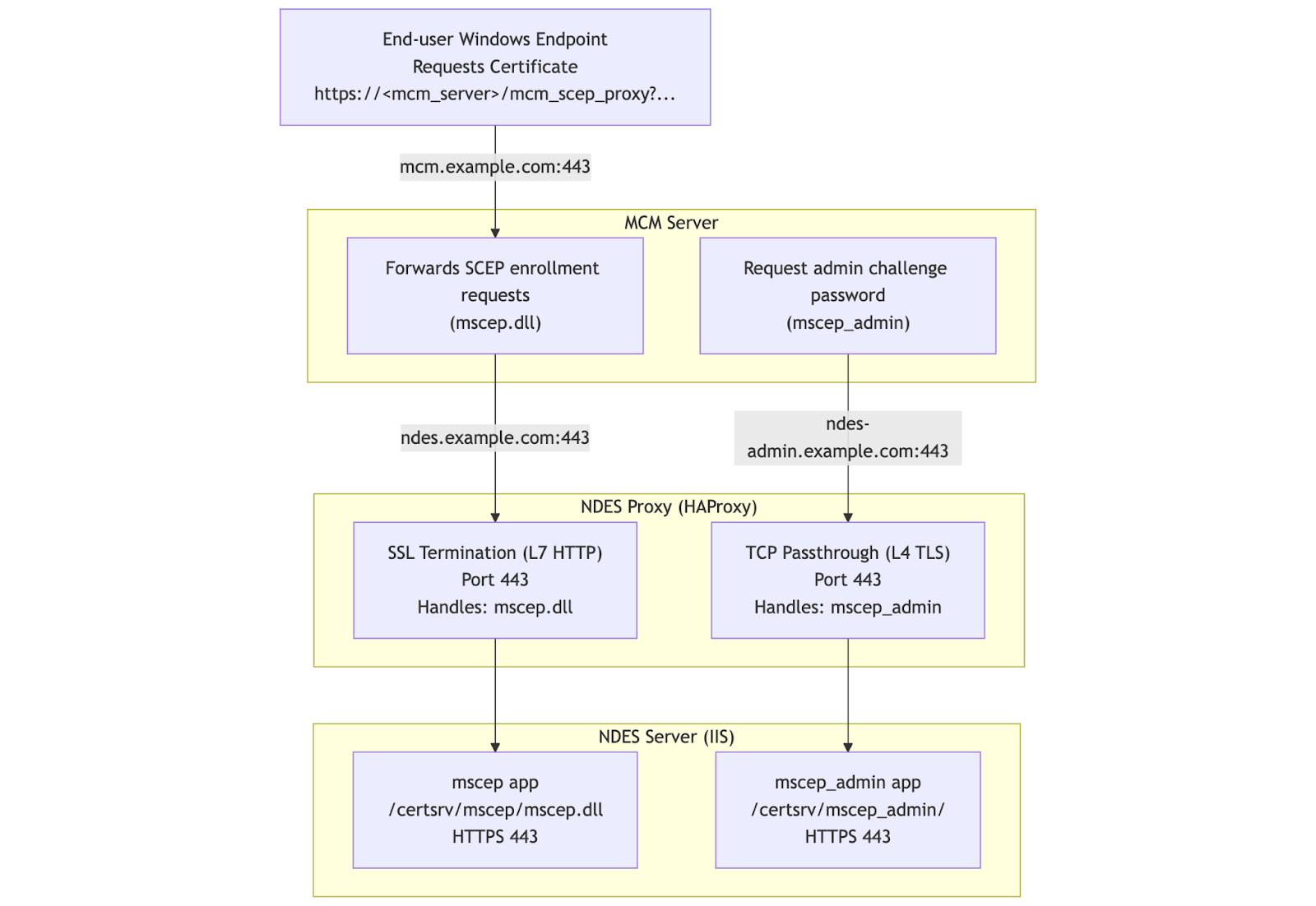
2. Steps to Install and Configure NDES Proxy
- 1. Install HAProxy
-
Run the following command to install HAProxy
sudo dnf install haproxy -y
- 2. Enable and Start HAProxy
-
Enable the HAProxy service to start on boot, then start the service and verify its status:
sudo systemctl enable haproxy
sudo systemctl start haproxy
sudo systemctl status
- 3. Backup the HAProxy configuration file
-
Rename the existing HAProxy configuration file to create a backup:
sudo mv /etc/haproxy/haproxy.cfg /etc/haproxy/haproxy.cfg_bkup - 4. Prepare SSL Certificates
- This step configures the SSL certificates required for HAProxy (NDES Proxy)
and ensures proper TLS handling for both:
- SCEP endpoint (TLS termination at HAProxy)
- NDES Admin endpoint (TLS passthrough to NDES server)
sudo mkdir -p /etc/haproxy/certsPrepare Certificate File
Copy the SSL certificate and private key to the HAProxy server. The certificate must be in PEM format, containing:
- Certificate
- Private key
If separate files exist, combine them:
Set Permissions# If separate files exist, combine them: sudo cat /path/to/certificate.crt /path/to/private.key > /etc/haproxy/certs/ndes.pemsudo chmod 600 /etc/haproxy/certs/ndes.pem sudo chown haproxy:haproxy /etc/haproxy/certs/ndes.pemCertificate Requirements: The certificate used by HAProxy must:- Include all hostnames exposed via HAProxy where TLS termination occurs
- Be trusted by clients (BigFix MCM server)
- Match the configured SNI routing
Required SAN Entries (HAProxy Certificate)
For the configuration described:
This is the SCEP endpoint, where TLS is terminated at HAProxy.ndes.example.comAdmin Endpoint (Passthrough Mode)
Example configuration:
TLS is NOT terminated at HAProxyndes-admin.example.com- Traffic is passed through directly to the NDES server
Therefore:
- HAProxy certificate does NOT need this SAN
- NDES server certificate MUST include this SAN
-
Architecture and TLS Termination Flow
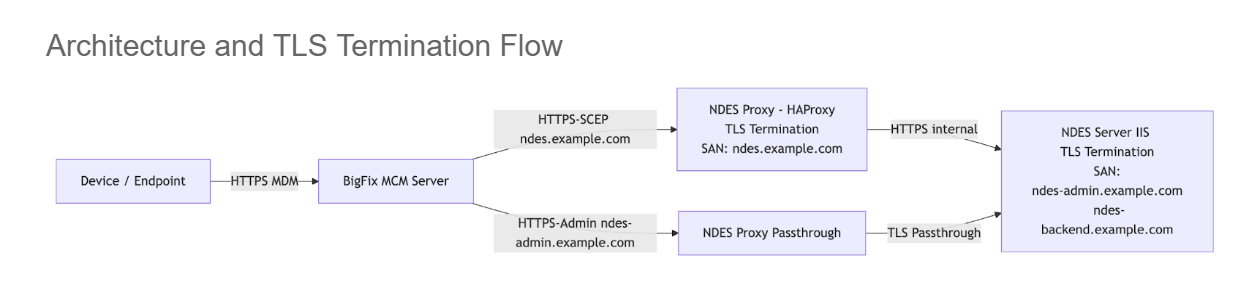 Certificate Mapping Summary
Component Hostname TLS Termination Certificate Must Include HAProxy (NDES Proxy - SCEP) ndes.example.com Yes ndes.example.com HAProxy (Admin endpoint) ndes-admin.example.com No Not required NDES Server (IIS) ndes-admin.example.com Yes ndes-admin.example.com NDES Server (IIS) ndes-backend.example.com Yes ndes-backend.example.com - 5. Create the HAProxy Configuration file for NDES Proxy
-
- Create a new HAProxy configuration
file:
sudo vi /etc/haproxy/haproxy.cfg - Add the following configuration, updating the FQDN as needed for
the
environment:
#---------------------------------------------------------------------
# Global settings
#---------------------------------------------------------------------
global
    log         127.0.0.1 local2
    chroot      /var/lib/haproxy
    pidfile     /var/run/haproxy.pid
    maxconn     4000
    user        haproxy
    group       haproxy
    daemon

    stats socket /var/lib/haproxy/stats
    ssl-default-bind-ciphers PROFILE=SYSTEM
    ssl-default-server-ciphers PROFILE=SYSTEM

#---------------------------------------------------------------------
# Common defaults
#---------------------------------------------------------------------
defaults
    mode                    tcp
    log                     global
    option                  tcplog
    option                  dontlognull
    retries                 3
    timeout connect         10s
    timeout client          1m
    timeout server          1m
    maxconn                 3000

#---------------------------------------------------------------------
# Frontend for NDES
#---------------------------------------------------------------------

frontend ft_https
    mode tcp
    option tcplog

    # Bind to port 443 for SSL/TLS
    bind *:443

    # Wait for the Client Hello packet before making a routing decision
    tcp-request inspect-delay 5s
    tcp-request content accept if { req.ssl_hello_type 1 }

    # Route based on SNI
    # For ndes.example.com, use the HTTP frontend for SSL termination
    use_backend bk_http_frontend if { req.ssl_sni -i ndes.example.com }

    # For ndes-admin.example.com, use passthrough mode
    use_backend bk_passthrough if { req.ssl_sni -i ndes-admin.example.com }

# HTTP frontend for SSL termination (used by bk_scep)
frontend ft_http
    mode http
    option httplog

    # This frontend is accessed via the bk_http_frontend backend
    bind 127.0.0.1:8443 ssl crt /etc/haproxy/certs/ndes.pem

    # Route to the HTTP backend
    default_backend bk_scep

# ----------------------------------------------------
# BACKENDS
# ----------------------------------------------------

backend bk_http_frontend
    mode tcp
    # Bridge to the HTTP frontend for SSL termination
    server local_http 127.0.0.1:8443

backend bk_passthrough
    mode tcp
    # Simple TCP passthrough to the backend - SSL is handled end-to-end
    server ndes_dc ndes-backend.example.com:443 check

backend bk_scep
    mode http
    # HTTP backend with SSL re-encryption to the upstream server
    server ndes_dc ndes-backend.example.com:443 ssl verify none check
-
Replace ndes.example.com with the NDES Proxy FQDN
-
Replace ndes-admin.example.com with the NDES Proxy - passthrough FQDN
-
Replace ndes-backend.example.com with the NDES server FQDN
Understanding Key Configuration Elements:
TCP Inspection Lines:
tcp-request inspect-delay 5s tcp-request content accept if { req.ssl_hello_type 1 }- tcp-request inspect-delay 5s: Tells HAProxy to wait up to 5 seconds to inspect incoming data
- tcp-request content accept if { req.ssl_hello_type 1 }: Proceeds immediately when Client Hello is detected (doesn't wait full 5s)
- These allow HAProxy to read the SNI from the SSL handshake without decrypting it
SNI-Based Routing:use_backend bk_http_frontend if { req.ssl_sni -i ndes.example.com }- Routes traffic based on the Server Name Indication (SNI) in the SSL handshake
- Case-insensitive matching (-i flag)
The configuration uses an internal loopback bridge to switch from TCP mode to HTTP mode:# Step 1: TCP backend bridges to internal HTTP frontend backend bk_http_frontend mode tcp server local_http 127.0.0.1:8443 # Step 2: HTTP frontend listens on internal port with SSL termination frontend ft_http mode http bind 127.0.0.1:8443 ssl crt /etc/haproxy/certs/ndes.pem default_backend bk_scepHow it works:
- Main frontend (ft_https) operates in TCP mode to inspect SNI at Layer 4
- Traffic for ndes.example.com is routed to bk_http_frontend backend
- bk_http_frontend connects to internal port 127.0.0.1:8443 (localhost only)
- ft_http frontend listens on port 8443 in HTTP mode and terminates SSL
- Now operating at Layer 7, HTTP headers are visible and can be inspected
- Create a new HAProxy configuration
file:
- 6. Validate the HAProxy Configuration
-
Run the following command to check the syntax and validity of your HAProxy configuration file:
If the configuration is valid, there will be a message indicating success. If there are errors, review the output, correct the configuration, and re-validate.sudo haproxy -c -f /etc/haproxy/haproxy.cfg
- 7. Reload the HAProxy service
- Apply the new configuration by reloading the HAProxy
service:
Verify the service is running:sudo systemctl reload haproxysudo systemctl status haproxy
- 8. Allow HTTPS through the Firewall
-
Open the HTTPS service in the firewall and reload the firewall rules:
sudo firewall-cmd --permanent --add-service=https
sudo firewall-cmd --reload