CVE details page
The CVE details page answers the three questions that follow from spotting a vulnerability in a CyberFOCUS report: what is it, which of my devices have it, and what fixes it.
Open the page by selecting a CVE name in the CVEs table of either
report, or by selecting a bubble in the CISA KEV chart. The heading reads
Details: CVE ID, for example
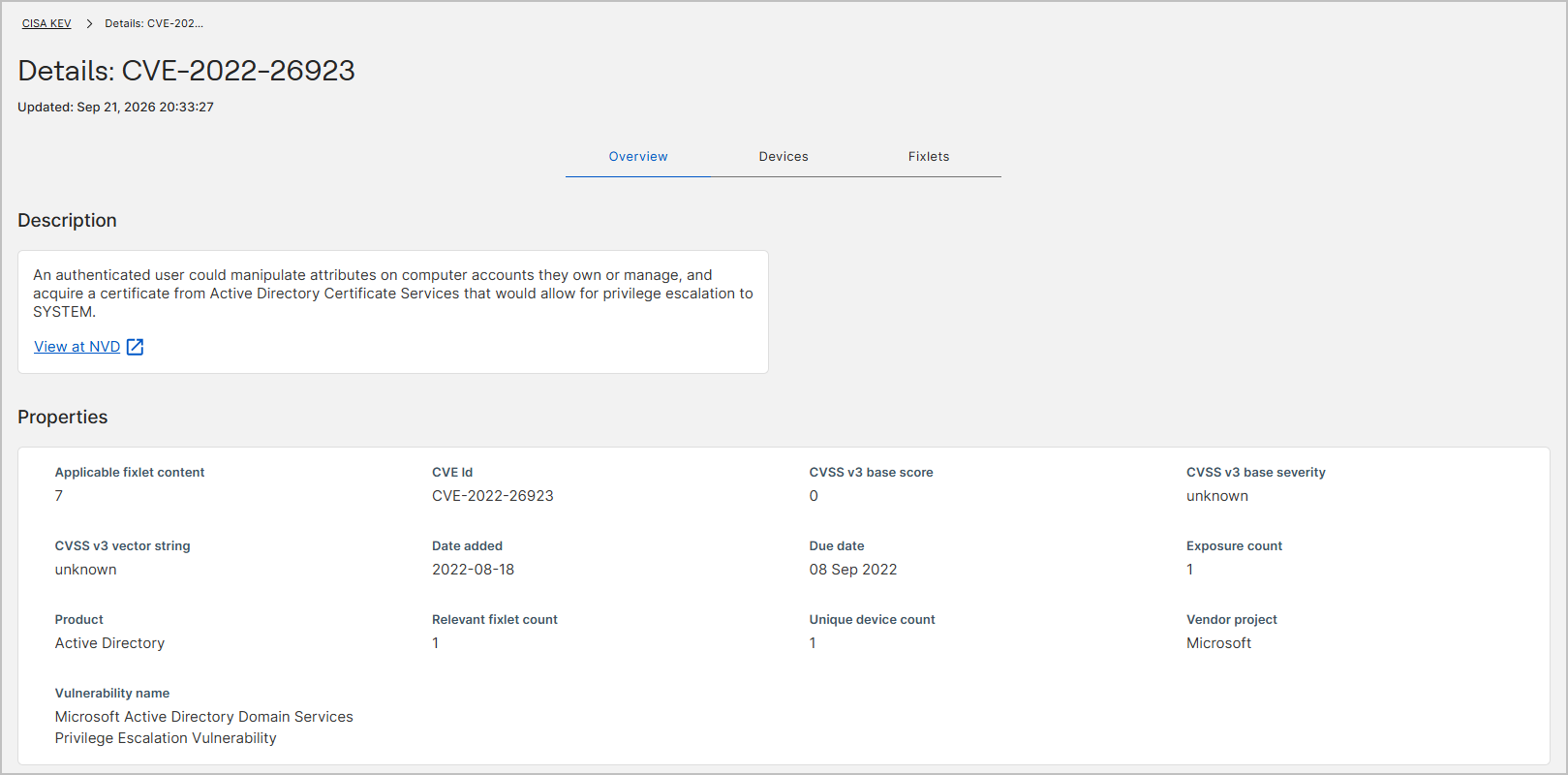
Details: CVE-2022-26923, with an Updated
stamp below it. A breadcrumb above the heading links back to the report.
The three tabs
| Tab | What it shows |
|---|---|
| Overview | Opens first. A Description card with the published description of the vulnerability and a View at NVD link, and a Properties card with the scoring, dates, affected product, and the Fixlet and device counts. |
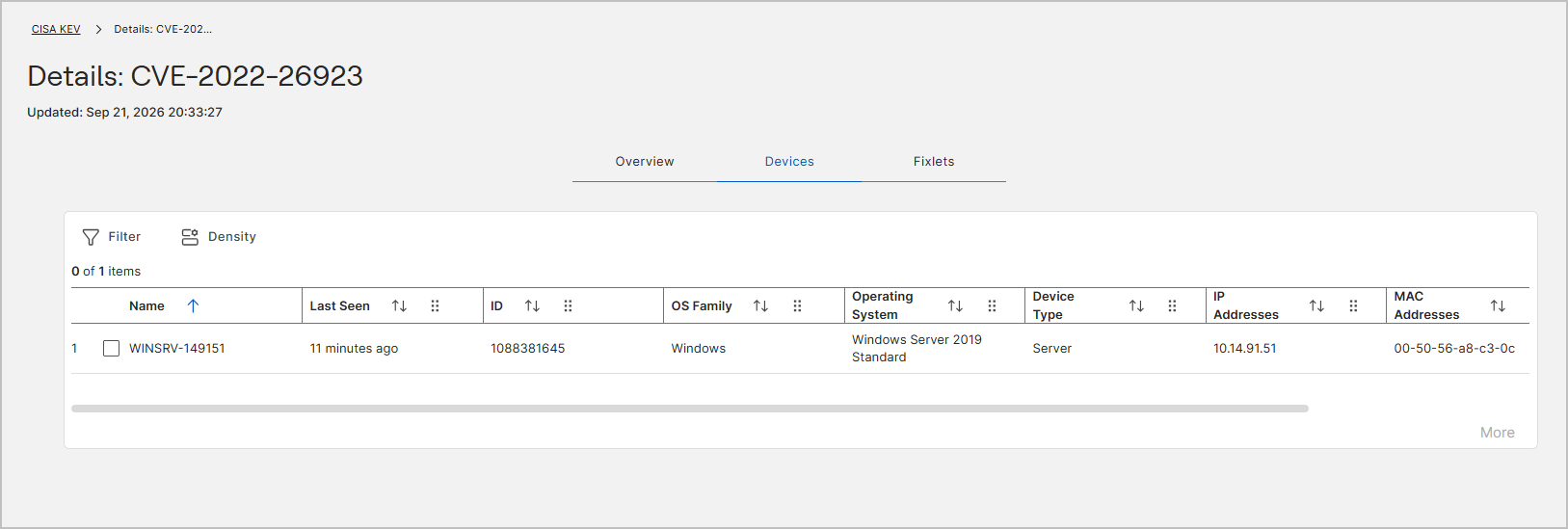
| Devices | The devices in your environment that this CVE affects, with the identity and operating system of each one. |
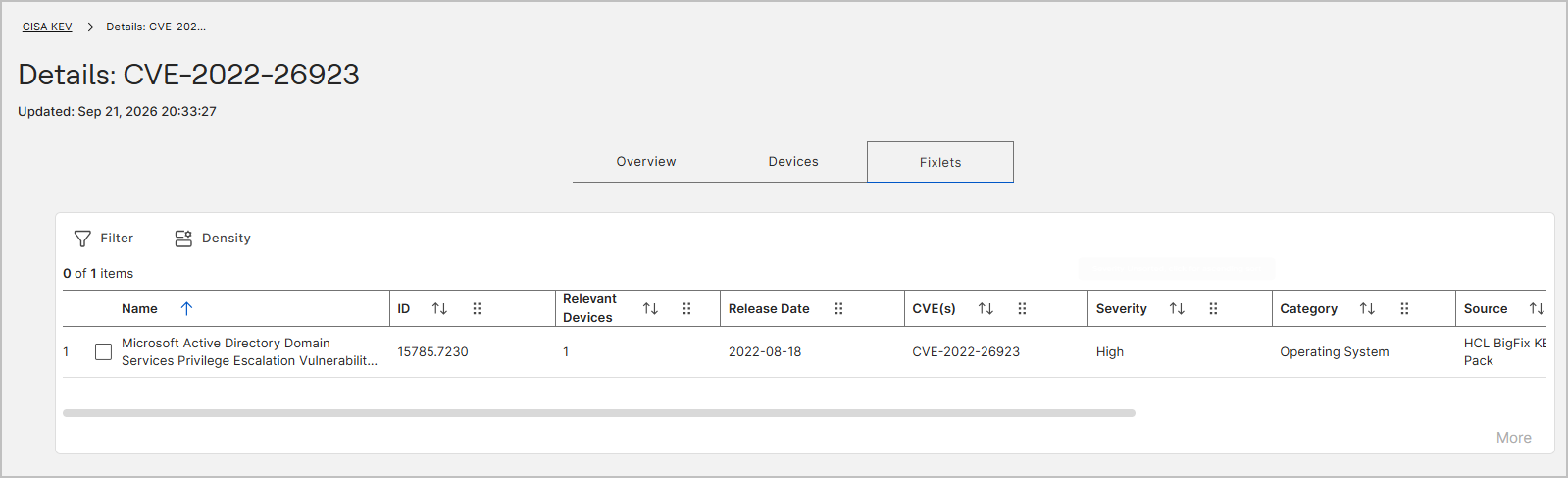
| Fixlets | The relevant Fixlets that remediate this CVE, with the severity, category, and source of each one. |
The Devices and Fixlets tabs each
provide a Filter control, a Density control, a counter of selected rows against the total (for
example 0 of 1 items), sortable and reorderable columns, and a
More button that loads further rows.
More is dimmed when every row is already shown. Both
tables scroll horizontally when the columns exceed the width of the page.
Overview tab properties
| Field | Description |
|---|---|
| Applicable fixlet content | The number of Fixlets that address this CVE, whether or not they are currently relevant to a device in your environment. |
| CVE Id | The Common Vulnerabilities and Exposures identifier, for example
CVE-2022-26923. |
| CVSS v3 base score | The Common Vulnerability Scoring System version 3 base score published for the CVE. |
| CVSS v3 base severity | The severity band that corresponds to the base score. |
| CVSS v3 vector string | The CVSS version 3 vector that records how the base score was calculated. |
| Date added | The date the CVE was added to the source catalog, for example
2022-08-18. |
| Due date | The remediation deadline published by CISA, for example
08 Sep 2022. |
| Exposure count | The number of Fixlet-to-device mappings that remain to remediate the CVE. |
| Product | The affected product, for example Active
Directory. |
| Relevant fixlet count | The number of Fixlets that are relevant to at least one device, and so still need to be applied. |
| Unique device count | The number of distinct devices in your environment that the CVE affects. |
| Vendor project | The vendor or project that owns the affected product, for example
Microsoft. |
| Vulnerability name | The descriptive name published for the vulnerability. |
The View at NVD link opens the National Vulnerability Database record for the CVE in a new browser tab. Use it to confirm the published scoring or to read the full technical write-up.
Devices tab columns
| Column | Description |
|---|---|
| Name | The name of the affected device. |
| Last Seen | How long ago the device last reported, for example 5
minutes ago. |
| ID | The computer identifier of the device. |
| OS Family | The operating system family, for example
Windows. |
| Operating System | The specific operating system and edition, for example
Windows Server 2019 Standard. |
| Device Type | The device category, for example Server. |
| IP Addresses | The IP addresses reported by the device. |
| MAC Addresses | The hardware addresses reported by the device. |
| DNS Name | The DNS name of the device. Scroll the table horizontally to see this column. |
Fixlets tab columns
| Column | Description |
|---|---|
| Name | The title of the Fixlet. |
| ID | The Fixlet identifier, for example
50045.7230. |
| Relevant Devices | The number of devices on which the Fixlet is currently relevant. |
| Release Date | The date the Fixlet was published, for example
2022-08-18. |
| CVE(s) | The CVE identifiers that the Fixlet addresses. |
| Severity | The severity rating of the Fixlet, for example
High. |
| Category | The content category of the Fixlet, for example Operating
System. |
| Source | The content site that published the Fixlet, for example
Known Exploited Vulnerabilities Content Pack for
                                    Windows
. Sites are split into per-operating-system
content packs, so this value can also name the NIX, macOS, or Mobile
pack. |
| Source ID | The identifier the source site uses for the content, which for KEV content is the CVE identifier. |
| Download Size | The size of the payload the Fixlet downloads. Shows [
null ] when the Fixlet has no download. |
Why the Fixlets tab can show fewer Fixlets than you expect
The Fixlets tab lists relevant Fixlets, which means the ones that still need to be applied to at least one device. The count of every Fixlet that addresses the CVE, including the ones your devices already satisfy, appears on the Overview tab as Applicable fixlet content.
The two numbers answer different questions. Operations teams use the relevant count, because it is the work that remains. Security teams use the applicable count, because compliance is measured against how many of the applicable Fixlets have been satisfied. See How CyberFOCUS counts Fixlets, devices, and exposures.