CISA KEV Report
The CISA Known Exploited Vulnerabilities (KEV) Catalog is a curated list maintained by the Cybersecurity and Infrastructure Security Agency (CISA). It includes vulnerabilities actively exploited in the wild and requiring immediate remediation. Organizations can use this intelligence to prioritize patching efforts and reduce exposure to cyber threats.
Key Benefits of CISA KEV
- Identifies vulnerabilities with confirmed exploitation in real-world attacks.
- Provides mandated patching deadlines (for U.S. federal agencies).
- Helps organizations prioritize security patches effectively.
Use Cases
- Security Teams: Helps in vulnerability management by focusing on critical threats.
- Compliance: U.S. federal agencies must comply with KEV patching deadlines.
- Threat Intelligence: Organizations can proactively monitor and defend against known exploited vulnerabilities.
Accessing CISA KEV report
To access the CyberFOCUS app, expand Resolve from the side navigation, and then select CyberFOCUS. By default, the dashboard displays the CISA KEV report.
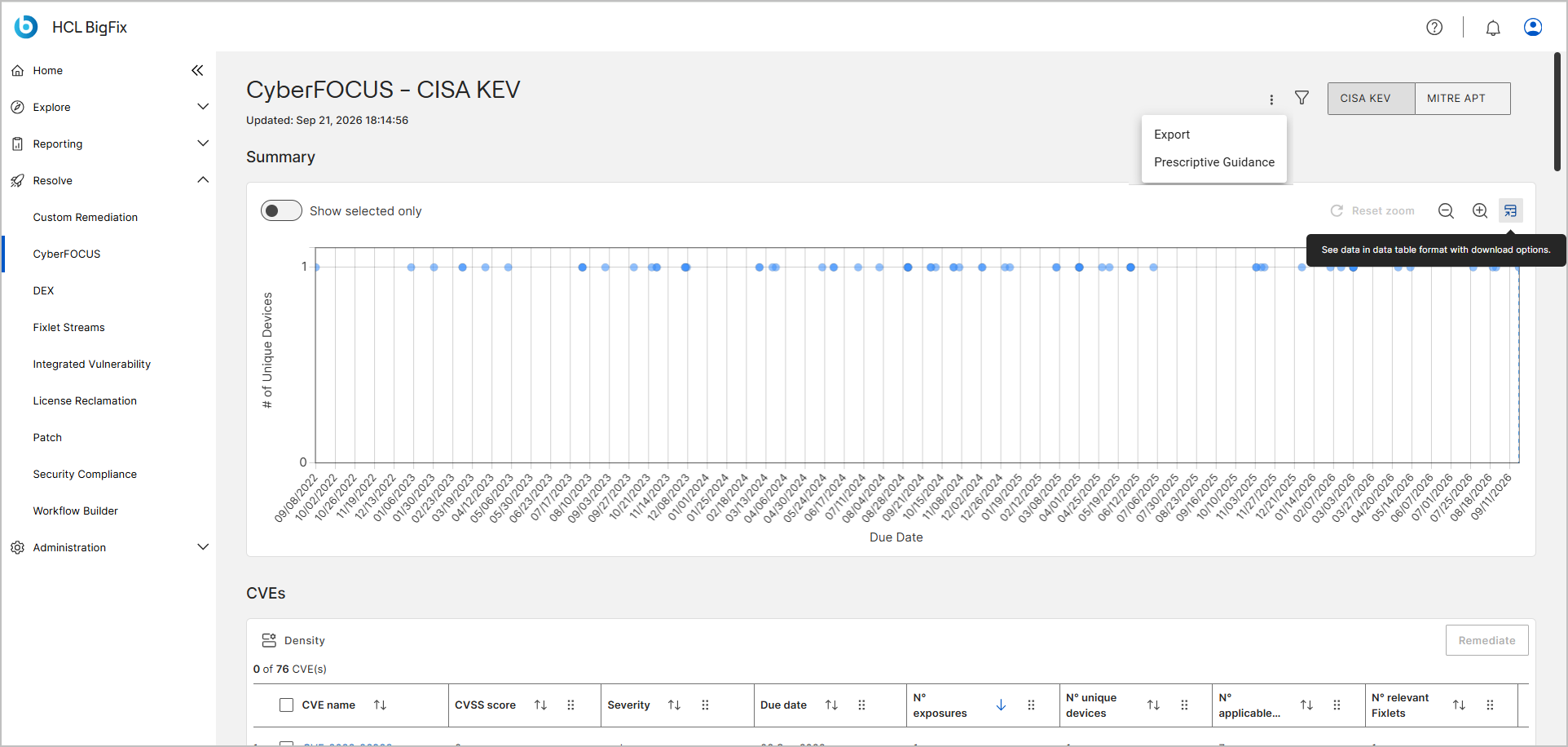
CISA KEV View and Utility Controls
The CISA KEV page includes utility controls that allow you to navigate between vulnerability reports, filter data, export information, and access remediation guidance.
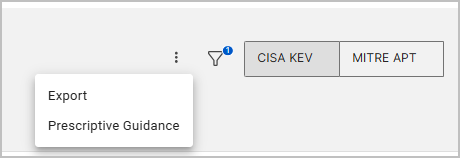
- Report Toggle (CISA KEV / MITRE APT)Click the buttons to switch the dashboard view between the CISA KEV and MITRE APT reports.
- Click the 3-dot ⋮ menu to access the Export and
Prescriptive Guidance tools.
- Export – Click the ⋮ menu and select Export to open the Export panel. Select your preferred format (CSV, Excel, JPEG, PNG, or PDF), and click Download to save the CVE data. For detailed steps, see Exporting Data and Exporting Charts.
- Prescriptive Guidance – Click the ⋮ menu and select Prescriptive Guidance to view actionable remediation recommendations. For more information, see Prescriptive Guidance for CISA KEV Scanner and Prescriptive Guidance.
- Filter – Click the Filter icon to open the filter panel. Use this tool to
refine and reduce the number of CVEs displayed in the data table. For detailed
steps, including how to save a filter and mark it as a favourite, see Global filter.Note:By default, the system applies a filter where the Property is set to
N° exposures, the Operator isGreater than, and the Value is0. The table is also sorted byN° exposuresin descending order, so the vulnerabilities that create the most work in your environment appear first.
CISA KEV Report Data Representation and Interactions
CyberFOCUS displays CISA KEV data in an interactive table and chart, offering insights into an organization’s exposure to known threats and take actions.
- CISA KEV Chart Representation
-
-
CyberFOCUS uses a bubble chart to visualize CISA KEV data:
-
X-axis: Due date of the CVE.
-
Y-axis: Number of unique affected devices.
-
Bubble Size: Exposure count (larger bubbles indicate higher exposure).
-
Bubble Color: CVSS3 severity (darker color = higher severity).
-
today marker: A labeled vertical line at the current date, separating deadlines that have passed from those still ahead.
-
Behavior:
-
Shrinking bubbles indicate that the vulnerabilities are partially remediated.
-
Fully remediated vulnerabilities disappear from the chart.
-
-
-
- CISA KEV Chart Interactions
-
- Hover for Details: Hover over a bubble to view a tooltip with
the
CVE name,Due date,# of unique devices, and# of exposures. The tooltip shows the due date inMM/DD/YYYYformat, for example12/07/2023. - Show Selected Only: Filter the chart to display only the CVEs selected from the table.
- Zoom Controls: Zoom in or out to focus on specific data points, with an option to reset the zoom level.
- Detailed CVE Insights: Click on any bubble in the chart to open the CVE details page, which shows the CVE description, the affected devices, and the Fixlets that remediate it.
- Chart Data Table: Click the data table icon at the right end
of the chart toolbar to open the plotted values as text. The icon
tooltip reads See data in data table format with download
options. The panel is titled CyberFOCUS
CISA KEV and lists
CVE name,Due date,# of unique devices, and# of exposures, each sortable, with the due date inMM/DD/YYYYformat. Select Copy to put the values on the clipboard, or choose CSV, PDF, or XLS from the Export as list to download them. Use this view when bubbles overlap too tightly to read, or with a screen reader. This is the chart's data, not the CVEs table. For detailed steps, see Viewing chart data in a table.
- Hover for Details: Hover over a bubble to view a tooltip with
the
- CISA KEV Table Representation
- The table provides a structured list of vulnerabilities with key details.
Above the table, Density sets the row spacing, the counter shows selected rows
against the total (for example
0 of 135 CVE(s)), and the header checkbox selects every CVE. For how the counts are calculated, see How CyberFOCUS counts Fixlets, devices, and exposures.
- CISA KEV Table Interactions
-
- Click for More Information: Click on a CVE name in the table to open the CVE details page, which provides the description, the affected devices, the relevant Fixlets, and a direct link to the National Vulnerability Database (NVD).
- Sort Functionality: Sort vulnerabilities by any column in the table to quickly identify and prioritize threats.
- Start Remediation: Select one or more CVEs from the table and click the Remediate button to initiate the CyberFOCUS remediation flow.
Prescriptive Guidance for CISA KEV Scanner
Prescriptive Guidance on the CyberFOCUS app helps identify and remediate endpoints that are missing the required CISA KEV scanner and/or not actively running the KEV scanner.
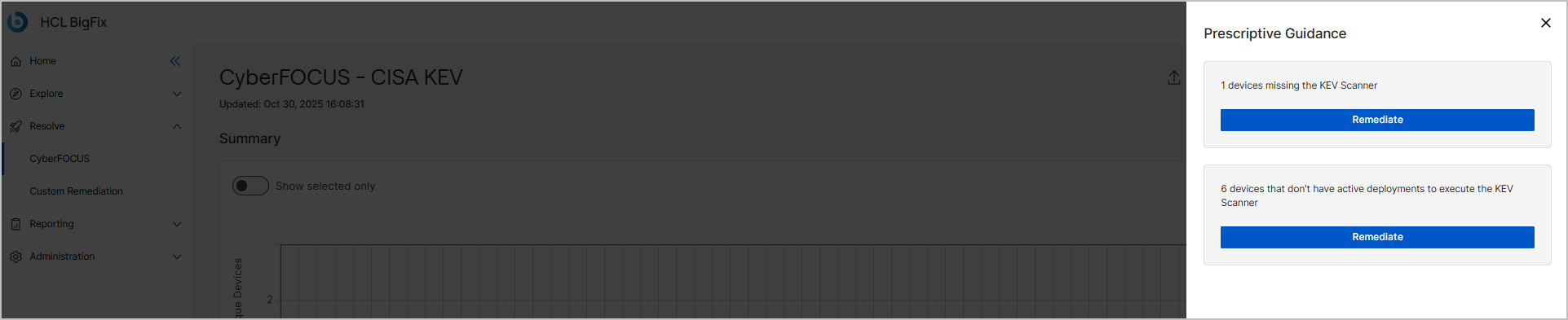
- Deploy the scanner to devices that do not have it installed.
- Execute the scanner on applicable devices.
- How the Remediation Flow Works
-
Each remediate action is tied to a specific Site ID and Fixlet ID.
With this, you can easily install and run the KEV scanner across your deployment, ensuring continuous vulnerability assessment and compliance.