BigFix Application Control System Architecture and Component Overview
The BigFix Application Control system architecture comprises three integrated layers: BigFix Server components (Core Server, Console, and Web Reports), managed Windows endpoints running the Process Monitor Service, Notification Utility, and Encryption Utility, and a third-party ITSM application such as ServiceNow™ for exception request ticketing and approval. Together these components enforce application execution policy, surface blocked-application notifications to end users, and route exception approval decisions back to endpoints via the BigFix Action API.
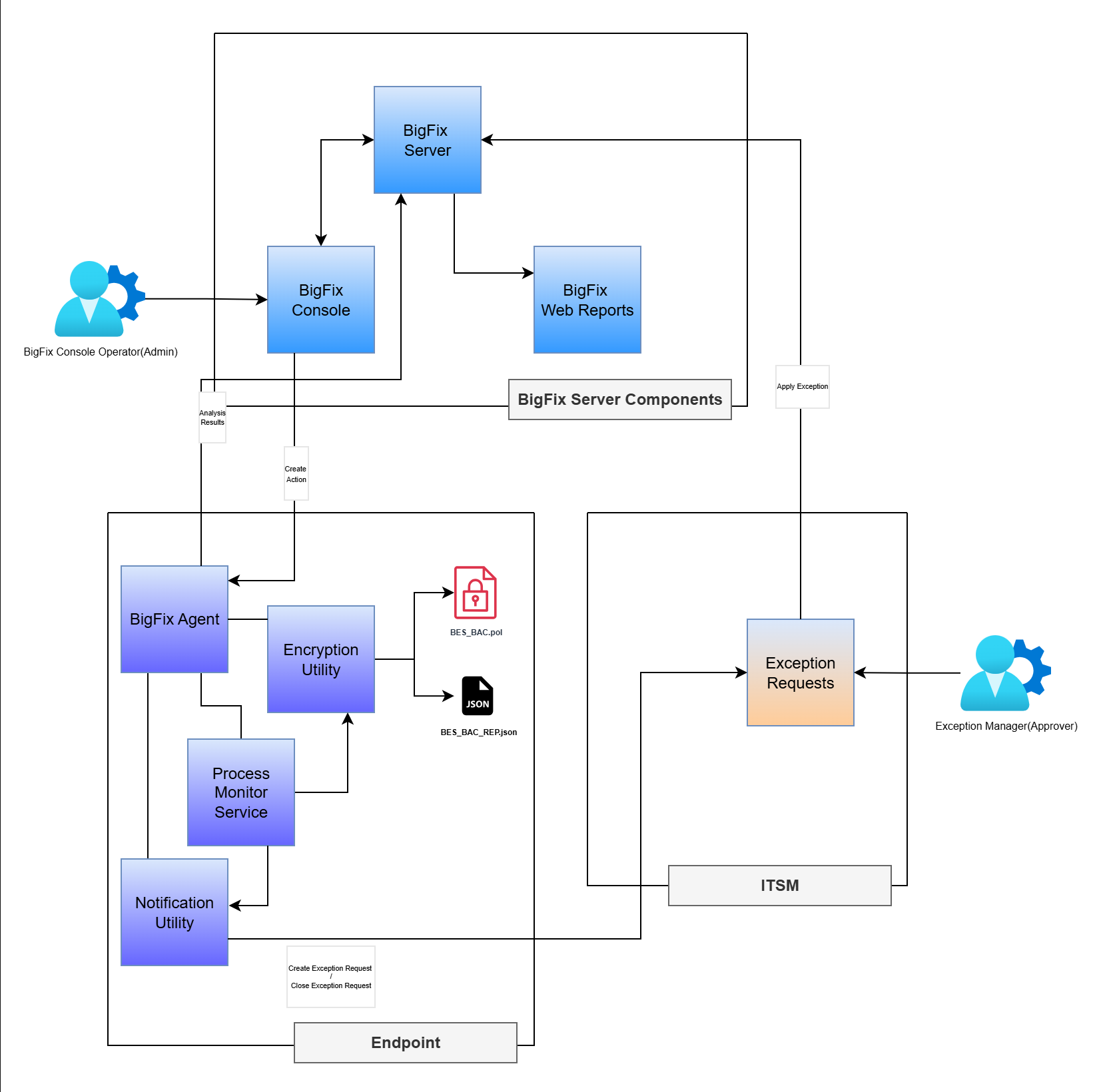
The diagram illustrates the interaction between BigFix Server components, managed BigFix endpoints, and third-party ITSM applications such as ServiceNow™. It shows how policy enforcement, user notification, exception ticketing, and approval decisions flow across the system.
-
- BigFix Server Components
- Application Control mainly utilizes the following three BigFix® Server
Components:
-
- BigFix® Core Server
- This is the central processing component for this solution. It manages all communications with the BigFix clients (agents), distributes content (like Fixlets, tasks, and analysis), and enforces policies. It accepts REST API calls from ITSM applications or solutions (like ServiceNow™) to execute action to allow the blocked app.
-
- BigFix® Console
- The console is the primary administrative interface for BigFix Application Control. It is a key part of the server-side infrastructure used to manage all aspects of the environment, including creating content and deploying actions. All BigFix Console integrations will be in the External Site.
-
- BigFix® Web Reports
- It provides a web-based interface for reporting and data visualization.
The BigFix Agent on the endpoint runs an analysis and sends the result to
the BigFix server. Below are the administrative reports that are shown for
Application Control:
- Effective Policy on Endpoint
- Approved Exceptions
- Endpoints With BAC Service
-
-
- Endpoints
- There are three services running along with BigFix® Agent
in the endpoint machines. The BigFix agent receives instructions from BigFix® console
to install following services:
-
- Process Monitor Service
- This component is deployed as a Windows® service, and will receive notifications of process executions using the ManagementEventWatcher class, and the service will compare the process meta data generated by the process execution events against the Effective Policy (bes_bac.pol) on the endpoint. If a process is to be blocked, the service terminates the process and initiate the Notification Utility to notify the logged in user of a blocked process. Default location for this service is C:\Program Files (x86)\BigFix Enterprise\BES Client\BAC\.
-
- Notification Utility
- Since the Process Monitor Service will be running in a non-interactive session, a notification utility is there to enable notification of the logged in users for a blocked process event. Upon invocation, this utility presents the logged in user with an alert indicating that a process has been blocked. Default location for this service is C:\Program Files (x86)\BigFix Enterprise\BES Client\BAC\
-
- Encryption Utility
- Encryption Utility is used to encrypt and decrypt the data into files. Latest payload data is encrypted through this utility and updated into the bes_bac.pol file and the latest payload data (in decrypted form) is updated to the bes_bac.rep file for reporting on BigFix® Web Reports. Default location for this service is C:\Program Files (x86)\BigFix Enterprise\BES Client\BAC\
-
-
- ITSM Applications (like ServiceNow™)
- ServiceNow™ is an ITSM application/tool where each exception raised from the endpoint through Notification Utility is created as a ticket. This ticket needs to be approved by the exception manager. Once the ticket is approved, BigFix Action API is called to send the approved exception to the respective endpoint and allow the blocked application on that endpoint machine. When an endpoint receives the approval for an exception, an action is executed to update the ServiceNow™ ticket with the status: fulfilled/completed. From the endpoint machine, an unauthenticated ServiceNow™ API is called to raise an exception on the blocked application.