
Flow of data
There are several different interactions that occur between the components of the BigFix Compliance infrastructure and between the user and the tool.
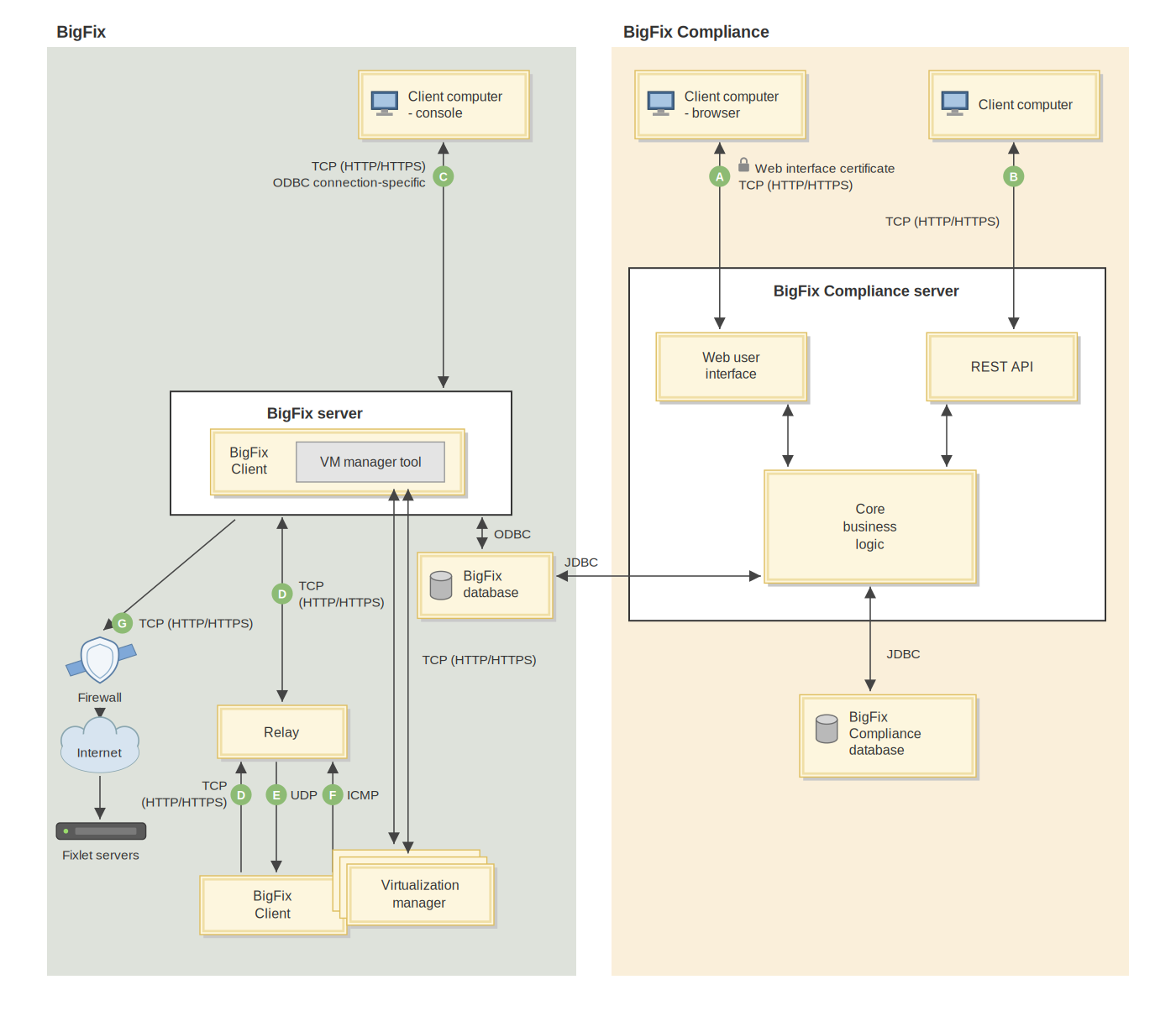
BigFix Compliance domain
| Label | Interaction | Attribute | Description |
|---|---|---|---|
| A | Web browser data traffic | Port | By default, the web browser connects to the BigFix Compliance server using port 9081 (HTTPS). You can disable the SSL/TLS connection tunneling. |
| Origination | The web browser connects to the BigFix Compliance server. | ||
| B | REST API data traffic | Port | By default, the client connects to the BigFix Compliance server using port 9081 (HTTPS). You can disable the secure connection. |
| Origination | A client that uses REST API connections. |
BigFix domain
| Label | Interaction | Attribute | Description |
|---|---|---|---|
| C | BigFix Console data traffic | Port | Consoles connect to the root server using HTTPS 52311 for all interactions. |
| Origination | The BigFix console connects to the RootServer service. | ||
| Network controls | There is a refresh rate for each BigFix console user (default 15 seconds). | ||
| D | Gather, post, download | Port | Port 52311 is configurable by the BigFix administrator at installation time. |
| Origination | The BigFix client initiates the request to the BigFix relay or server. | ||
| Network controls | Configurable bandwidth throttling to BigFix relay or clients. Configurable gather interval (default: 1 per day per fixlet site). Configurable minimum time to wait between posts (default 15 seconds). Configurable temporal distribution (spread downloads over time) per action. Ability to set policy to prevent computers from downloading files if they are not pointed at the proper BigFix relay. | ||
| E | UDP "new information" message | Port | Port 52311 is configurable by the BigFix administrator at installation time. |
| Origination | The UDP messages are sent from the immediate parent of the BigFix clients, which can be either a BigFix relay or server. | ||
| Network controls | Configurable limit of the number of UDP messages sent at one time from a BigFix relay. Configurable limit of the amount of time to wait after sending UDP messages from a BigFix relay. | ||
| F | Relay selection | Port | The ICMP protocol does not use a port. |
| Origination | Each BigFix client sends progressive "rounds" of ICMP packets to each relay with increasing TTLs until a BigFix relay responds. The BigFix client then chooses the closest relay. | ||
| Network controls | Relay auto-selection can be disabled. Configurable interval for when the BigFix clients perform auto-selection. Configurable limit on the maximum number of ICMP packets to send out in a time interval. Configurable limit on the maximum number of rounds to send out during relay auto-selection. | ||
| G | New data download from external BigFix fixlet servers | Port | 80 (typically); possibly 21, 443. |
| Origination | The BigFix server connects to the BigFix fixlet servers. | ||
| Network controls | There is a configurable interval for when the BigFix server checks for new fixlet messages. |
The following database protocols are used:
- ODBC
- JDBC