Post-Provisioning System Configuration
This Fixlet automates the post-provisioning configuration of AIX® LPARs and Linux™ systems by updating the hostname and/or time zone based on user-provided parameters. If parameters are left blank, the corresponding settings will remain unchanged. As this is an optional Fixlet and task, this can be used if the user intends to use it for updating; otherwise it will not be used.
Before you begin
About this task
This Fixlet automates post-provisioning configuration of Linux™ and AIX® systems by updating the hostname and/or the time zone. It accepts user-provided parameters and applies them to the target system using OS-specific methods.
If either parameter is
left blank, that setting will be skipped.
Note:
- Examples of valid time zones: AIX® TZ formats (IST-5:30, IST-0530, CST6CDT), Linux™ tz database names (Asia/Kolkata, etc.).
- Hostnames must contain only letters, numbers, dots, and hyphens. No spaces or special characters like #@%^&*.
- Maximum hostname length is 25 characters.
This Fixlet contains the following two parameters:
| Parameter Name | Description |
|---|---|
| Hostname | The new hostname of the system/endpoint. If left blank, then this parameter is not changed. |
| Timezone | The new time zone of the system/endpoint. If left blank, then this parameter is not changed. |
Fixlet behaviour on different environments -
- On Linux™
- For hostname, updates are made to /etc/hostname.
- On AIX®
- For hostname, updates are made to either /etc/nodename or /etc/hosts.
Procedure
- Login to BigFix Console.
-
From , select Post-Provisioning System
Configuration fixlet.
Figure 1. Post-Provisioning System Configuration Task 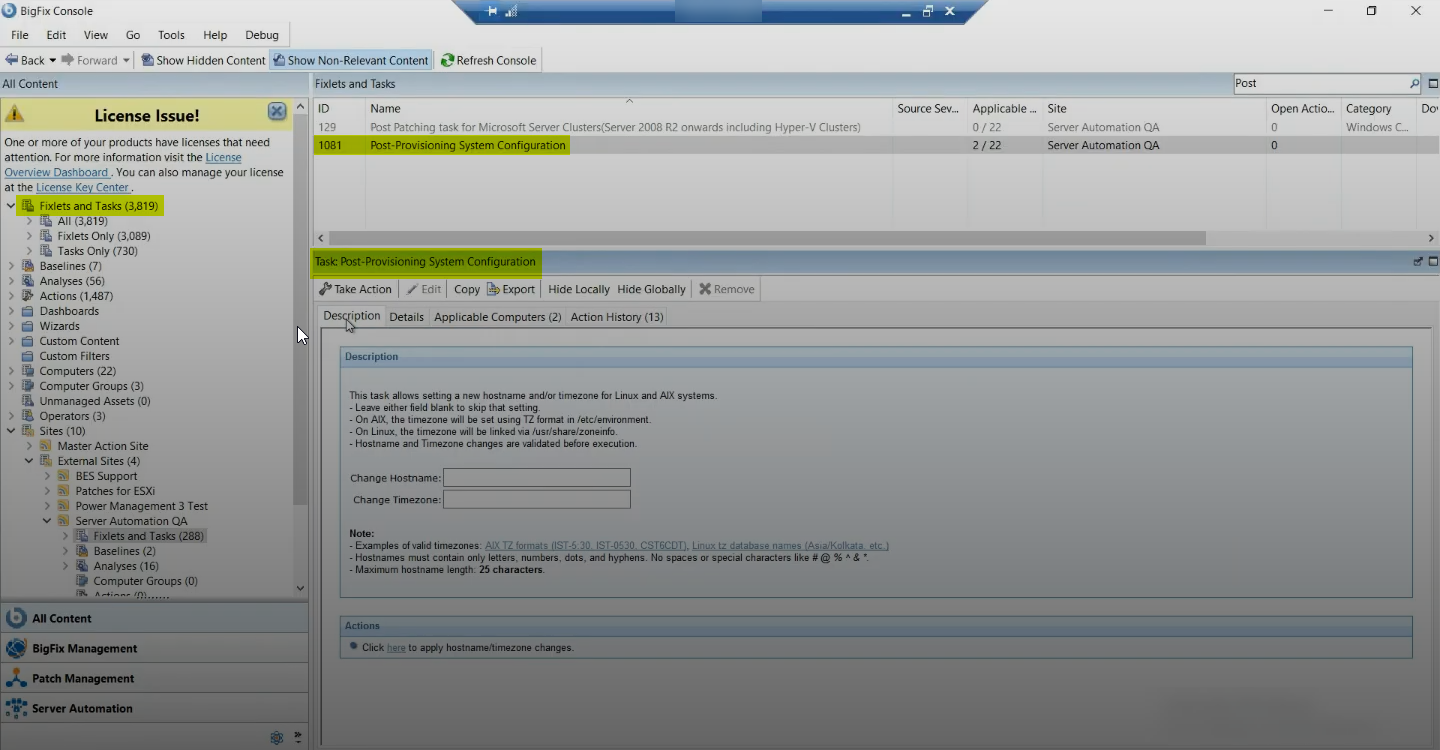
- From the Task: Post-Provisioning System Configuration panel, on the Description tab, enter the hostname and timezone parameters.
- Select the Take Action tab, and select the endpoints you want to apply the changes to.
- Click OK.