
Registering the Middleware download plug-in
Use the Manage Download Plug-in dashboard to register the Middleware plug-in on the BigFix server or BigFix relay.
Before you begin
- For Linux BigFix servers, install the following packages and their dependencies:
- GLIBC 2.2.5
- GLIBC 2.3
- GNU/Linux kernel version 2.6.31 and later
- Subscribe to the Patching Support site to gain access to the Manage Download Plug-ins dashboard.
- From the BES Support site, enable the Enable Encryption for Clients Fixlet on servers and relays for which you want to register the download plug-in.
- Activate the following analyses:
Table 1. Analyses that must be activated ID Analysis Site 977 Encryption Analysis for Clients BES Support 45 Download Plug-in Versions Patching Support
Procedure
- From the Patch Management domain, click .
-
From the Servers and Relays table, select the server on which the download plug-in is to be
registered.
Important: You can register the download plug-in on the BigFix server or BigFix relays.
- From the Plug-ins table, select Middleware Plug-in.
-
Click Register.
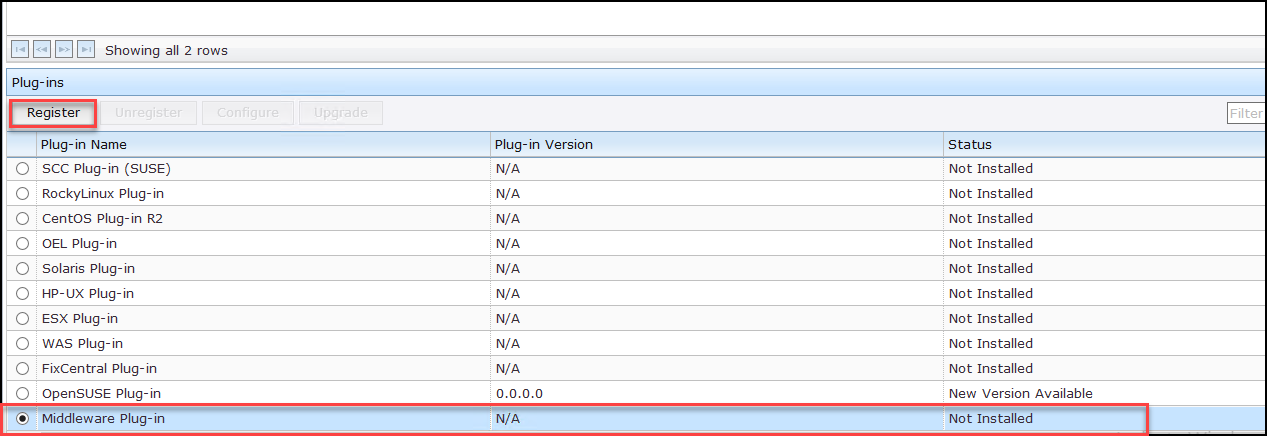
The Register Middleware Plug-in wizard displays. -
Enter the User name and Password.
Note: If required, provide the Proxy URL, Proxy Username, and Proxy Password.
Figure 1. Register Middleware Plug-in 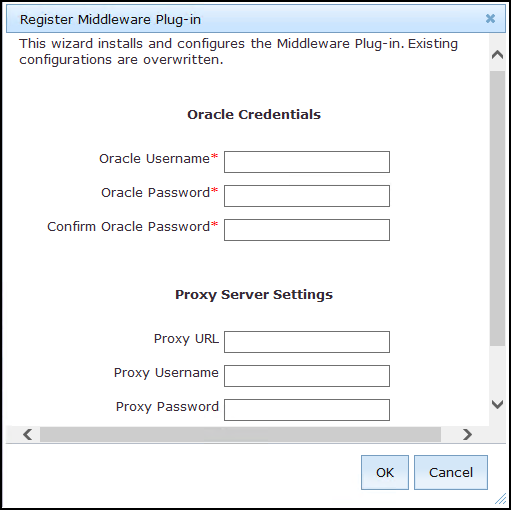
- Proxy URL
- The URL of your proxy server. It must be a well-formed URL that contains a
protocol and a host name. The URL is usually the IP address or DNS name of
your proxy server and its port, which is separated by a colon. For example:
http://192.168.100.10:8080.
- Proxy Username
- Your proxy user name if your proxy server requires authentication. It is
usually in the form of
domain\username.
- Proxy Password
- Your proxy password if your proxy server requires authentication. Note that only basic authentication is supported.
- Confirm Proxy Password
- Your proxy password for confirmation.
-
Click OK.
The Take Action dialog displays.
- Select the target computer.
- Click OK.
Results
plugin.ini
configuration file is created in the following locations:- On Windows systems
- %PROGRAM FILES%\BigFix Enterprise\BES Server\DownloadPlugins\MiddlewareProtocol
- On Linux systems
- /var/opt/BESServer/DownloadPlugins/MiddlewareProtocol