
Importing a node-locked license file
This task topic describes the procedure for importing AppScan® Source license files.
Before you begin
Note: You also can use the
licensemanager.bat
script at the command line to import a node-locked license. Procedure
- From AppScan® Source License Manager, click Import license file.
-
At the Import License File dialog box, click Browse to
locate the license file on your local system. Select the license file and then
click OK.
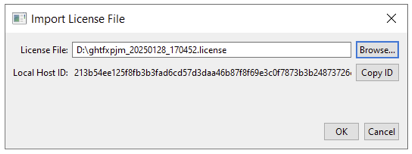
If the license file does not already exist, generate it.
Note: Make sure that the license file is generated for the correct Host ID. - When the License file has been imported successfully message appears, click OK to complete activation.
- Close License Manager to begin using the license when you launch the installed product or products.