
Generating a node-locked license file
To generate a node-locked license file from the user interface:
- Copy the Local Host ID from the Import License File dialog.
- Log into the My HCLSoftware portal with your HCL
credentials. Note: If this is your first login, reset your password.
- Select :
- For the required entitlement, enter 1 in the Allocated column.
- Click Assign License.
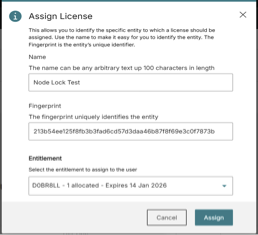
- In the Assign License dialog:
- Type in a unique Name for the assignment.
- Paste the Local Host ID in the Fingerprint field.
- Select the appropriate Entitlement from the drop-down.
- Click Assign.
- Click the download icon in the License column to download the license.
Note: Specifying a larger number (if available) wastes licenses, since
the licenses will be valid on one machine only.