
Migrate Installation for Z and I Emulator for Web
- HCL Z and I Emulator for Web v3.0 search the installed HCL Z and I Emulator for Web and displays on Migrate installation Dialog.
- Z and I Emulator for Web 3.0 search installation manager Z and I Emulator for Web installed path only on below
system location:
- Linux Platform -> /usr/ /opt/ /home/
- OS400(i5/OS) -> /usr/ /opt/ /QHCL/ /home/
- OS390(IBM z/OS) -> /usr/ /opt/
- On Silent installation, if the user wants to use the installation manager's custom
installation location, they need to add an extra argument with the installation path of
the Installation manager. (IM_INSTALLED_PATH= /OPT/IBM/INSTALLATIONMANAGER).Note: On Console mode installation, if user use custom installed location of installation manager, it need to pass extra argument with proper installation path of installation manager. (-DIM_INSTALLED_PATH=/OPT/IBM/INSTALLATIONMANAGER).Note: In case migrate installation fails, the user needs to install v3.0 and then copy the user configured files from installation Manager installed Z and I Emulator for Web v3.0 installation path manually.
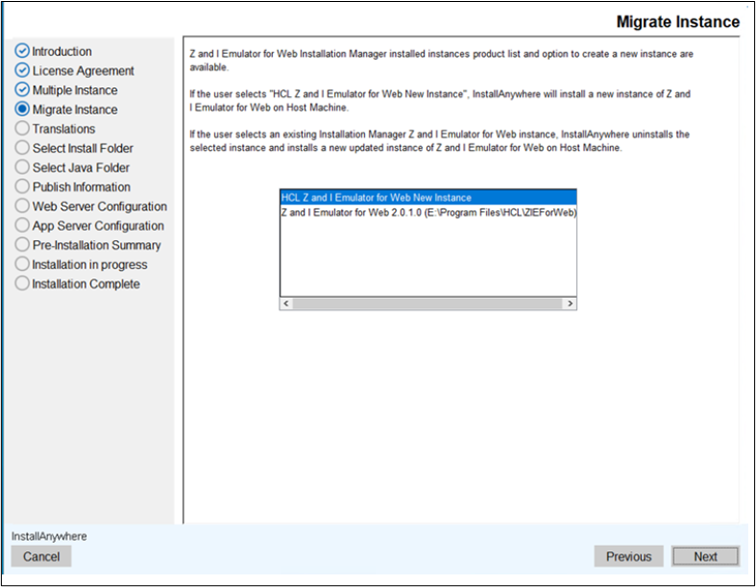
Z and I Emulator for Web Migrate in GUI Mode
The Installation Manager HCL Z and I Emulator for Web is installed on the host. HCL Z and I Emulator for Web 3.0 displays a migrate dialog with HCL Z and I Emulator for Web New Instance and Installation Manager's Z and I Emulator for Web product list. If the user selects " HCL Z and I Emulator for Web and New Instance," it is installed as New Instance. If the user selects Installation Manager Z and I Emulator for Web, it migrates installation.
Z and I Emulator for Web Migration in Console Mode
The Installation Manager HCL Z and I Emulator for Web is installed on the host. HCL Z and I Emulator for Web v3.0 displays a migrate console dialog with HCL Z and I Emulator for Web New Instance and Installation Manager installed Z and I Emulator for Web product list. If the user choose "HCL Z and I Emulator for Web New Instance," it is installed as New Instance. If the user chooses Installation Manager Z and I Emulator for Web, it migrates installation.