Step : Replacing the banner


|

|

|
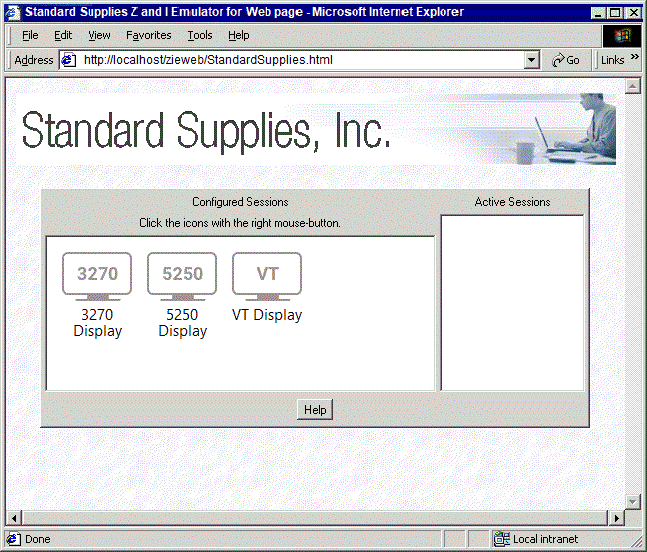
In this step we replace the WebSphere Z and I Emulator for Web banner at the top of the page with the banner of Standard Supplies, Inc.
- In the custom HTML template file, replace the existing element line with the following line: <IMG id="topholder" src="<DW_CODE_BASE>sslogo.gif" ALT="sslogo.gif"> We have replaced two occurrences of "hodlogo.gif" with "sslogo.gif", the file which contains the new banner image. Also we have added an identifier, "id=topholder", which is used in a later step. The <DW_CODE_BASE> string is substituted with the real location of the Z and I Emulator for Web Publish Directory. View the custom HTML template file for this step.
- Save and close the custom HTML template file.
- Copy the new GIF file to the Z and I Emulator for Web publish directory. copy sslogo.gif c:\Program Files\HCL\ZIEForWeb\ZIEWeb
- Regenerate the Deployment Wizard output files.
The resulting Web page is shown below. At the top of the page is the banner for Standard Supplies, Inc.
|
|
|
|