Prerequisites
In order to use Passkey APIs, we need to follow some mandatory prerequisites, these are detailed below. Ensure they are met.
Some features are supported only on specific devices / OS / browser versions.
Passkey
-
A valid passkey compliant server. The relying party (RP) must implement FIDO2 or WebAuthn specifications for passkey creation and assertion.
-
Users must have enrolled biometric credentials or device PINs if using platform authenticators (like Face ID, Touch ID, Windows Hello, etc.).
iOS
- Minimum supported version is iOS15.
- Associated Domains capability should be added to your project and reflected in your app’s entitlements. You can add this in voltmx_iris_configuration.json / quantum_nitro_configuration.json file under resources > common in your project file.
Example
"iOS":{
        "KRelease":{
            "Capabilites":{
                "com.apple.developer.associated-domains":["webcredentials:yourRelying-PartyDomain.com"]
            },
            "BuildSettings":{
            }
        }
    }
- You need to add a valid apple-app-site-association file (AASA) on your website and must have a matching TEAMID.bundleID associated with your app.
For more info, see Supporting Associated Domains doc from Apple.
Android
-
Passkeys are supported only on devices that run Android 9 and above.
-
Creation of passkey and sign-in using the same passkey will be authorized only when the server(Relying Party) is associated with the application to avoid phishing attacks. This can be done using asset-linking for procedure please refer here.
-
assetlinking on a server requires application signing fingerprints, package names. This file should be placed in a server ./well-known location.
SPA
Passkey in SPA is supported in the below devices/browsers. Support is available with compatible hardware (TPM, biometric sensors).
Supported Devices
- Windows 10 or newer
- macOS Ventura (13.0) or newer
- ChromeOS 109 or newer
- iOS 16 or newer
- Android 9 or newer
Supported Browsers
- Microsoft Edge 109 or newer
- Safari 16 or newer
- Chrome 109 or newer
Note: When using cross-device passkey register/sign-in (e.g., scanning a QR code on Android using an iPhone), both devices need to be connected to internet and bluetooth turned ON.
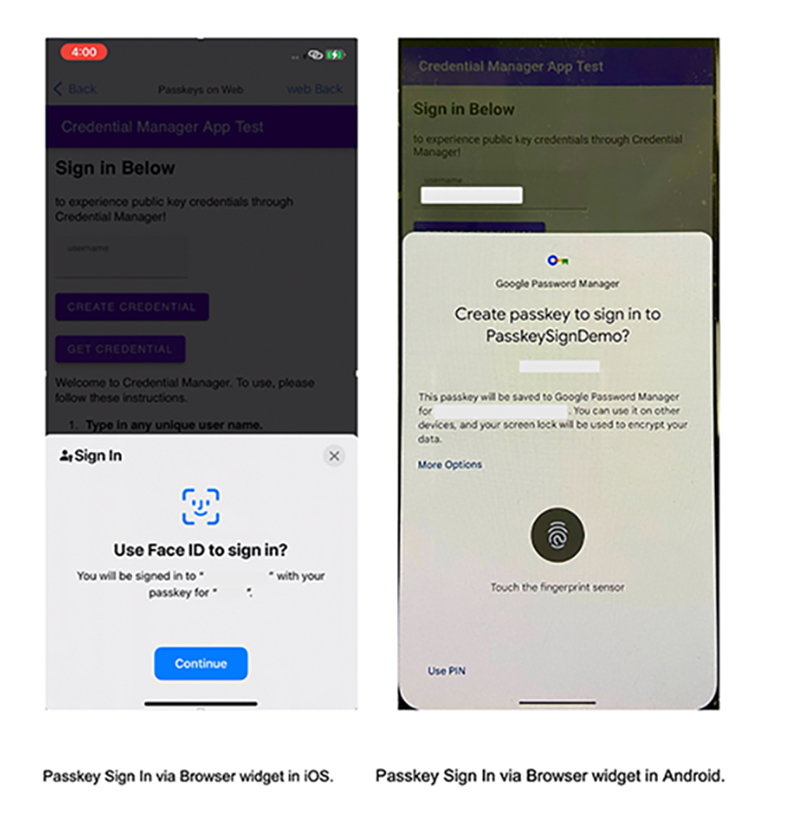
Passkey in Browser widget
iOS: To support passkey in Browser widget, configure your service’s Relying Party Identifier (RP ID) as an associated domain in your app's entitlements.
Android: In Browser widget, passkey generation is handled by native invocation unlike running URL on Android browser. So, asset-linking is mandatory. Also, set user-agent as an android native application and incorporate your logic such that the expected Origin is calculated as per standard.
AutoFill in Passkeys
Passkey autofill allows you to sign in to the app seamlessly without showing the Credential Manager bottom sheet. Only the biometrics/PIN screen is shown to authenticate the user.
To use passkey autofill, see example autofill code snippets under
To enable passkey autofill for an <input> tag in the browser widget, set the autocomplete attribute to "username webauthn".
Example
<input type="text" id="passkey-username-field" placeholder="username" autocomplete="username webauthn"/>
Platform Availability
- Android , SPA
Remarks
- In SPA autofill is not supported in Firefox browsers.