
Audience Condition Templates
This page describes how to configure audience condition templates.
Audience Condition Templates are template condition for filtering the master profile of Detect. This selects a list of users which satisfies an audience condition.
audience conditions are configured in
etc/model/campaigns/audience_condition_categories.json file.
Audience templates are grouped into named categories based on their business logic as shown below:
{
    "categories": [
        {
            "icon": "fa-sliders",
            "name": "Demographic",
            "templates": [
                {
                    ...
                },
                {
                    ...
                }
            ]
        },
        {
            "icon": "fa-user",
            "name": "Transaction Based",
            "templates": [
                {
                    ...
                },
                {
                    ...
                }
            ]
        }
}
categories are shown below:
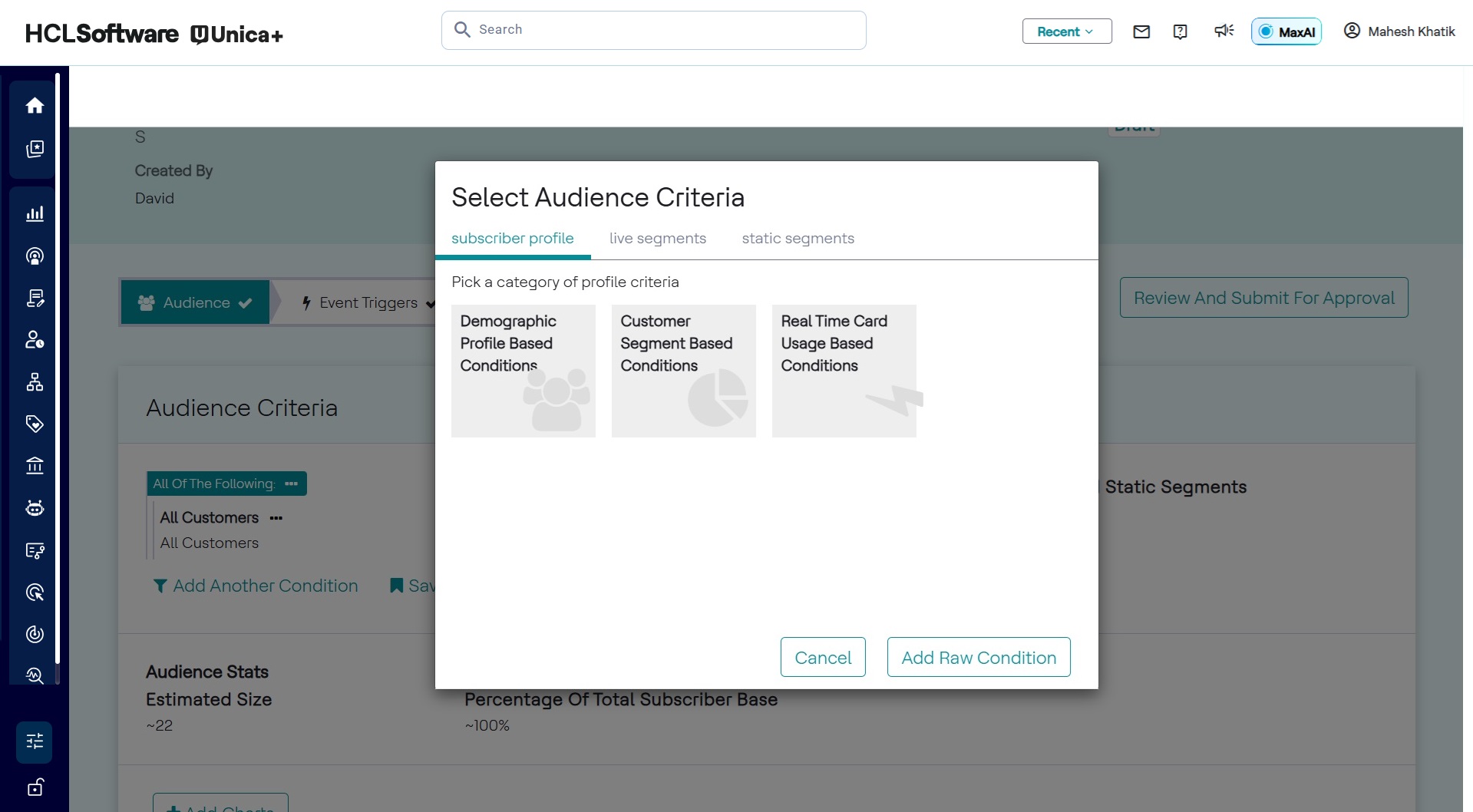
Once we select an audience category, all audience templates under that audience category will shown as below:
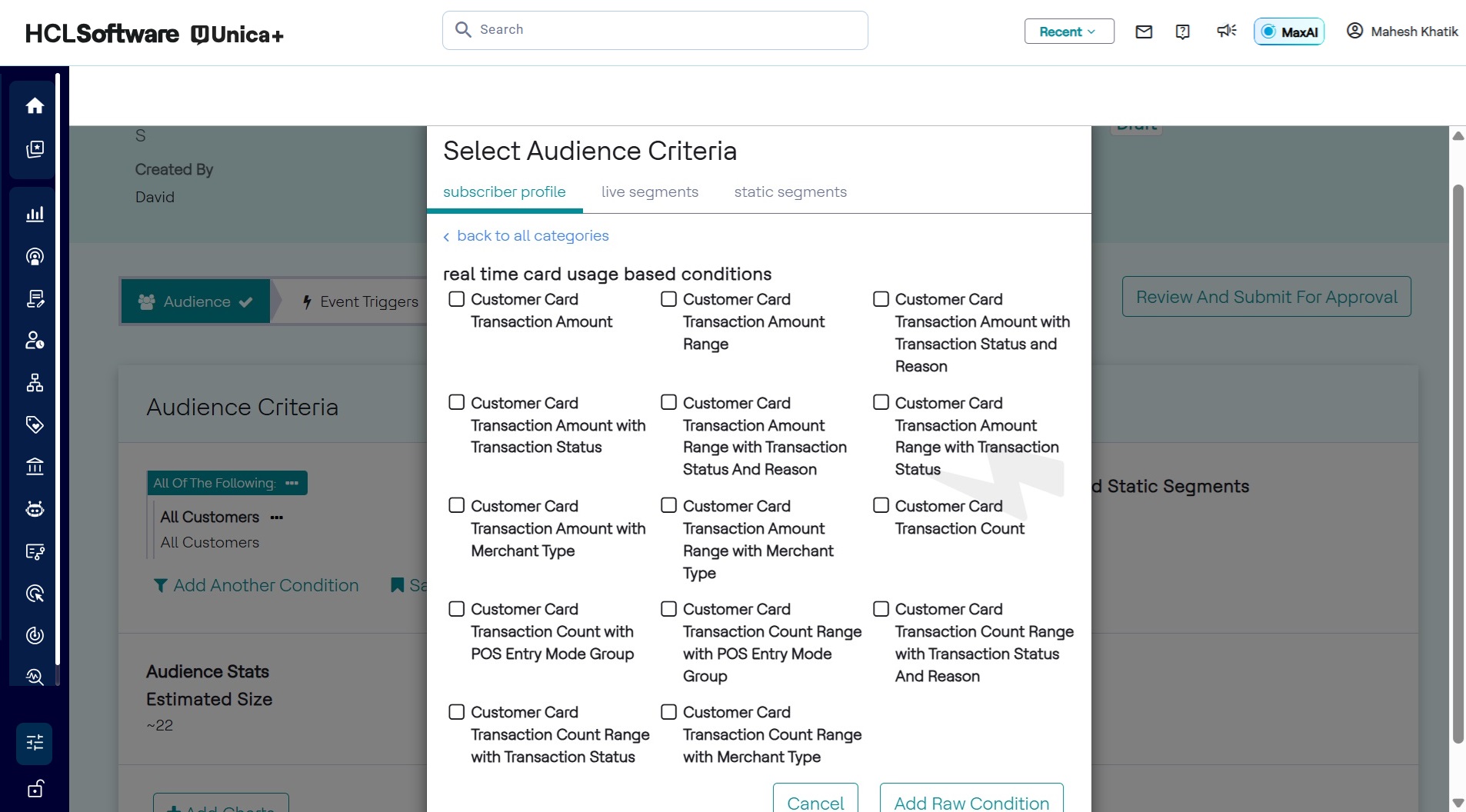
Elements inside the templates are different audience template condition,
we will try learn how to configure audience condition templates by examples.
Simple Audience Templates
Below is an example audience template, which filters users who have not changes device since some configurable date time:
{
    "analyticsBased": false,
    "caption": "Subscribers who have not changed their device since ${deviceChangeDateTime}",
    "conditionTemplateId": "deviceChangeDateTime",
    "domainMapping": {
        "expressionTemplate": "profile.deviceChangeTime < ${deviceChangeDateTime}"
    },
    "name": "Device change time",
    "profile": "Customer",
    "segments": [
        {
            "segmentId": "deviceChangeDateTime",
            "segmentKind": "Complex",
            "segmentType": "DateTime",
            "segmentValue": {
                "dateTimeValue": "2000-11-11T12:00:00"
            }
        }
    ]
},
Lets look how it looks in the UI if we select this audience template in the use case:
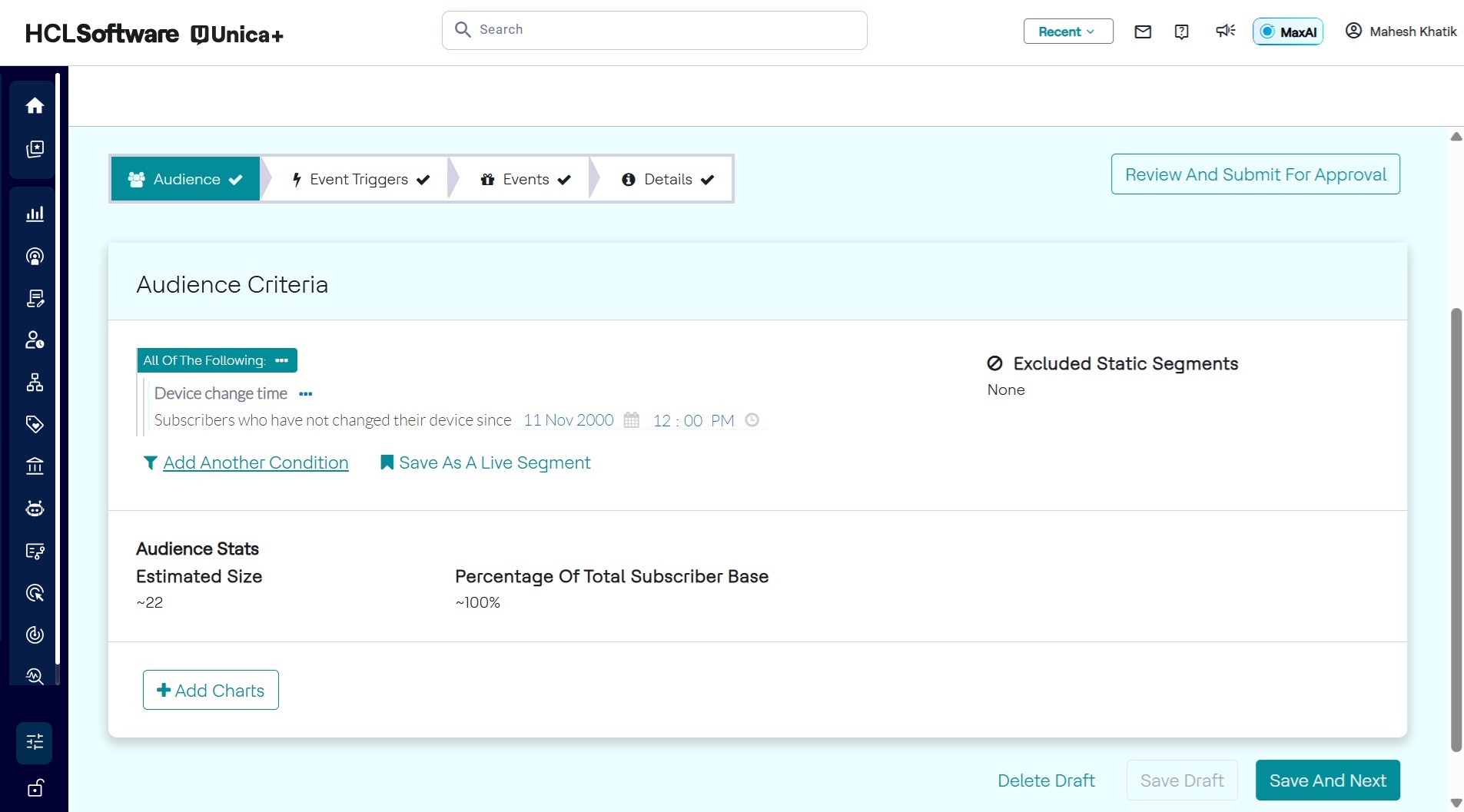
captionis the caption text which will appear in the UI. It can optionally contain one or more segmentIds in order to make caption customizable. In this example deviceChangeDateTime is a segmentId and definition of this segmentId is done in thesegmentssection. Segments are used to get inputs from users while they are configuring an audience condition.conditionTemplateIdis an unique id given to used by Detect.domainMapping.expressionTemplateis the UEL expression that always evaluates to either true or false. A Subscriber will be part of this audience only if this UEL expression evaluates to true based on their profile attributes. In order to access a profile attribute,profile.is suffixed in the name of attribute. In this exampleprofile.deviceChangeTimewill access deviceChangeTime attribute of master profile of any given subscriber.nameis the name of the audience condition under a given audience category.profileshould be master profile name.segmentsthe list of segment definitions used in the caption.segmentIdis id of segment used in the caption.segmentKindis the data type of segment. This can bePrimitivetype like String, Integer, Double or Boolean. orComplextype like Time, POIs, Geofences, Duration, DateTime, AggregationDuration, MonetaryValue. or Enum or TreeEnum.segmentValueis the value which will be shown as default value in the UI which user can update while configuring the audience.
Audience Template with Modifiers
An audience template can have one or more optional additional condition along with
primary domainMapping condition expression. These are called
modifiers.
Let look at below example:
{
    "analyticsBased": false,
    "caption": "Subscribers whose monthly average amount in the last ${recentObservationWindowLength} months has ${increasedDecreasedIndicator} by ${changePercentage}% compared to the average recharge value in the last ${historicalObservationWindowLength} months",
    "conditionTemplateId": "averageRechargeAmount",
    "domainMapping": {
        ...
        ...
        }
    },
    "modifiers": [
        {
            "caption": "${hasRoaming} roaming enabled",
            "domainMapping": {
                "expressionTemplate": "profile.roamingEnabled == ${hasRoaming}"
            },
            "modifierId": "roamingEnabled",
            "name": "Roaming...",
            "segments": [
                {
                    "captions": [
                        "Does not have",
                        "Has"
                    ],
                    "segmentId": "hasRoaming",
                    "segmentKind": "Enum",
                    "segmentType": "Boolean",
                    "segmentValue": {
                        "booleanValue": false
                    }
                }
            ]
        },
        {
            "caption": "Main balance is greater than ${mainBalanceAmount}",
            "domainMapping": {
                "expressionTemplate": "profile.mainBalanceAmount >= ${mainBalanceAmount}"
            },
            ...
            ...
        }
    ],
    "name": "Average recharge amount",
    "profile": "Customer",
    "segments": [
        ..
    ]
}
In above example we have 2 additional modifiers condition along with primary domainMapping condition. If selected a modifier in the UI, modifier's domainMapping is added as an and condition logic to primary domainMapping condition.
Lets look how the list of modifiers looks in the UI :
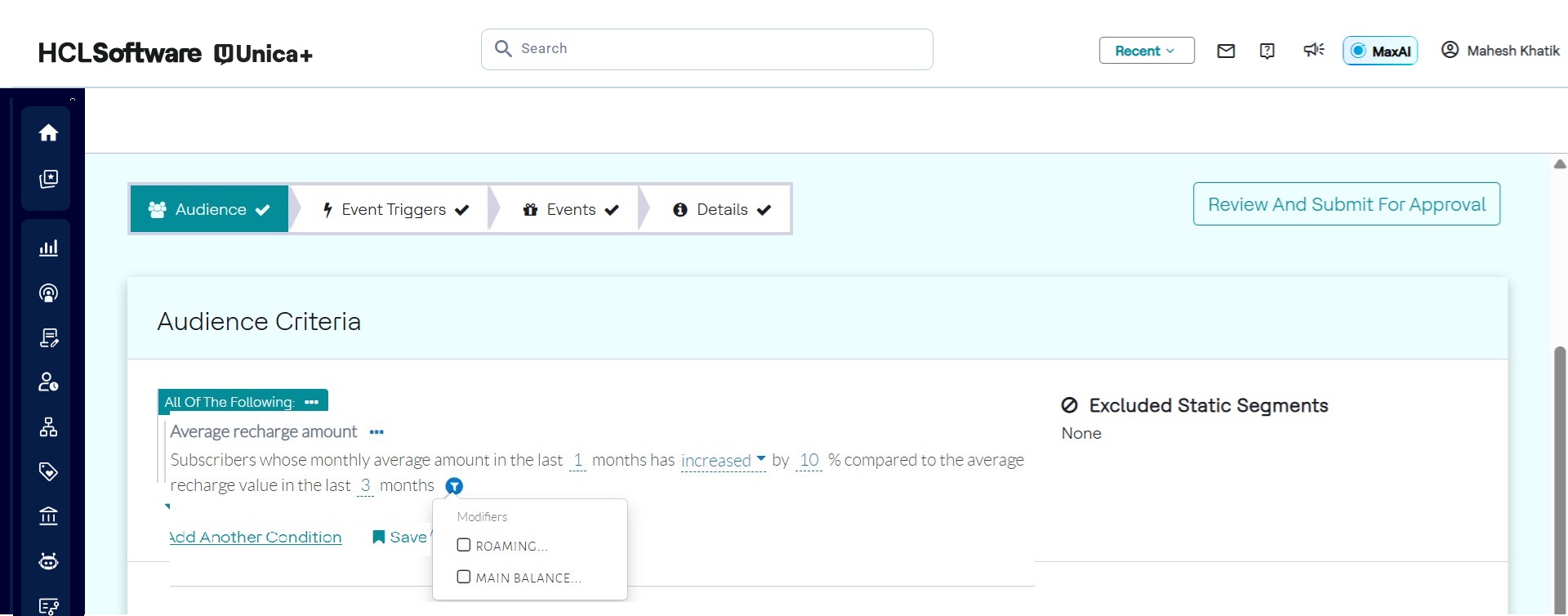
If we select a modifier, the UI reflect it by expanding the caption and allowing users to exit default segment values.
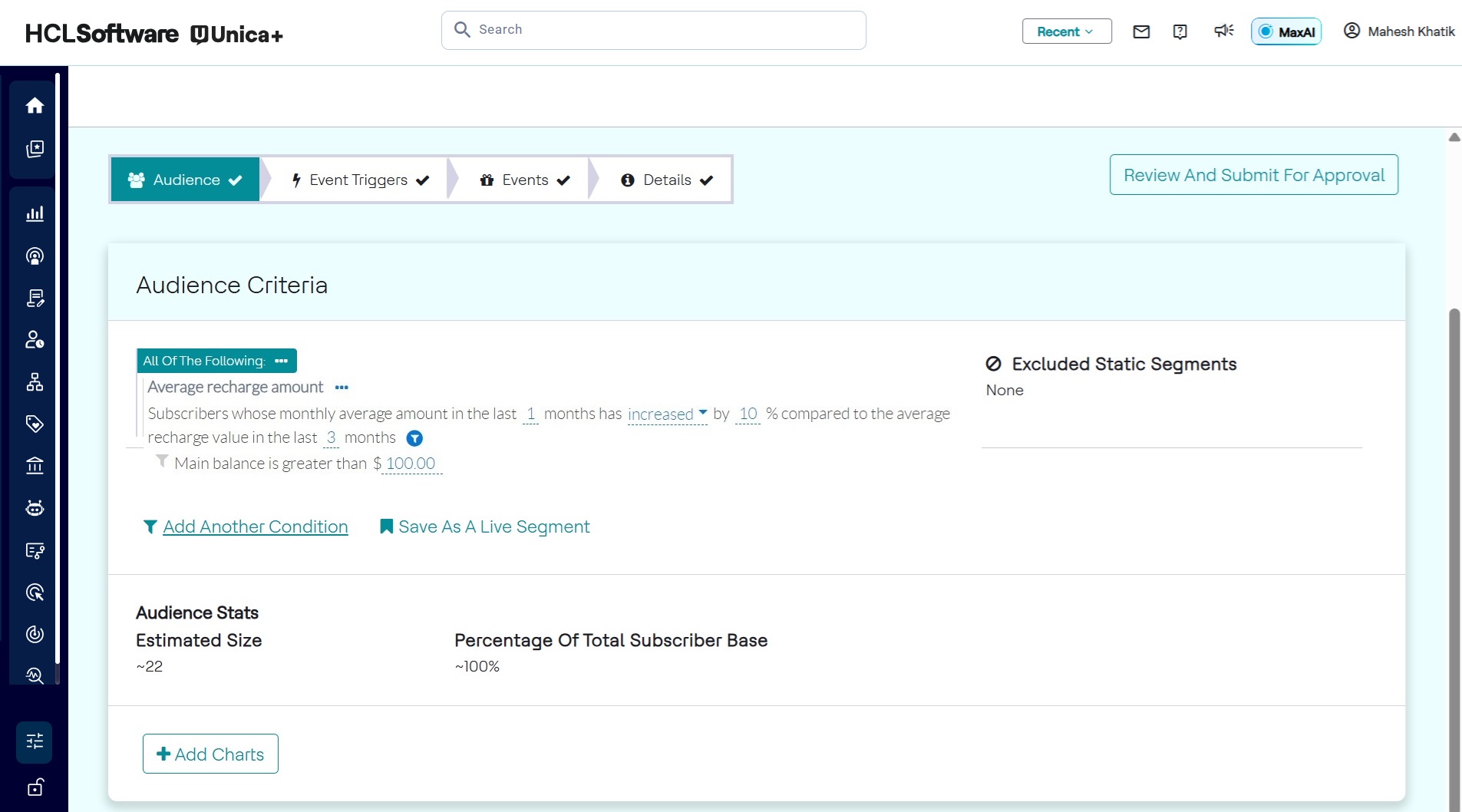
Modifiers selected in the Audience condition.
Modifier follows the same structure as explained in simple audience template, expect
it has unique modifierId instead offer
conditionTemplateId
- hasRoaming is a segment of type Enum. Its Enum type is Boolean and selected segment value is false
Below is an example of a condition using TreeEnum:
{
    "analyticsBased": false,
    "caption": "Subscribers who have installed appllications from categories ${appCategories}",
    "conditionTemplateId": "treeSelectAppCategories",
    "domainMapping": {
        "expressionTemplate": "profile.installedAppCategories in ${appCategories}"
    },
    "name": "App categories",
    "profile": "Customer",
    "segments": [
        {
            "segmentId": "appCategories",
            "segmentKind": "TreeEnum",
            "segmentType": "AppCategories",
            "segmentValue": {
                "stringListValue": {
                    "values": [
                        "BOOKS_AND_REFERENCE",
                        "GAME_ACTION"
                    ]
                }
            }
        }
    ]
}
TreeEnum selection returns are list, that is why the
segmentValue is stringListValue type.
Audience template with Segment Switch
If we want to have different expressions to be used in a domainMapping based
on the value of user selected segmentId, then we could use
segmentSwitch in the domainMapping
example as below:
{
    "analyticsBased": false,
    "caption": "Subscribers who ${belong} to the ${staticSegment} static segment",
    "conditionTemplateId": "staticSegment",
    "domainMapping": {
        "segmentSwitch": {
            "cases": [
                {
                    "expressionTemplate": "${staticSegment} not in profile.segments",
                    "segmentValue": "false"
                },
                {
                    "expressionTemplate": "${staticSegment} in profile.segments",
                    "segmentValue": "true"
                }
            ],
            "segmentId": "belong"
        }
    },
    "name": "Static Segment",
    "profile": "Customer",
    "segments": [
        {
            "captions": [
                "do not belong",
                "belong"
            ],
            "segmentId": "belong",
            "segmentKind": "Enum",
            "segmentType": "Boolean",
            "segmentValue": {
                "booleanValue": true
            }
        },
        {
            "segmentId": "staticSegment",
            "segmentKind": "DynamicEnum",
            "segmentType": "StaticSegment"
        }
    ]
}- In above example we can see that we have a segmentIdbelong whose value will decide which expressionTemplate will be used in the domain mapping.
- We can also override the display value of a Enum by addition captions in the segment definition.
- DynamicEnum is a built-in enum for StaticSegment selection.
Audience template with Aggregate condition
Audience condition can make use of aggregates being maintain by Detect. The condition can combine any combination of profile attribute based condition and aggregate based condition.
details of aggregates based UEL expression can be found in Miscellaneous - UEL section.
An example of aggregate based profile condition is as below:
{
    "analyticsBased": false,
    "caption": "Subscribers who calls back after ${callBackDuration}",
    "conditionTemplateId": "callBack",
    "domainMapping": {
        "expressionTemplate": "aggregate(numOutgoingCallsBySubscriber[profile.MSISDN], Last, ${callBackDuration.amount}, #{callBackDuration.windowLengthUnit}) == 5"
    },
    "name": "Call back duration",
    "profile": "Customer",
    "segments": [
        {
            "segmentId": "callBackDuration",
            "segmentKind": "Complex",
            "segmentOption": {
                "aggregationDurationOption": {
                    "durationStepSizeInMinutes": 10
                }
            },
            "segmentType": "AggregationDuration",
            "segmentValue": {
                "aggregationDurationValue": {
                    "amount": 1,
                    "unit": "Months"
                }
            }
        }
    ]
},
Below is the UI for the same:
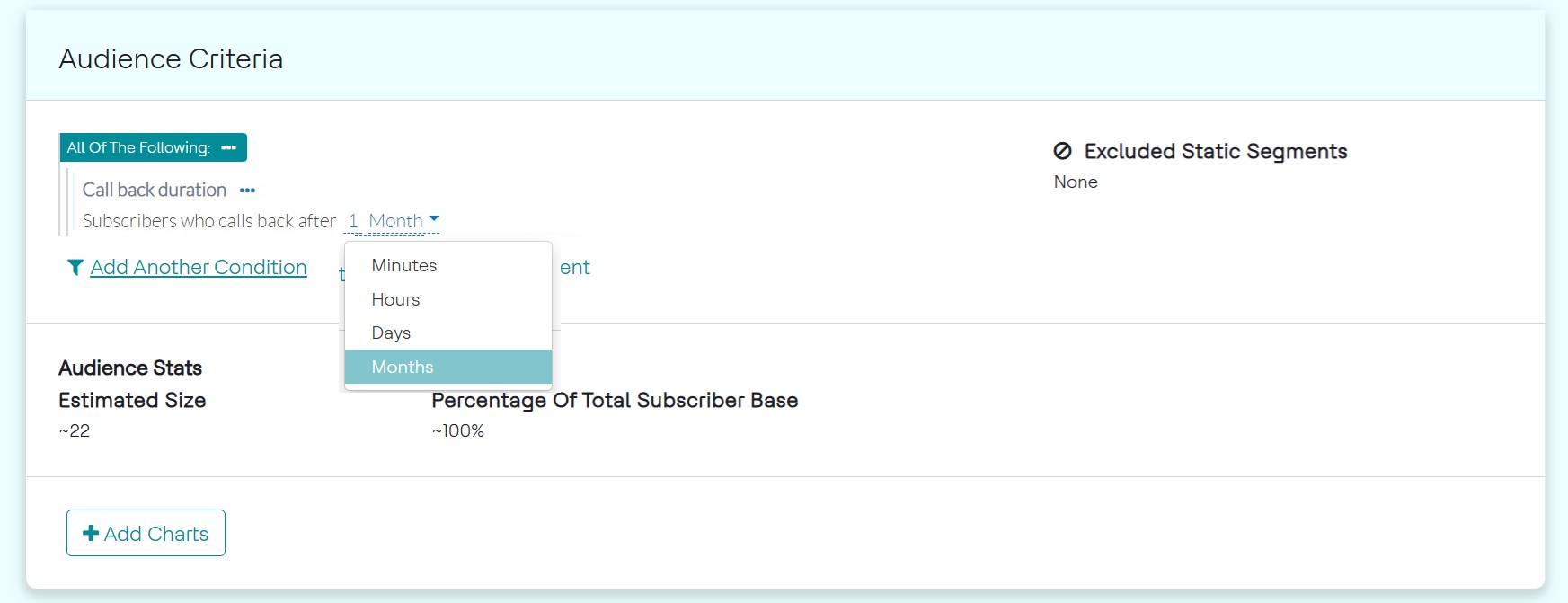
- The segment callBackDuration is of kind Complex, of type AggregationDuration.
- callBackDuration.amount will give Window Unit Length for the aggregate query.
- callBackDuration.windowLengthUnit will give aggregate window unit i.e., Month, Year, Hour, Minute, or Day.
- aggregate(numOutgoingCallsBySubscriber[profile.MSISDN], Last, ${callBackDuration.amount}, #{callBackDuration.windowLengthUnit}), here numOutgoingCallsBySubscriber is name of aggregate, profile.MSISDN is group by attribute, Last is the period.