Domino Files integration in HCL Sametime Mobile
Domino Files integration in HCL Sametime Mobile offers seamless collaboration between chat and file management, enhancing productivity and user experience.
Supported features
OIDC Authentication
Sharing Files
Saving Files
HCL Domino Files app must be installed on the device
Sharing a Domino File in a chat
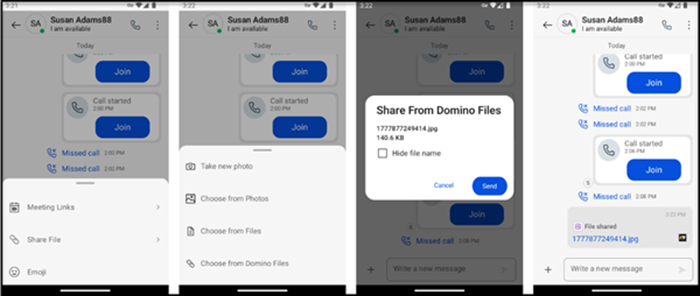
Tap the + icon next to the chat input text field
Select Share File
Select Choose from Domino Files
The phone will flip over to the Domino Files app and allow you to select any file
The phone will flip back over to Sametime and allow you to hide the file name if you choose before you share it
Tapping Share will share the file with the conversation
The file displays as a chat bubble in the conversation. All Domino Files are known as a Domino File and the chat bubble will display the Domino Files icon.
Saving Sametime Files within the Domino Files App
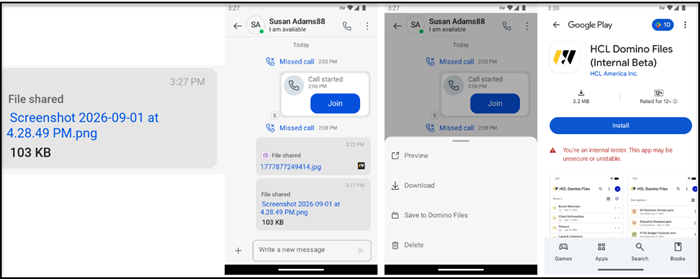
Tap on the chat bubble to reveal the options menu
Save to Domino Files will flip over to the Domino Files app allowing you to select a folder
Working with Domino Files
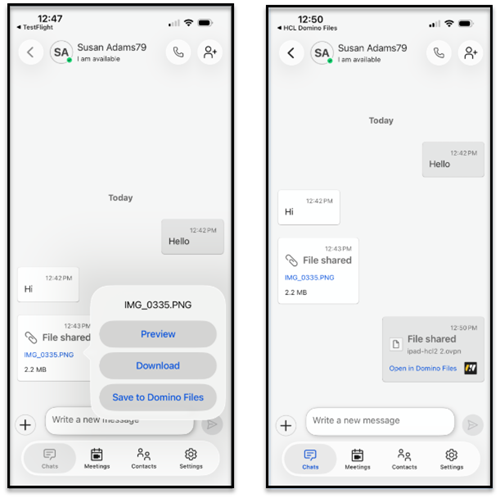
Tap on the chat bubble to flip over to the Domino Files app which will then open the file