
V1
Fetch Details from Kafka
| API | Fetch Details |
| Purpose | To fetch the details from Kafka based on topic configured on UI. |
| API URL | https://<API URL>:<API Port>/api/v1/kafka/orgentityid/{orgentityid}?topic={topic}&count=1 |
| Authentication type | Basic/Token |
| Method Type | GET |
| Column | Column Type | Mandatory | Expected/Sample value | Remarks |
|---|---|---|---|---|
| orgentityid | int | Yes | 1 | Organization Id |
| topic | string | Yes | iAutomate | Topic from which details to be fetched |
Output:
{
 "Result": "Welcome to iAutomate",
 "Status": "Success",
 "Message": "Information from Kafka retrieved successfully."
}
Parameter Returned in API result.
| Column | Column type | Value | Remarks |
Result |
Json/string |
{"key":"value"} |
This field provides the latest message pushed in Kafka for the given topic |
| Status | string | Success/Fail | This field provide status |
| Message | string | Information from Kafka retrieved
successfully. |
Success /fail message |
Get Details from Kafka
| API | Get Details from Kafka |
| Purpose | To get data fromKafka. |
| API URL |
https://<API URL>:<API Port>/api/v1/kafka/orgentityid/<ORG_ID>?topic=<Topic from which record will be fetched> |
| Authentication type | Basic /Token |
| Method Input | GET |
Output:
{
 "Count": 1,
 "Result": "<Response from Kafka>",
 "Status": "Success",
 "Message": "Information from Kafka retrieved successfully."
}
Parameters Returned in Response of API
| Column | Column type | Value | Remarks |
|---|---|---|---|
| Count | integer | 1 | Total count of records from Kafka |
| Result | string | <Response from Kafka> | The actual data fetched from Kafka |
| Status | string | Success/Fail | This field provides status of the API call |
| Message | string | Message | Details about the API call result |
Push Attachment in Kafka
| API | Push attachment |
| Purpose | To Push attachment in Kafka |
| API URL | https://<API_URL>:<API_Port>/api/v1/kafka/orgentityid/{orgentityid}/uploadattachment?topic={topic} |
| Authentication type | Basic/Token |
| Method Type | Post |
|
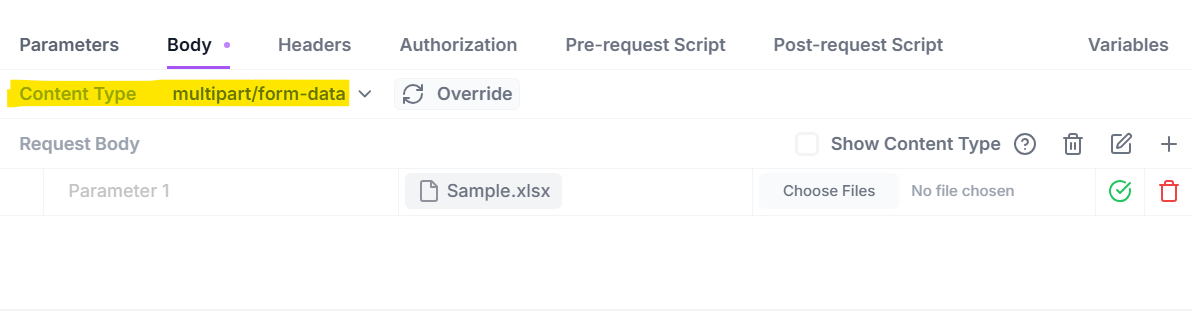
Request Format: Pass a file in the request body
|
|
| Column | Column Type | Mandatory | Expected/Sample value | Remarks |
| orgentityid | int | Yes | 1 | Organization Id |
| Topic | string | Yes | iAutomate | Topic in which attachment will be pushed |
Output:
{
 "Result": "SUCCESS",
 "Status": "Success",
 "Message": "File uploaded successfully."
}
Parameter Returned in API result
| Column | Column type | Value | Remarks |
Result |
string | SUCCESS | This field provide result of the operation |
| Status | string | Success/Fail | This field provides the status |
| Message | string | File uploaded successfully. | Success /fail message |
Download Attachment from Kafka
| API | Download Attachment |
| Purpose | To download the file uploaded. |
| API URL | https://<API_URL>:<API_Port>/api/v1/kafka/orgentityid/{orgentityid}/downloadattachment?topic={topic} &outputPath={path} |
| Authentication type | Basic/Token |
| Method Type | Get |
| Column | Column Type | Mandatory | Expected/Sample value | Remarks |
|---|---|---|---|---|
| orgentityid | int | Yes | 1 | Organization Id |
| Topic | string | Yes | iAutomate | Topic from which attachment will be fetched |
| path | String | Yes | C:\D Drive\path | The location where file will get downloaded in .zip format |
Output:
{
 "Result": "SUCCESS",
 "Status": "Success",
 "Message": "Download operation is successful."
}| Column | Column type | Value | Remarks |
Result |
string | SUCCESS | This field provide result of the operation |
| Status | string | Success/Fail | This field provide status |
| Message | string | Download operation is
successful. |
Success /fail message |