
Agent to Agent (A2A) - Server
Overview
The A2A (Agent-to-Agent) Server Configuration feature enables administrators to publish an agent from an AEX tenant and make it accessible to external A2A-compliant platforms. Administrators can create an A2A Agent channel, configure the discovery URL's access settings, and activate the channel for external integration.
In this setup, the external platform acts as the A2A client, while the published AEX agent acts as the A2A server. The discovery URL enables the external platform to discover the agent, with authentication requirements determined by the configured access settings.
Objective
Configure and publish an AEX agent through channel configuration. So that External A2A-compliant platforms can discover and access the published agent using the discovery URL and the required authentication credentials, when authentication is enabled.
Prerequisites
- You have access to the Channel Configuration page.
- For private discovery URLs, the required authentication credentials are available from the Bot Connect API configuration.
Configuring the A2A Server
Follow these steps to configure and publish an agent.
- Access to Channel Configuration by using following URL: <tenant-url/admin#/channel_configuration_console>
- Click Add New Channel to create a channel.
Step 2: Configure the channel
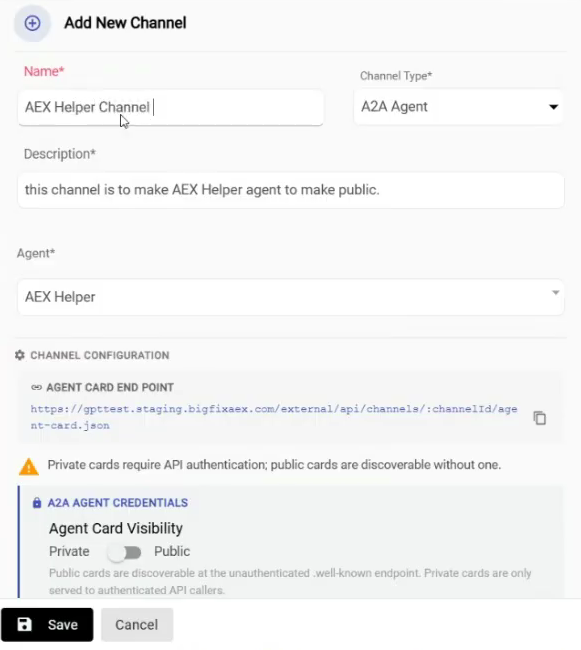
| Field | Description |
| Channel Name | Enter a name to identify the channel. |
| Channel Type | Select the A2A Agent channel type. |
| Description | Enter a description of the channel. |
| Agent | Select the agent that you want to publish from the available tenant agents. |
For example, you can select the AEX helper agent from the tenant's agent list.
Review the configuration and save the channel using the available save or confirmation option.
Step 3: Configure the discovery URL
After configuring the channel, manage the discovery URL's access settings to control how external platforms access the agent.
The discovery URL can be configured as either public or private.
| Discovery URL setting | Description | Authentication requirement |
| Public | Makes the agent discoverable through the public discovery URL. | Authentication or keys are not required, according to the demonstrated configuration. |
| Private | Restricts access to authenticated requests. | Authentication is required. The external platform must use the required credentials. |
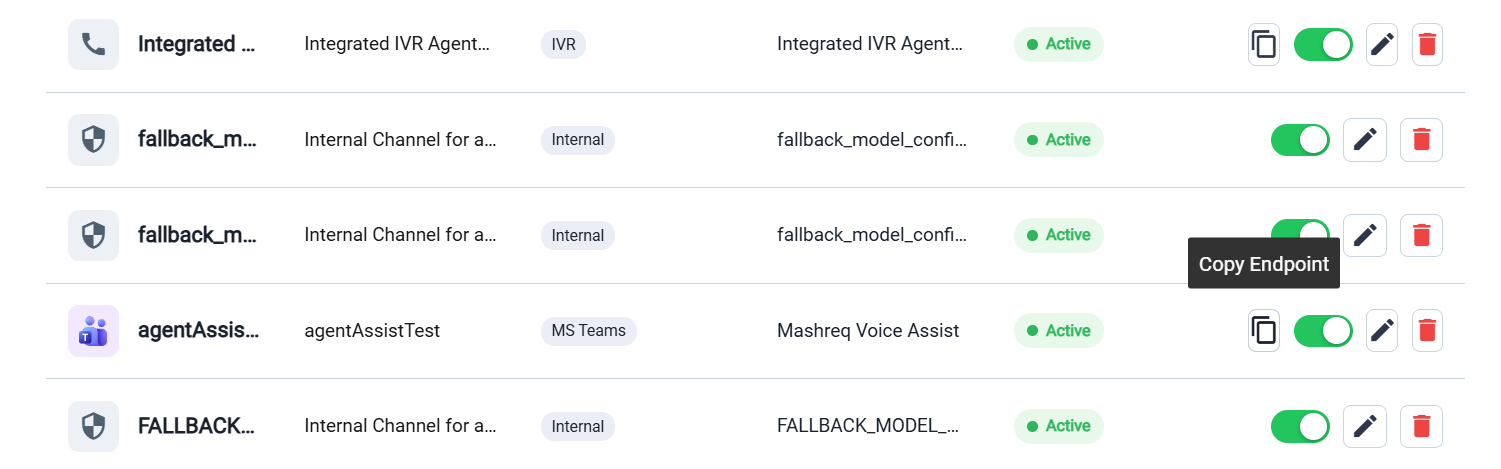
- Enable the channel by switching its status to active.
- Verify that the channel is enabled.
- Copy the generated discovery URL.
- The discovery URL can be shared with an external A2A-compliant platform to
enable it to discover and access the published agent.
 Important:For a private discovery URL, provide the required authentication credentials to the external platform through the appropriate secure configuration process.
Integrating with an External Platform
An external A2A-compliant platform can connect to the published AEX agent using the discovery URL and, when required, the authentication credentials.
| Component | Description |
|---|---|
| A2A client | The external platform that connects to the published agent. |
| A2A server | The AEX agent published it through Channel Configuration. |
| Discovery URL | The endpoint is used by the external platform to discover the agent. |
| Authentication credentials | The credentials required to authenticate requests when the discovery URL is private. |
- Key-value pairs: The configured key-value authentication details.
- Key ID: The identifier associated with the authentication key.
- Secret: The corresponding secret used for authentication.
Configure the discovery URL and credentials in the external platform according to its integration requirements.
Detailed Bot Connect API configuration instructions are outside the scope of this guide. Refer to the relevant Bot Connect API documentation for the complete credential-generation and configuration procedure.
Verifying the Configuration
- The channel has been created with the A2A Agent channel type.
- The intended agent is selected.
- The discovery URL is configured as public or private according to the requirement.
- The channel status is active.
- The discovery URL is available to copy.
- For private access, the required authentication credentials are configured on the external platform.
- If the external platform cannot access the agent, verify the discovery URL, channel status, access setting, and authentication configuration.
- The discovery URL's access setting determines whether authentication is required.
- A public discovery URL does not require authentication or keys in the demonstrated configuration.
- A private discovery URL requires authentication.
- The external platform acts as the client, and the published AEX agent acts as the server.
- Share authentication credentials securely when private access is configured.
- The external platform must support A2A integration to access the published agent.