
Tutorial exercise 4: Creating opaque data types
This exercise demonstrates how to create opaque data types, their support routines, and user-defined routines that operate on them. This exercise has 11 steps. It takes approximately one hour to complete.
About this task
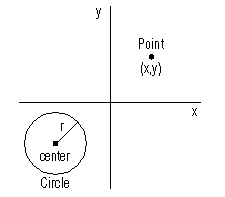
The example Circle module in this exercise is similar to the RowCircle module in the Creating Row Data Types exercise. The difference is that the Circle module creates opaque data types, whereas the RowCircle module creates row data types.
- Store circles or points in a single column of a database table.
- Calculate the distance between two points.
- Calculate whether a circle contains a point.
The Circle module that you create in this exercise is similar to the example Circle module included with the Developers Kit. You can look at the example module to see how to change the input format of an opaque circle type and how to add functionality. The example Circle module is located in the %INFORMIXDIR%\dbdk\examples\types\dapi\Circle directory, where %INFORMIXDIR% is the environment variable that represents the root directory of your DBDK installation.