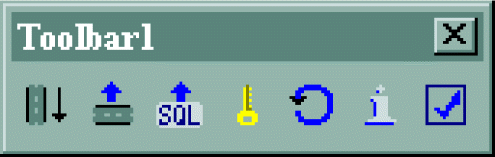
The DBDK Visual C++ Add-In is a toolbar that appears in Microsoft™ Visual C++ after
you install DBDK.
The add-in aids you in debugging modules
in the following ways:
If you are using a local database server for debugging, the add-in
automates tasks from compiling through reaching the first breakpoint
in your source code. In this case, you must have your database server
on the same computer as the you
used to develop your module.
If you are using a remote database server, the add-in automates
the following tasks:
Installing the module
project file
Installing the module
SQL scripts
Registering the module
The add-in toolbar contains seven buttons. To see the name of each
command, position the mouse pointer over the button. The following
figure shows the add-in toolbar. Figure 1. DBDK Visual C++ Add-In
The primary add-in command is the Debug Module command;
it completes all the tasks necessary to bring your module
to the first debugging breakpoint. When you use the Debug Module command
to start debugging, the IfxQuery tool is launched from within Visual
C++ when an SQL unit test file is the active window.