Invoke the ESQL/C filter
The esql command can automatically call the Informix® ESQL/C filter, esqlmf, to process non-ASCII characters.
- The ESQLMF environment variable indicates
whether esql automatically calls the Informix®
ESQL/C filter.
When you set ESQLMF to
1, esql automatically calls esqlmf after the Informix® ESQL/C preprocessor and before the C compiler. - The CC8BITLEVEL environment variable indicates
the non-ASCII characters in the Informix®
ESQL/C source file that esqlmf filters.
Set CC8BITLEVEL to indicate the ability of your C compiler to process non-ASCII characters.
| CC8BITLEVEL | The esqlmf action |
|---|---|
| 0 | Converts all non-ASCII characters, in literal strings and comments, to octal constants. |
| 1 | Converts non-ASCII characters in literal strings, but not in comments, to octal constants. |
| 2 | Converts non-ASCII characters in literal strings to octal constants to ensure that all the bytes in the non-ASCII characters have the eighth bit set. |
| 3 | Does not invoke esqlmf. |
1.0, 1,
or 2, the Informix®
ESQL/C processor performs
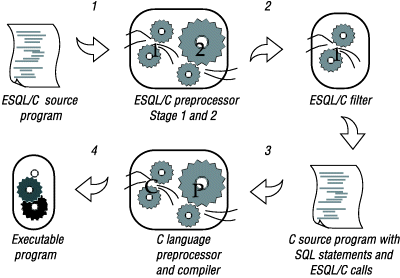
the following steps:- Converts the embedded-language statements (source.ec) to C-language source code (source.c) with the Informix® ESQL/C preprocessor
- Filters non-ASCII characters in the preprocessed
file (source.c) with the Informix®
ESQL/C filter, esqlmf (if the ESQLMF environment variable is
1)Before esqlmf begins filtering, it creates a copy of the C source file (source.c) that has the .c_ file extension (source.c_).
- Compiles the filtered C source file (source.c) with the C compiler to create an object file (source.o)
- Links the object file with the Informix® ESQL/C libraries and your own libraries to create an executable program
When you set CC8BITLEVEL to 3,
the Informix®
ESQL/C processor
omits step 2 in the preceding
list.
If you do not set CC8BITLEVEL, then esql converts non-ASCII characters in literal strings and comments. You can modify the value of CC8BITLEVEL to reflect the capabilities of your C compiler.