
Discover Integration
This topic describes how to integrate HCL Discover with HCL CDP using the Data Ingestion API (DIAPI).
This integration enables HCL Discover to send events to HCL CDP for customer behavior analysis and personalized experiences. Discover uses the DIAPI to transmit events, which are then processed and stored in HCL CDP. Users can configure which events should flow to CDP, map HCL Discover event attributes to CDP schema, and set the CDP primary identifier from the HCL Discover for consistent identity resolution.
Configure DIAPI in HCL CDP
Create a new source using Rest API and configure DIAPI in HCL Discover. The HCL Discover sends the Identify and Track event types to CDP through DIAPI.
To configure DIAPI, follow the steps below:
- From the Menu bar, click Data Pipeline > Sources. Click + Create New Source.
- Select REST API, and click Proceed.
- Enter a source name, and click Create Source. On successful creation, the x-api-key and x-api-passkey will be displayed. You can use these keys to authenticate the event payload from the HCL Discover. For more information about creating Rest API as data source, refer REST API.Note: Currently, only one DIAPI data source can be added for the HCL Discover integration.
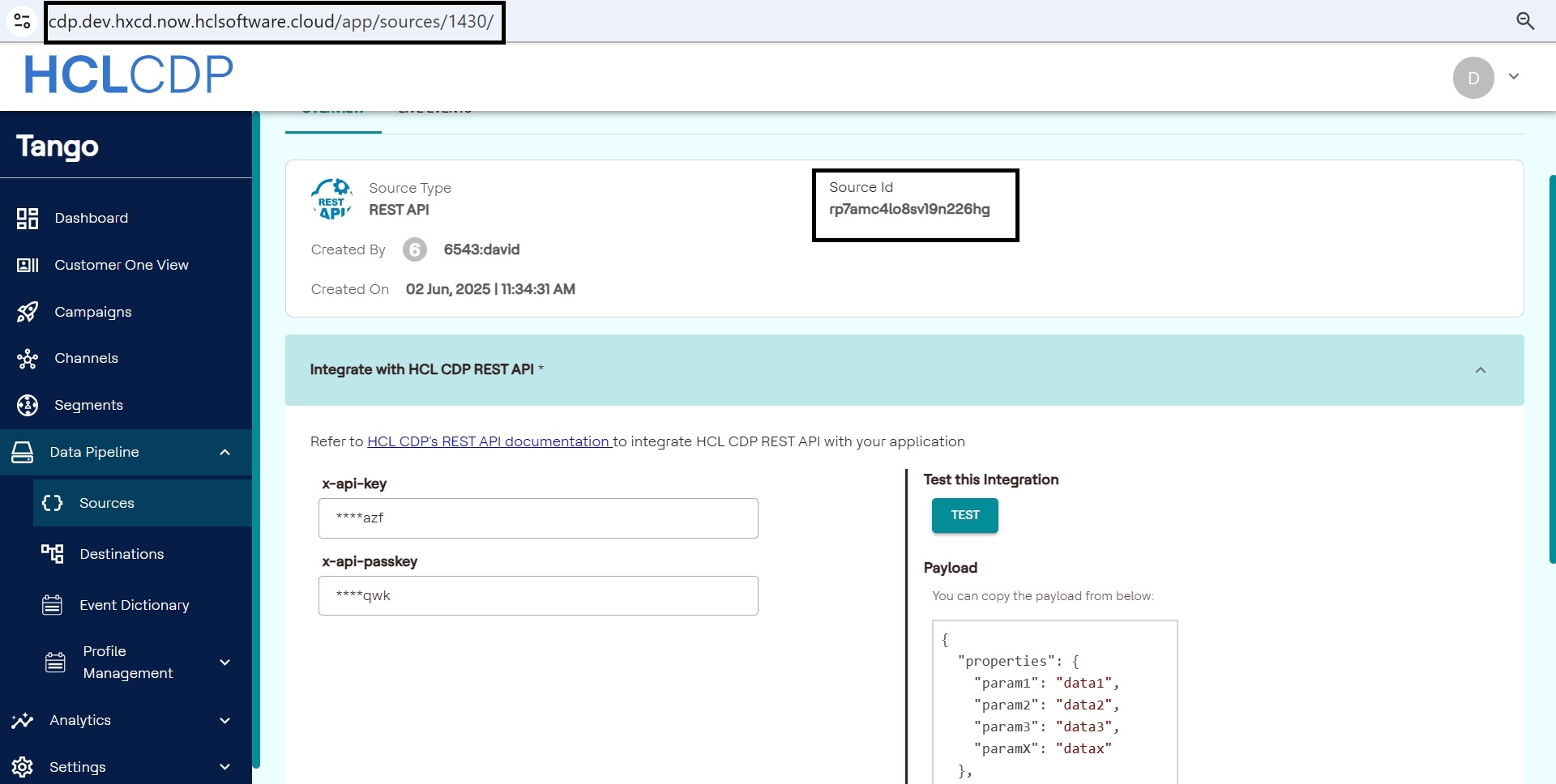
- Copy the Source ID from the Rest API source, this will be used as the WriteKey in the event payload.
- Similarly, copy the ID displayed at the end of the url as shown in the image
below. This ID will be used as srcid in the Event payload as well. The
srcid and WriteKey are marked in the image below.
Configure Discover Event Payload
Currently, HCL CDP supports Track Type events from HCL Discover.
- identity (Primary Identifier of Tenant)
- type
- ts (timestamp)
- event name
These are required for HCL CDP to determine the source and type of event received. For more information about HCL Discover's events, refer HCL Discover Event Manager Manual.
Additional Notes:
- Discover uses the following DIAPI endpoint for sending data:
/v3/data.Note: Currently, HCL CDP accepts only String, number, JSON, and Array data types. - The request headers must include the x-api-key and x-api-passkey obtained from the REST API source.
- These four parameter such as identity, type, ts, and event name must be included in the event payload. This allows CDP to determine the source and type of event received.
- The event payload must include srcid and WriteKey.
Sample Curl Request for DIAPI Payload
Source - DIAPI

curl --location '<domain>/v3/data' \
--header 'Content-Type: application/json' \
--header 'x-api-key: <x-api-key>' \
--header 'x-api-passkey: <x-api-passkey>' \
--data '{
  "properties": {
    "Origin": "Discover",
    "identity": "CT_0000004640",
    "category": "Travel",
    "label": "Tours and Packages",
    "action": "Sumbited",
    "CT App Version": "10.4",
    "CT Source": "Web"
  },
  "eventname": "Tours and Packages Submitted",
  "type": "track",
  "ts": 1747215980
}<x-api-key> and
<x-api-passkey> with the values obtained from the REST API
source.Sample Payload for Events
{
    "srcid": "2931",
    "WriteKey": "7i3rtmzivxstrbnk7vhi",
    "id": "a17bcead-b563-42c5-9fb7-558103a566ca",
    "ts": 1748539959,
    "type": "track",
    "eventname": "OrderTotal2",
    "properties": {
        "vizid": "B8891326D9873FEADFB287FE49850821",
        "identity": "ENC_CUST_145",
        "ordervalue2": "ENC_CUST_145"
    }
}