
Administration features
Domino 14.5.1 provides the following new features and enhancements related to administering.
VSS snapshot support for Domino with Local Service account
This new feature enables support for VSS (Volume Shadow Copy Service) snapshot mount and unmount operations in HCL Domino when running under the Local Service account. By leveraging a dedicated Windows service with administrative privileges, this feature ensures that snapshot operations are handled reliably and without issues.
For more information, see Running backupvss as a non-admin and handling privileged snapshot operations.
Tika attachment indexing statistics
Statistics are now available that provide administrators with a list of statistics for the attachments that were full-text indexed for a given database. Administrators can control whether or not the statistics are generated by using a notes.ini setting. If enabled, the statistics are displayed on the server console once the indexing of the database completes.
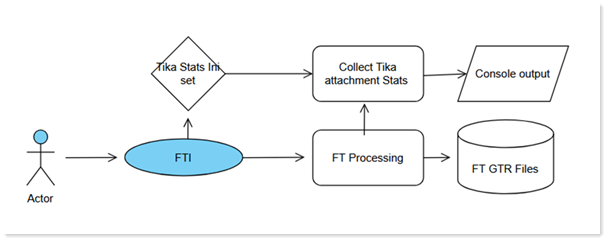
The available statistics are as follows:
- Total count of attachments processed
- Total count processed per attachment type
- Average download speed from Tika
- Average attachment transfer speed to Tika
- Larger attachment transfer time to Tika
- Total failed attachment processing by Tika
- Peak download speed from Tika
- Largest attachment file size
- Largest attachment noteid processed
- DEBUG_FT_TIKA_ENABLE_EXTENDED_STATS=1
For more information on attachment indexing, see Controlling attachment indexing on servers.
DBMT tool updates
the DBMT tool is enhanced with command line updates and improved indirect file processing.
Changes to command line options
- The -blacklist command has been changed to -exclude. we still honor the -bl abbreviated syntax for backward compatiblity.
- The -regex command line option is deprecated. DBMT now automatically detects wildcard expressions and regular expressions. The -regex switch is not required.
- New command line option: -legacy
If you have existing program documents or indirect files, you can specify the -legacy option to use the old behavior.
Improved indirect file processing (.ind files)
Indirect files can now contain wildcard and regular expression entries.
- userstore.nsf
- mail3\a{bc}{o}*.nsf
- mail4\p*.nsf
load dbmt test.ind -vd
- mail3\acollins.nsf
- mail3\acowell.nsf
- mail4\pbentz.nsf
- mail4\pbhenki.nsf
- userstore.nsf
- ValidateDBs found 5 matching files