Entitlement checking in the My HCLSoftware delivery portal
The My HCLSoftware portal (MHS) is available for the distribution of HCLSoftware products. In MHS, you can find and download the latest HCLSoftware product releases and supported older releases. This topic provides information on how you can check your entitlements in the My HCLSoftware delivery portal.
Prerequisites
Make sure you have the following elements before configuring the HCL Digital Experience (DX) Cloud Native V9.5 entitlements to be deployed on supported Kubernetes platforms using My HCLSoftware delivery portal for entitlement checking:
- A My HCLSoftware account and access to the My HCLSoftware portal.
- A valid HCL DX Cloud Native 9.5 (Tier 1 – 7) offering part purchased and issued by the HCL Software licensing team.
- Your DX Cloud Native 9.5 (Tier 1 – 7) entitlements are mapped to your My HCLSoftware portal instances.
- A plan to deploy or update to HCL DX 9.5 Container Update CF226 or to a later release, if currently using a prior version.
- An instance deployment. To create an instance deployment, refer to the steps in Creating a deployment in My HCLSoftware portal.
In addition to these elements, review the architecture that presents the License Manager component of the HCL DX v9.5 Container Update software.
Architecture
The License Manager component communicates with the My HCLSoftware entitlement service. This is to validate license entitlement at set periods for HCL DX Cloud Native V9.5 Tier 1 – 7 software after configuring the DX Cloud Native 9.5 deployment through the Helm chart. The License Manager component also transmits user session consumption from your production DX Cloud Native 9.5 deployments to the My HCLSoftware usage reporting services.
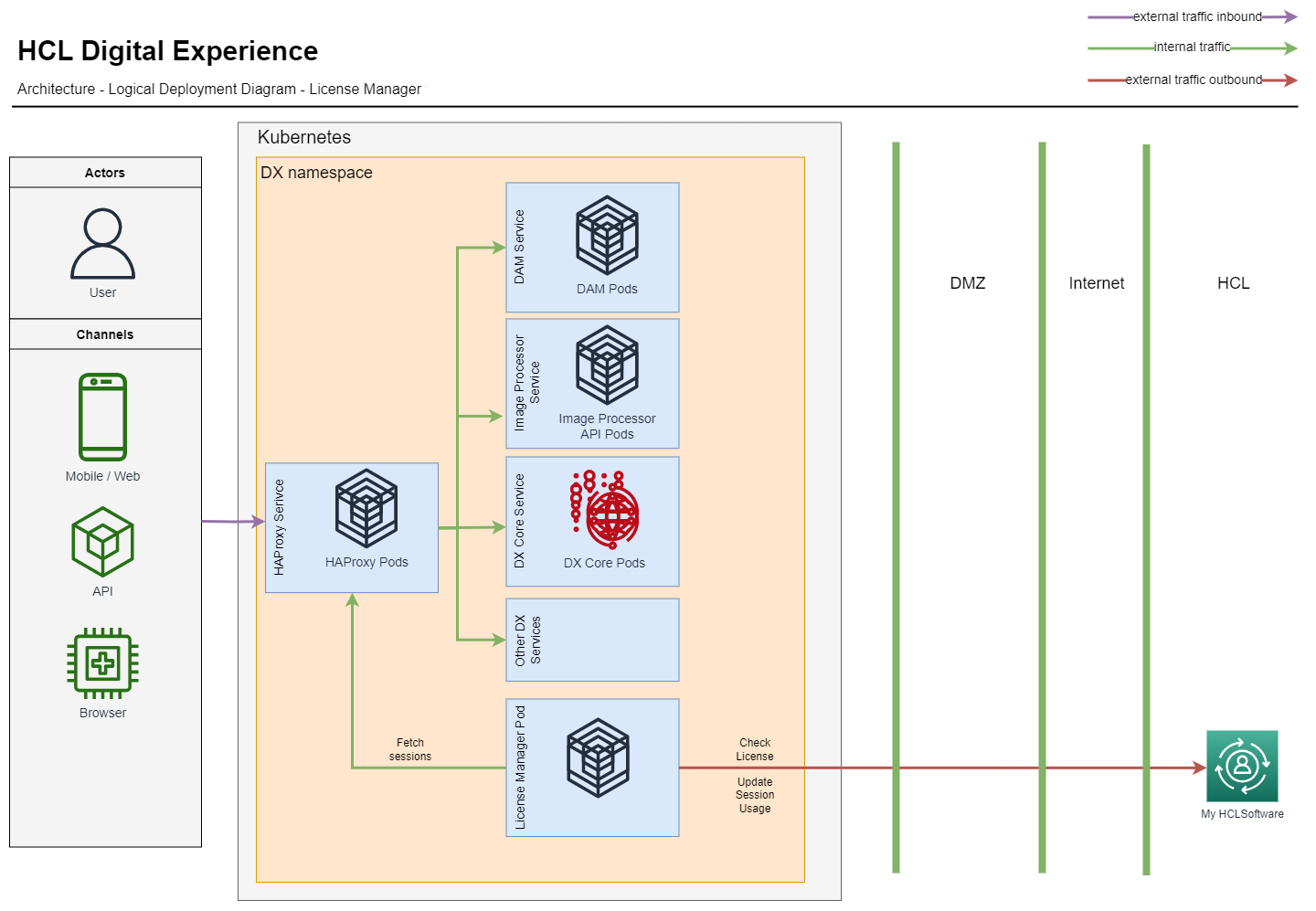
Follow the configuration steps in Configuring the DX Cloud Native 9.5 entitlement before you deploy a new or update an existing DX 9.5 Container deployment. By completing these steps, you configure the DX Cloud Native 9.5 Tier 1 – 7 deployment using a Helm chart and enable the License Manager entitlement-checking functions.
Configuring the DX Cloud Native 9.5 entitlement
To validate the entitlement details for your software, configure the following properties in the Helm chart:
# License Manager Configuration
  licenseManager:
    # Configures if this environment is a production environment.
    # For non production environments sessions are not counted but the license
    # is still validated.
    productionEnvironment: true
    # MHS License Server URI
    licenseServerUri: ""
    # Custom Deployment key secret for MHS deployment instance
    customMhsDeploymentKeySecret: ""
    # Deployment key for MHS deployment instance
    mhsDeploymentKey: ""
productionEnvironment: Set totrueto send usage reports to MHS. For other environments (for example, test or UAT), set tofalse.licenseServerUri: Set to the MHS License Server URI.customMhsDeploymentKeySecret: Set to the deployment key that creates a custom secret name. Any method can usecustomMhsDeploymentKeySecretormhsDeploymentKeyfor the deployment key.mhsDeploymentKey: Set to the credentials for product deployments. Any method can usecustomMhsDeploymentKeySecretormhsDeploymentKeyfor the deployment key. You can obtain the deployment key from My HCLSoftware portal.
To create a custom secret, run the following command:
#Example to create custom secret
kubectl create secret generic <secret-name> --from-literal=deploymentKey=<deploymentKey> --namespace=<namespace>
Validating the DX Cloud Native 9.5 deployment entitlement
To validate your entitlement, you must check the logs generated by the License Manager component. The following sample command uses kubectl to fetch the logs from a specific pod within a Kubernetes namespace.
 #Example to get logs:
 kubectl logs pod/dx-deployment-license-manager-0 --namespace=<namespace>
Expected logs
This section shows what a successful entitlement check should look like. The logs should indicate a successful connection to the entitlement server, as illustrated in the following example:
INFO: The connection to the entitlement server is successful. You have a valid HCL Digital Experience Cloud Native 9.5 entitlement. HCL DX Cloud Native 9.5 server starts.
INFO: Starting session count of the license manager
INFO: License validity: true
File-based export in a Kubernetes environment
The method of using a file-based export of user session data usage is only used in disconnected use cases within the Kubernetes environment where the Helm chart has not configured DX with My HCLSoftware portal.
Generating user session data usage in metrics format
To generate the user session data usage in metrics format, the report must include the session data encrypted for each user session.
Use the following command to generate usage metrics from the user session data. Make sure to specify the appropriate startDate, endDate and deploymentId values.
kubectl exec -it <release name>-license-manager-0 -n <namespace> -- java -jar UserSessionReporting.jar GenerateMetricFile <YYYY-MM-DD> <YYYY-MM-DD> <deploymentId>
Where:
startDateis the start date of the user session in YYYY-MM-DD format.endDateis the end date of the user session in YYYY-MM-DD format.deploymentIdis the deployment identifier.You can find thedeploymentIdin the My HCLSoftware portal after clicking the deployment card in the URL. For example, in the URLhttps://my.hcltechsw.com/deployments/pzneck8m,pzneck8mis thedeploymentId.productFeatureIdis the product name, eitherHCL_DX_CloudNativeorHCL_DX_Compose.
To save the generated metrics to a file, use the following command:
kubectl exec -it <release name>-license-manager-0 -n <namespace> -- java -jar UserSessionReporting.jar GenerateMetricFile <YYYY-MM-DD> <YYYY-MM-DD> <deploymentId> /tmp/{YYYY-MM-DDTHH-MM-SS UTC}_usage.metrics [-productFeatureIdName <productFeatureId>]
The timestamp in the usage metrics file should be earlier than the start date. The timestamp is formatted as {YYYY-MM-DDTHH-MM-SS UTC}_usage.metrics. For example, 2024-06-24T02-50-00_usage.metrics.
Sample command
kubectl exec -it pod/dx-deployment-license-manager-0 -n dxns -- java -jar UserSessionReporting.jar GenerateMetricFile 2022-07-22 2025-07-28 pnkeq6pk > /tmp/2022-06-24T02-50-00_usage.metrics -productFeatureIdName HCL_DX_CloudNative
Expected result
The following is a sample expected result when generating user session data usage in metrics format:
1,Alpha525634,HCL Digital Experience,v9.5,pnkeq6pk,ebb89d32f30abc4eed049f7afbb8a7299bdc8459fd235d0b8473ca22e9457c65
HCL_DX_CloudNative,2024-10-20T06:49:23.183Z,2024-10-20T06:59:23.183Z,0,7ddd259d3077bca6774a14c005250614b9dec4fc3ac7cd4954c2c4ca0212562d
HCL_DX_CloudNative,2024-10-20T07:00:54.836Z,2024-10-20T07:10:54.836Z,0,0c8210ba2bcb22c29d35df2aae2a7292f74385dc1125dbca634e9d2ba5affcd5
HCL_DX_CloudNative,2024-10-20T07:32:00.618Z,2024-10-20T07:42:00.618Z,1,470a75d9d6eb8553fdd54f873baa85c89935cd4710d7430542e8696c3eda20d8
HCL_DX_CloudNative,2024-10-20T08:00:37.267Z,2024-10-20T08:10:37.267Z,1,e946675c396d99f892c7099e772b776082b2a9a269a1d2670ea9063b61ac43e2
End,370d193fe0be35950d2707026d23ce595ae46054b77efcc944aa2484eab39399976854c58321ba5437b78896908a0b78de6b7ee6db989b0ccd28ce5c58bd9a09
Uploading usage metrics
After generating the metrics file (for example, {YYYY-MM-DDTHH-MM-SS UTC}_usage.metrics), upload the file to My HCLSoftware for processing. For more information, see Uploading the usage metric file to My HCLSoftware.
My HCLSoftware use cases
The use cases for My HCLSoftware in Kubernetes deployments are similar to the use cases for FlexNet. The HCL DX License Manager container is extended to integrate with My HCLSoftware in a similar way to the existing integration with FlexNet. This integration ensures proper entitlement validation and usage reporting.
-
Entitlement validation: Periodically verify the validity of your DX entitlement. Generally, your entitlement is valid for 12 months, with a grace period of 28 days during which reminders for renewal are posted in the container log before it expires.
-
User session reporting: Periodically send user session reports to My HCLSoftware to allow customers and HCL to monitor consumption and make sure consumption is aligned within the allocated entitlement tier. These reports help assess if a change to a different usage tier is required based on the number of user sessions consumed.