Personalization rules REST API content details | HCL Digital Experience
The following topic provides details about DX Personalization rules REST API content.
Visibility rule contents
visibility- Field to addshoworhideif the "conditions" are met.otherwise- Field to addshoworhideif the "conditions" are met.caseInsensitive- Boolean indication that the string comparisons in the rule are case insensitive.conditions- List of conditions to meet the visibility rule criteria. More details are provided below.
conditions with Date properties:- Example: The condition with Date property
current Date.day is
                                25
is shown
- In this example, the condition with Date property
current
                                    Date.day is 25
is shown. - The operator given is
isand gets a single parameter in thevaluekey.
Reference response structure:{ "and": [ { "operator": "is", "attributeName": "day", "attributeType": "Date", "value": [ 25 ] } ] }For the condition request, which is shown in the Date propertycurrent Date.day is 25screenshot above, the whole response structure body reference with response structure for Visibility Rule type is:{ "id": "ce285ec1-af9e-485b-8911-ab454946a104", "description": "This is Test rule.", "title": "Visibility Rule Example", "ruleType": "Visibility Rule", "contents": { "visibility": "show", "otherwise": "hide", "conditions": { "and": [ { "operator": "is", "attributeName": "day", "attributeType": "Date", "value": [ 25 ] } ] }, "caseInsensitive": false, }, "authors": "uid=wpsadmin,o=defaultWIMFileBasedRealm", "creator": "uid=wpsadmin,o=defaultWIMFileBasedRealm", "created": "2021-11-18T02:56:31.475Z", "publishedOnDate": "1970-01-01T00:00:00.001Z", "lastModified": "2021-11-18T04:28:32.549Z", "lastModifier": "uid=wpsadmin,o=defaultWIMFileBasedRealm", "parentId": "_6QR_0048AAQUGF0A1T2A_18L" } - In this example, the condition with Date property
conditions where
visibility is an attribute, and it says
show few conditions should meet:-
Example: The condition
current Browser
                                                  Capability.Accept Language is 1
is shown
- In this example, the condition
current
                                                  Browser Capability.Accept Language is 1
is shown. - The operator given is is and gets a single
parameter in the
valuekey.
Reference response structure:{ "and": [ { "operator": "is", "attributeName": "AcceptLanguage", "attributeType": "BrowserCapability", "value": [ 1 ] } ] } - In this example, the condition
-
Example: The condition of like
current
                                                  Browser Capability.Accept Language is between 1
                                                  and 5
is defined
- This example shows results when the condition of
like
current Browser Capability.Accept
                                                  Language is between 1 and 5
is defined. - The operator is defined as is between and returns multiple parameters in the value key.
Reference response structure:{ "and": [ { "operator": "is between", "attributeName": "AcceptLanguage", "attributeType": "BrowserCapability", "value": [ 1, 5 ] } ] } - This example shows results when the condition of
like
-
Example: The condition
current
                                                  Device.Device Class includes current
                                                  Device.City
is defined
- In this example, the condition
current
                                                  Device.Device Class includes current
                                                  Device.City
is defined. - The
current Device.Device Classproperty is defined ascurrent Device.City.
Reference response structure:{ "operator": "includes", "attributeName": "DeviceClass", "attributeType": "Device", "value": [ { "attributeName": "City", "attributeType": "Device" } ] } - In this example, the condition
-
Example: The condition of addition of one or more attributes is defined
attr1 + attr2 is 5
- In this example the condition of addition of one or
more attributes is defined
attr1 + attr2 is 5. - The
attributes,arithmeticOperatorare defined and values presented in an array format.
Reference response structure:{ "operator": "is", "arithmetic": { "attributeNames": [ "attr1", "attr2" ], "arithmeticOperator": "+" }, "value": [ 5 ] } - In this example the condition of addition of one or
more attributes is defined
- Example: The condition is defined as a set of matching
conditions

- In this example the condition is defined as a set of
matching conditions which is a wrapper of two
properties
(current Action Bean.Action Names is 1) is 2and(current Device.Device Class is current Device.City) is between 1 and 4.
Reference response structure:{ "operator": "is", "matchingItems": { "operator": "is", "attributeName": "actionNames", "attributeType": "ActionBean", "value": [ 1 ] }, "value": [ 2 ] }, { "operator": "is between", "matchingItems": { "operator": "is", "attributeName": "DeviceClass", "attributeType": "Device", "value": [ { "attributeName": "City", "attributeType": "Device" } ] }, "value": [ 1, 4 ] } - In this example the condition is defined as a set of
matching conditions which is a wrapper of two
properties
- Example: The profile user conditions are defined by
selecting
ProfileNamewith result(s) returned in an array format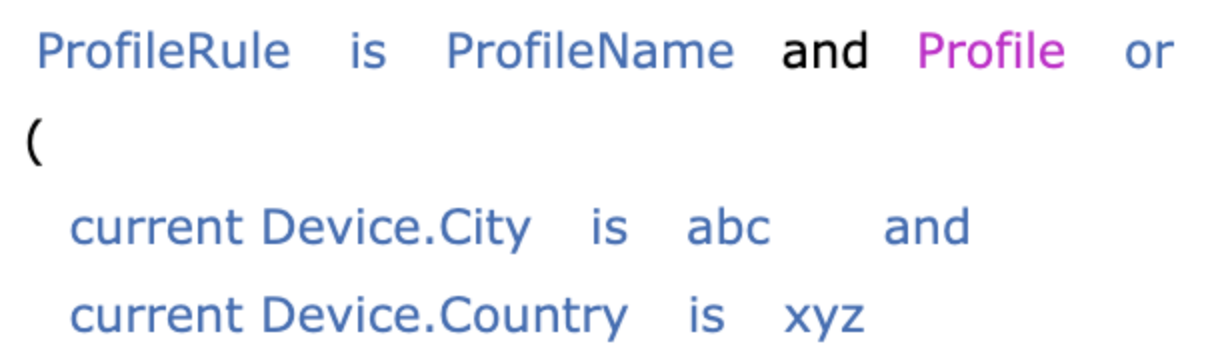
- In this example, the profile user conditions are
defined by selecting
ProfileNamewith result(s) returned in an array format. Multiple multiple names can be presented. "or"and"and"conditions can also be defined.
Reference response structure:{ "or": [ { "profile": { "id": "c1a8f9a4-95c8-4e86-87c1-b106f075d190", "profiles": [ "ProfileName" ] }, "operator": "is" }, { "and": [ { "operator": "is", "attributeName": "City", "attributeType": "Device", "value": [ "abc" ] }, { "operator": "is", "attributeName": "Country", "attributeType": "Device", "value": [ "xyz" ] } ] } ] } - In this example, the profile user conditions are
defined by selecting
Overall summary:
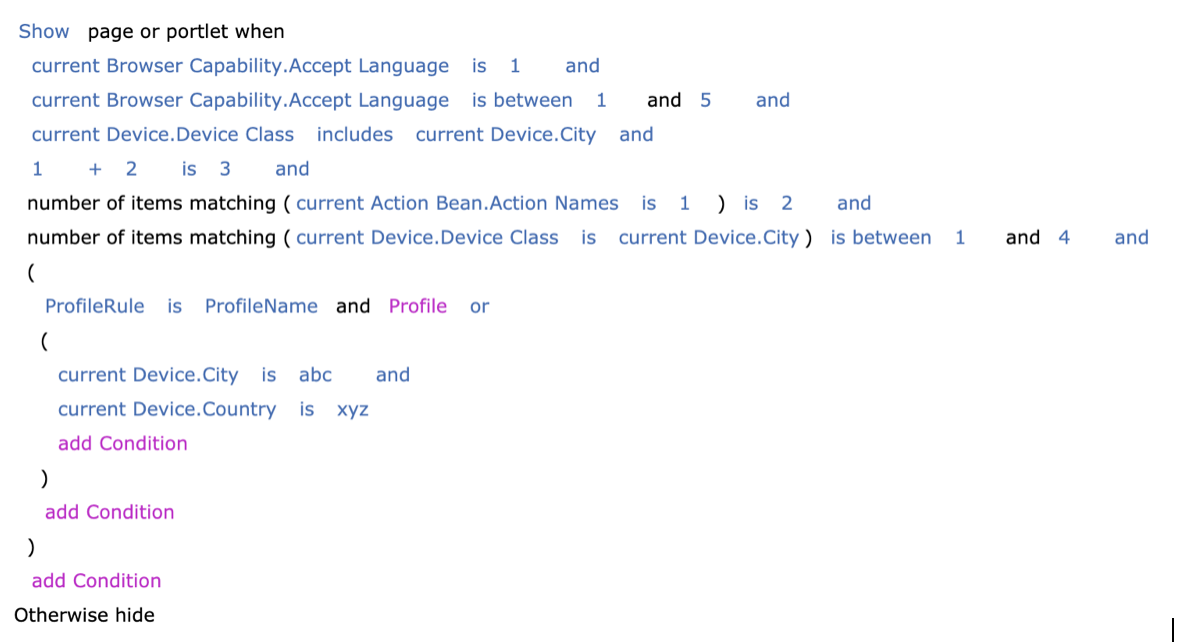
Visibility
rule type as reference:
{
"id": "ce285ec1-af9e-485b-8911-ab454946a104",
"description": "This is Test rule.",
"title": "TestRule",
"ruleType": "Visibility Rule",
"contents": {
"visibility": "show",
"otherwise": "hide",
"conditions": {
"and": [
{
"operator": "is",
"attributeName": "AcceptLanguage",
"attributeType": "BrowserCapability",
"value": [
1
]
},
{
"operator": "is between",
"attributeName": "AcceptLanguage",
"attributeType": "BrowserCapability",
"value": [
1,
5
]
},
{
  "operator": "includes",
  "attributeName": "DeviceClass",
  "attributeType": "Device",
  "value": [
    {
      "attributeName": "City",
      "attributeType": "Device"
    }
  ]
},
{
"operator": "is",
"arithmetic": {
"attributeNames": [
1,
2
],
"arithmeticOperator": "+"
},
"value": [
3
]
},
{
  "operator": "is",
  "matchingItems": {
    "operator": "is",
    "attributeName": "actionNames",
    "attributeType": "ActionBean",
    "value": [
      1
    ]
  },
  "value": [
    2
  ]
},
{
  "operator": "is between",
  "matchingItems": {
    "operator": "is",
    "attributeName": "DeviceClass",
    "attributeType": "Device",
    "value": [
      {
        "attributeName": "City",
        "attributeType": "Device"
      }
    ]
  },
  "value": [
    1,
    4
  ]
},
{
          "or": [
            {
              "profile": {
                "id": "c1a8f9a4-95c8-4e86-87c1-b106f075d190",
                "profiles": [
                  "ProfileName"
                ]
              },
              "operator": "is"
            },
            {
              "and": [
                {
                  "operator": "is",
                  "attributeName": "City",
                  "attributeType": "Device",
                  "value": [
                    "abc"
                  ]
                },
                {
                  "operator": "is",
                  "attributeName": "Country",
                  "attributeType": "Device",
                  "value": [
                    "xyz"
                  ]
                }
              ]
            }
          ]
}
]
},
"caseInsensitive": false,
},
"authors": "uid=wpsadmin,o=defaultWIMFileBasedRealm",
"creator": "uid=wpsadmin,o=defaultWIMFileBasedRealm",
"created": "2021-11-18T02:56:31.475Z",
"publishedOnDate": "1970-01-01T00:00:00.001Z",
"lastModified": "2021-11-18T04:28:32.549Z",
"lastModifier": "uid=wpsadmin,o=defaultWIMFileBasedRealm",
"parentId": "_6QR_0048AAQUGF0A1T2A_18L"
}Profiler rule contents
profiles- A profiler rule will group a user into one or more profiles. These profiles may be used within the context of a web page or within a binding rule to identify which content to return.profileName- Field to indicate name of the profile to be shown when the respective conditions are met.conditions- List of conditions to meet for that profile selection criteria. More details are provided in the below section.otherwiseProfile- Fallback profile name if none of the conditions for other profiles are not met.caseInsensitive- Boolean indication that the string comparisons in the rule are case insensitive.stopFirstProfile- Boolean indication that the rule returns the first matching profile for the current user.
"profiles" array contains the following
attributes:profileName- Profile name to be selected if theconditionsare met."conditions- List of conditions to meet the visibility rule criteria. More details are provided below:
profiles with conditions
having Date properties:- Sample request condition: Profiler Rule with title as
Profiler
                                User Rule 1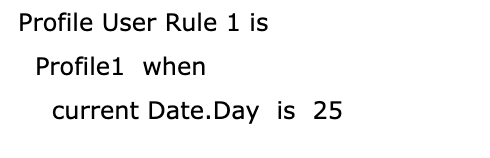
- In this example, the profile name is
Profile1. - The conditions provided include
current Date.day is
                                    25
. - The operator given is
isand gets a single parameter in thevaluekey.
{
  {
    "profileName": "Profile1",
    "conditions": {
        "and": [
            {
                "operator": "is",
                "attributeName": "day",
                "attributeType": "Date",
                "value": [
                    25
                ]
            }
        ]
    },
    "caseInsensitive": false
  }
}
For theprofilesandconditionsrequest, which is shown in theProfiler User Rule 1screenshot above, the whole response structure body reference with response structure for Profiler Rule type is:{ "id": "ce285ec1-af9e-485b-8911-ab454946a104", "description": "This is Test rule.", "title": "Profiler Rule Example", "ruleType": "Profiler", "contents": { "profiles": [ { "profileName": "Profile1", "conditions": { "and": [ { "operator": "is", "attributeName": "day", "attributeType": "Date", "value": [ 25 ] } ] }, "caseInsensitive": false } ], "otherwiseProfile": null, "caseInsensitive": false, "stopFirstProfile": false }, "parentId": "_6QR_0048AAQUGF0A1T2A_18L" } - In this example, the profile name is
-
The following example shows the entire API response structure body for
Profilerrule type as reference:{ "id": "1ed429e5-80a2-4bbc-97d8-adcbaebb85ce", "description": "", "title": "Profile User Rule 1", "ruleType": "Profiler", "contents": { "profiles": [ { "profileName": "Profile1", "conditions": { "and": [ { "operator": "is", "attributeName": "date", "attributeType": "Date", "value": [ "2021-11-29" ] } ] } }, { "profileName": "Profile2", "conditions": { "and": [ { "operator": "is", "attributeName": "city", "attributeType": "wpsUser", "value": [ "Bangalore" ] } ] } } ], "otherwiseProfile": "Profile3", "caseInsensitive": false, "stopFirstProfile": true }, "authors": "uid=wpsadmin,o=defaultWIMFileBasedRealm", "creator": "uid=wpsadmin,o=defaultWIMFileBasedRealm", "created": "2021-11-29T07:33:31.613Z", "publishedOnDate": "1970-01-01T00:00:00.001Z", "lastModified": "2021-11-29T07:33:31.613Z", "lastModifier": "uid=wpsadmin,o=defaultWIMFileBasedRealm", "parentId": "_6QR_0048AAQUGF0A1T2A_18L" }
Select action
select- Field to indicate type of select action rule.conditions- List of conditions to meet the select action rule criteria. More details are provided below.
conditions having Web Content
select type:- Example: Select Action Rule with title as
SelectActionWebContent
- In this example, we have selected the
Web Contentwith the nameSelectActionWebContent. - The operator given for the 1st condition is
isand thevaluehas a selectedattributeNameandattributeTypehavingpropertyTypeasfixedandpropertyNameaslocation. - The operator given for the 2nd condition is
includesand is getting a single parameter in thevaluekey withpropertyTypeasdynamicandpropertyNameasFull Text.
{
  "select": "Web Content",
  "conditions": {
      "and": [
          {
              "propertyType": "fixed",
              "propertyName": "Location",
              "value": [
                  {
                      "attributeName": "AcceptLanguage",
                      "attributeType": "BrowserCapability"
                  }
              ],
              "operator": "is"
          },
          {
              "propertyType": "dynamic",
              "propertyName": "Full Text",
              "value": [
                  "English"
              ],
              "operator": "includes"
          }
      ]
  }
}
For the conditions request which is shown in the above screenshot, the whole response structure body reference with response structure forSelect Action Ruletype is:{ "id": "846ced49-cced-473d-b579-8d24f21805bc", "description": "This is Select Action Rule Web Content", "title": "SelectActionWebContent", "ruleType": "Select Action", "contents": { "select": "Web Content", "conditions": { "and": [ { "propertyType": "fixed", "propertyName": "Location", "value": [ { "attributeName": "AcceptLanguage", "attributeType": "BrowserCapability" } ], "operator": "is" }, { "propertyType": "dynamic", "propertyName": "Full Text", "value": [ "English" ], "operator": "includes" } ] } }, "authors": "uid=wpsadmin,o=defaultWIMFileBasedRealm", "creator": "uid=wpsadmin,o=defaultWIMFileBasedRealm", "created": "2022-04-08T06:26:34.745Z", "publishedOnDate": "2022-04-08T06:34:30.924Z", "lastModified": "2022-04-08T06:27:56.095Z", "lastModifier": "uid=wpsadmin,o=defaultWIMFileBasedRealm", "parentId": "_6QR_0048AAQUGF0A1T2A_18L" } - In this example, we have selected the
Binding Rule
The following topic provides details about DX Personalization Binding rules.
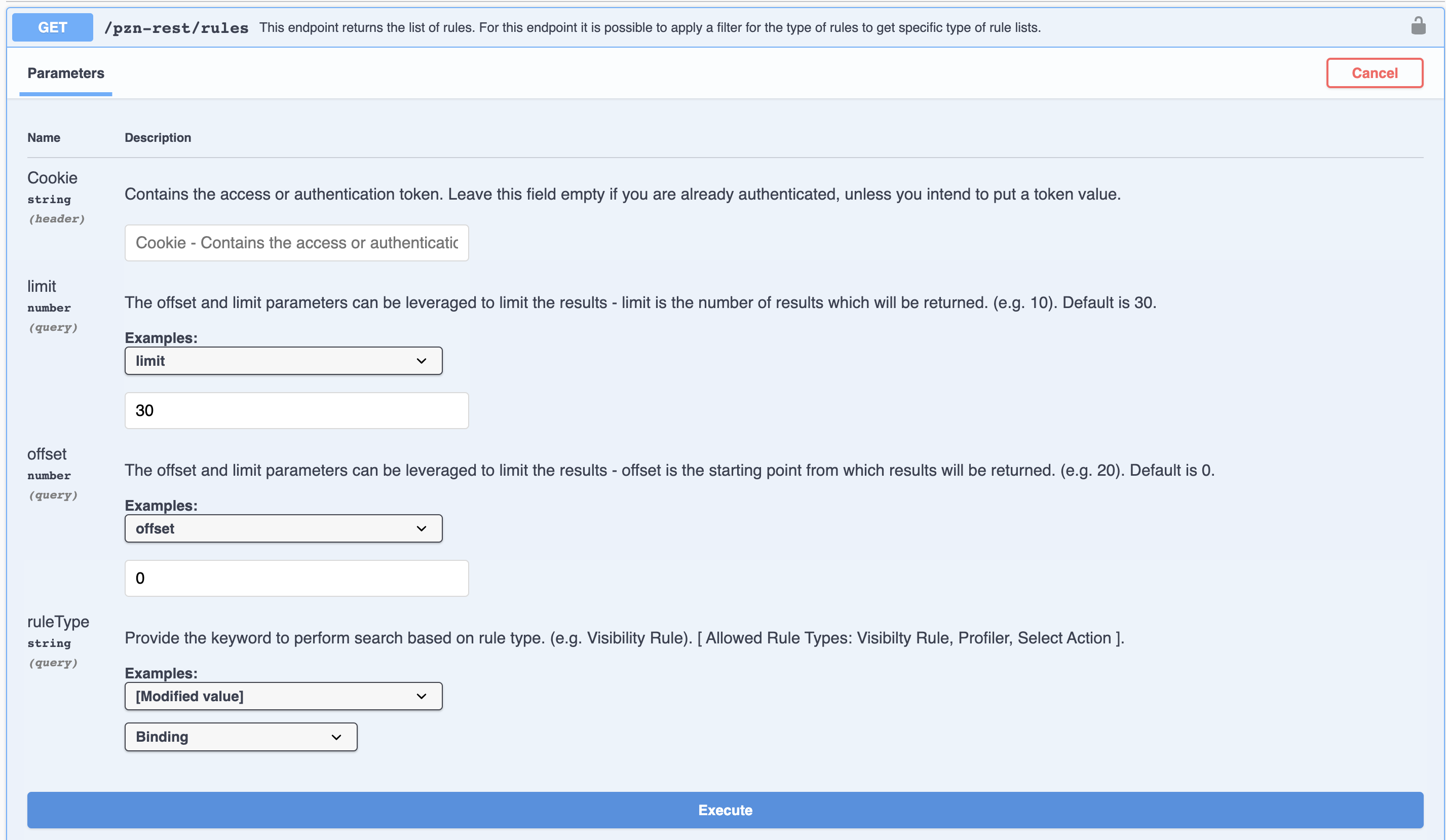
- API to get all Binding rule.
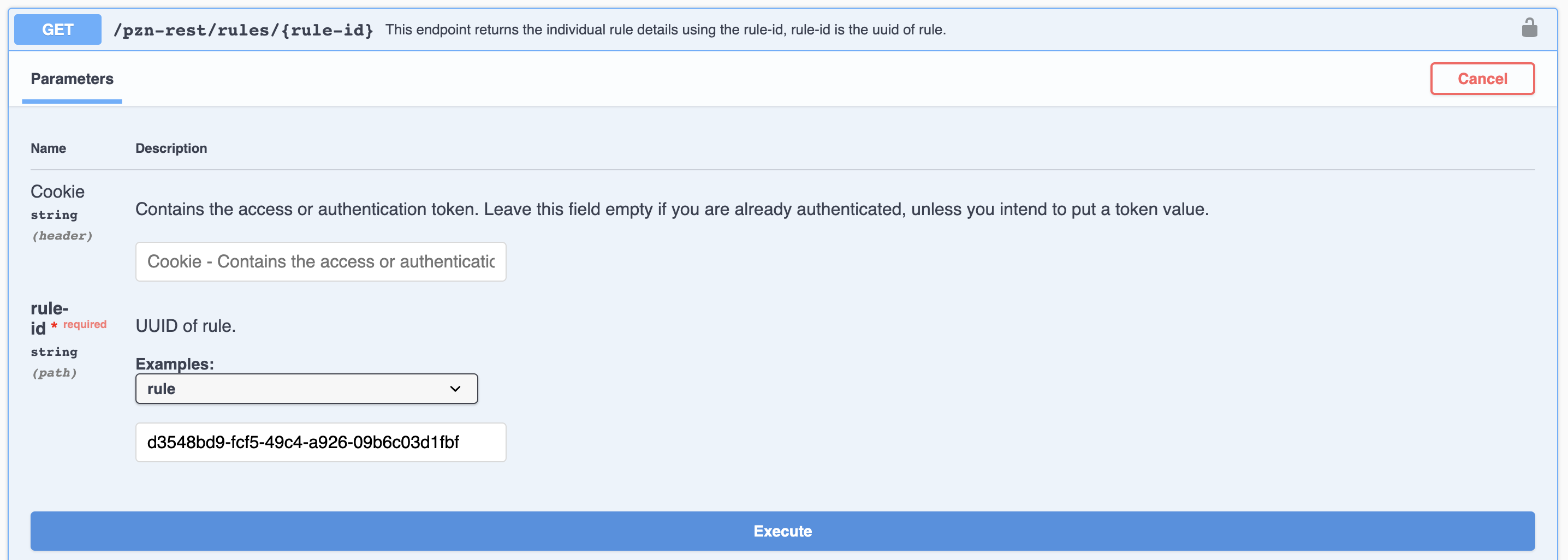
- API to get Binding rule by id.
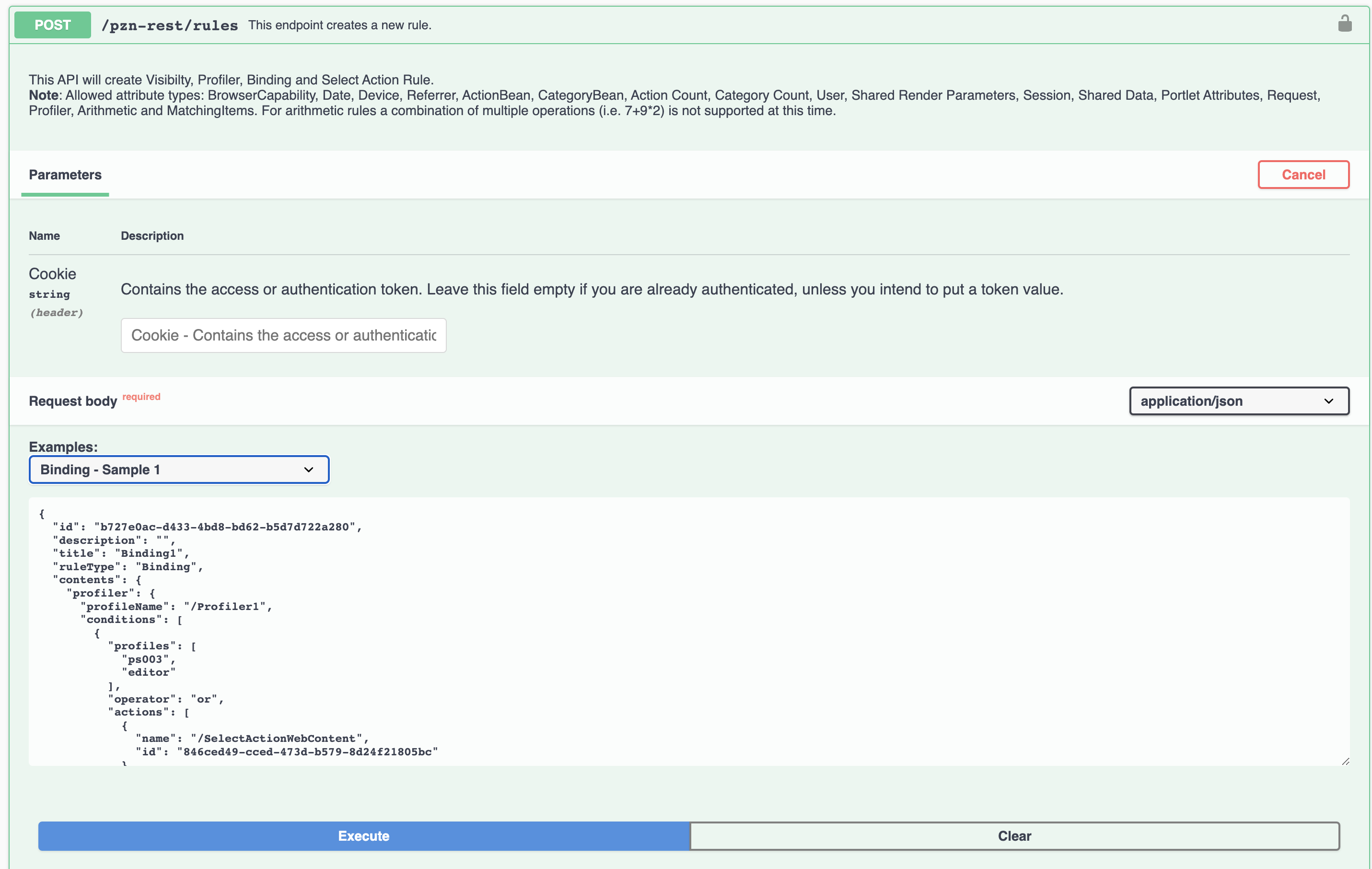
- API to create Binding rule.
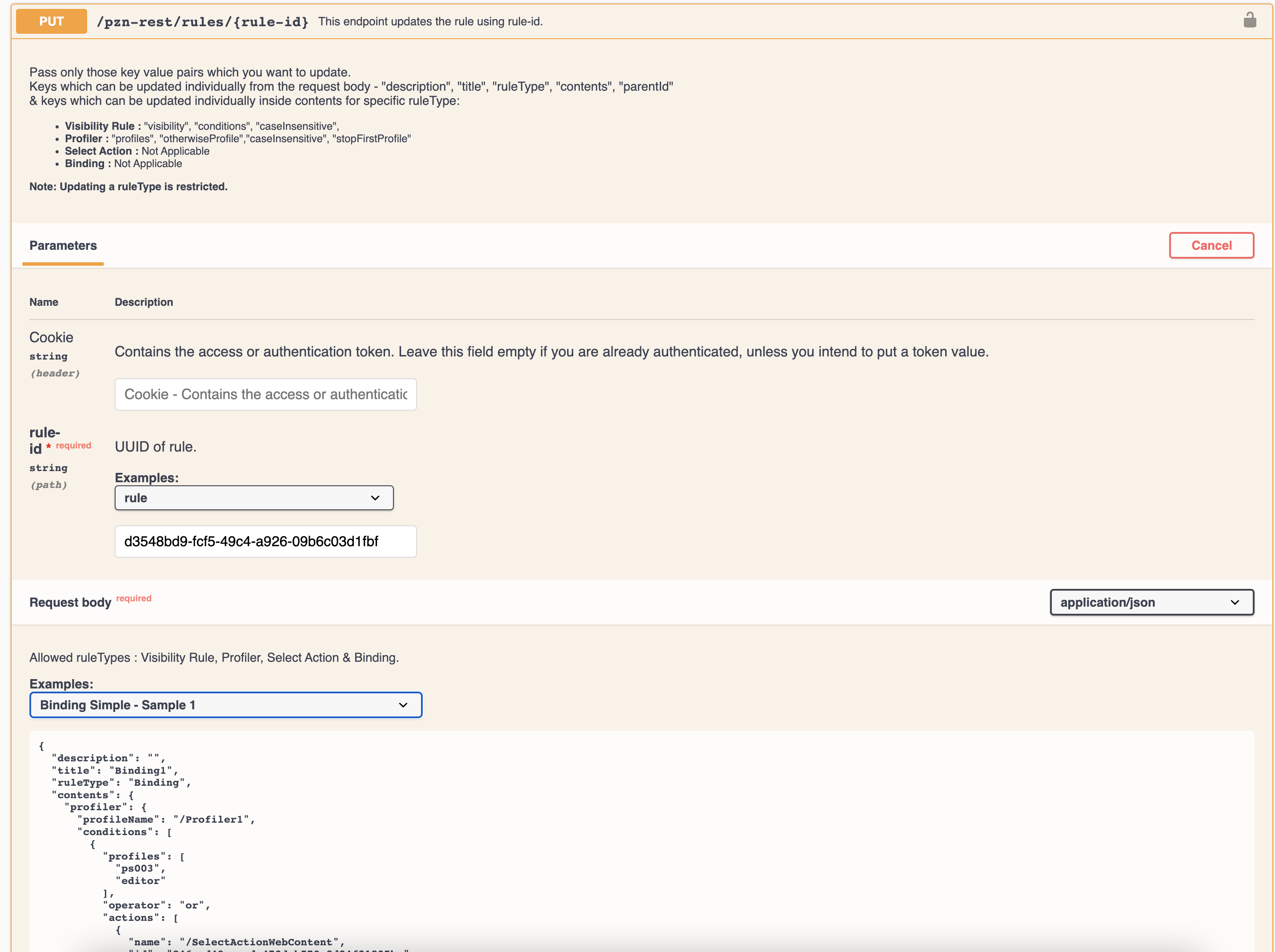
- API to update Binding rule.
- API to Invoke Binding rule
- API to get all Binding ruleRefer following screenshot to GET all binding rule.
- API to get Binding rule by id:Screenshot for reference for get Binding rule by id. Refer following screenshot to get Binding rule by id (rule-id).
- API to create Binding rule:Refer following screenshot to create Binding rule (POST).
- API to update Binding rule:Refer following screenshot to update Binding rule (PUT).
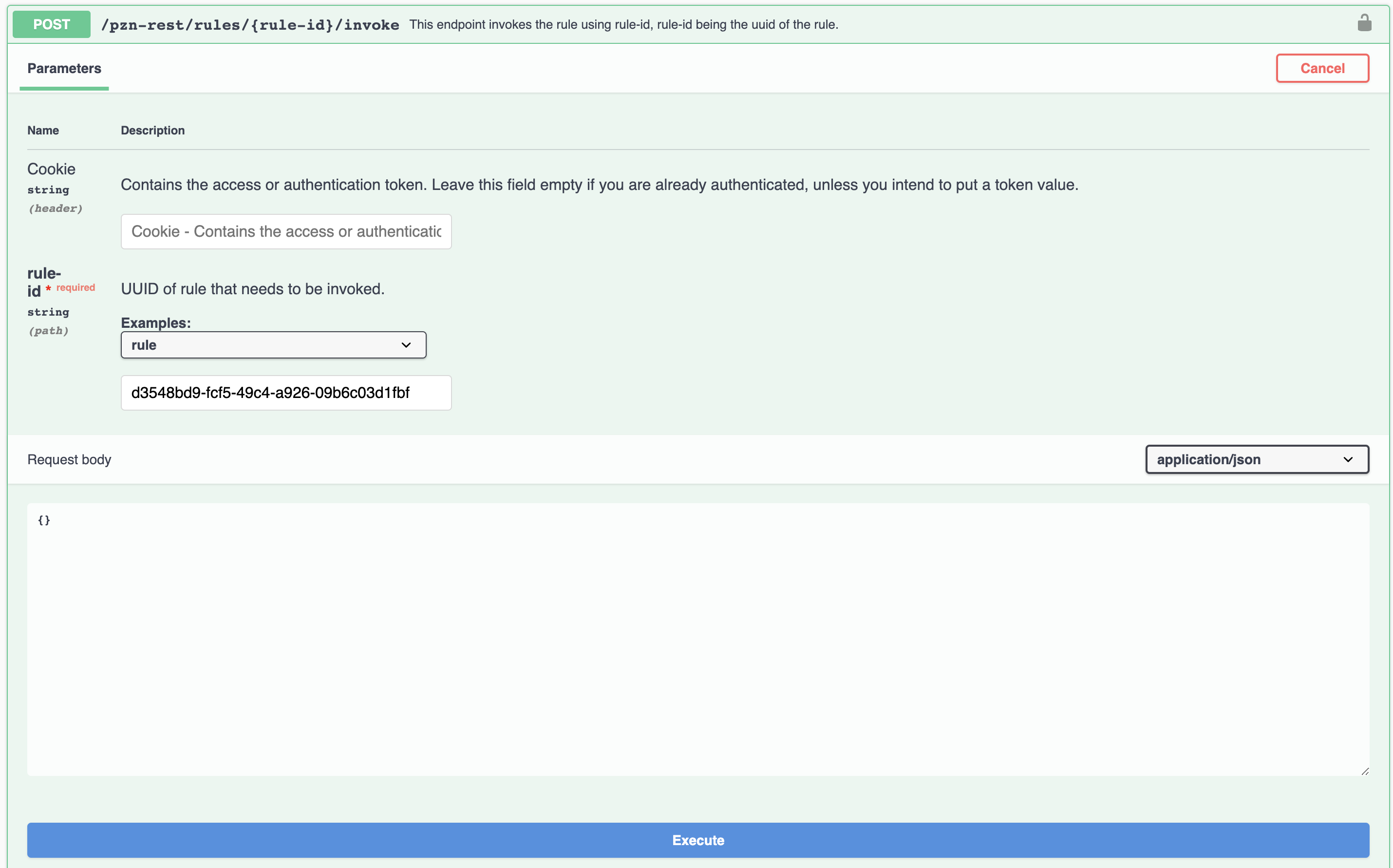
- API to Invoke Binding rule:Refer following screenshot to invoke Binding rule (POST).