
System Requirements
This document contains information about hardware and software requirements for HCL DevOps Velocity (Velocity).
Minimum system requirements for production environment
| Resource | Requirement |
|---|---|
| Platform | Kubernetes, OpenShift |
| Number of Platform Nodes | 3 |
| Operating System | See Kubernetes and OpenShift documentation for supported operating systems |
| Processor | 4 CPU Cores |
| Memory | 12 GB of RAM |
| Storage |
|
| Network | Gigabit (1000) Ethernet with low-latency to the database |
| Additional information |
|
Note: MongoDB is not installed by default with the product installation
for Kubernetes and OpenShift platforms. You are expected to install it separately. It is
highly recommended to allocate one node for MongoDB and three nodes are for the product
installation for better performance and stability of the application.
Minimum system requirements for production environment on cloud platforms
| Resource | Requirement |
|---|---|
| Service | Google Kubernetes Engine |
| Node pool | 1 |
| Number of nodes | 3 |
| Node Machine type | e2-standard-4 (4 vCPU, 2 core, 16 GB memory) |
| Node Image type | Container-Optimized OS, Ubuntu, or Windows Server |
| Boot disk type | Balanced persistent disk |
| Boot disk size | 100GB |
| Resource | Requirement |
|---|---|
| Service | Azure Kubernetes Service (AKS) |
| Node pool | 1 |
| Number of nodes | 3 |
| Node VM size | Standard_D4s_v5 (4 vCPU, 16 GB memory) |
| Node OS image type | Ubuntu 22.04 LTS (default AKS Linux node image) or Windows Server (if required) |
| Boot disk type | Azure Managed Disk – Premium SSD (recommended for production workloads) |
| Boot disk size | 100 GB |
MongoDB requirements
MongoDB is not installed by default and you must install, configure, and manage the
database separately. As a guideline, use the following specifications:
- 2 CPU Cores
- 8 GB RAM minimum (16 GB recommended)
- 20 GB storage minimum (50 GB recommended)
Note: MongoDB replica sets are supported if configured by the
customer. For more inofmration, see documentation.
The figure below provides storage guidelines over time and contributors to total size.
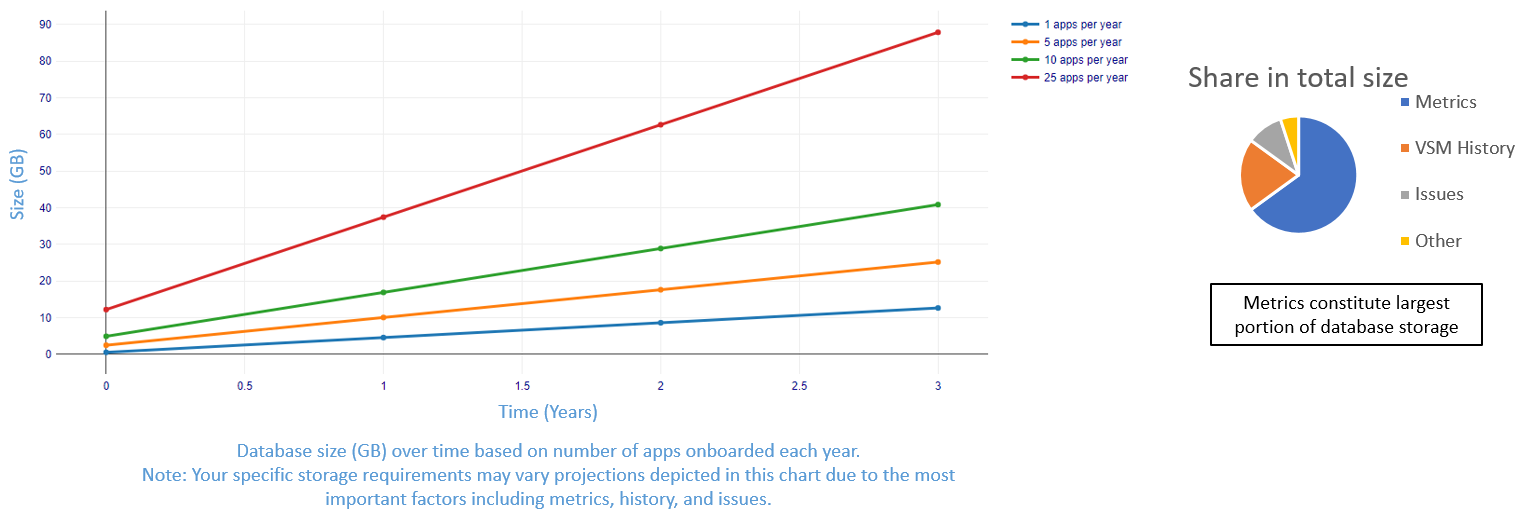
For the above graph, estimates are calculated using real production data and with the
following assumptions:
- Each onboarded application has at least one associated value stream.
- Over 300 issues are created and imported per year with associated Pull requests (PRs) and commits.
- Over 20 builds and deployments are captured per application per day.
- Five quality metrics are captured per build with examples including functional test results, code coverage, vulnerability scans, and so forth.
The following table details growth estimates over time based on number of apps per
year.
| Number of apps per year | Day 1 (GB) | Year 1 (GB) | Year 2 (GB) | Year 3 (GB) |
|---|---|---|---|---|
| 1 | 0.5 | 4 | 8 | 13 |
| 5 | 2 | 10 | 17 | 25 |
| 10 | 5 | 16 | 28 | 41 |
| 25 | 12 | 37 | 62 | 88 |
The following table details estimates for environments based on number of apps.
| Environment | Number of apps | Size (GB) |
|---|---|---|
| POC | 1-3 | 20 |
| Pilot | 5-10 | 30 |
| Typical onboarding | 20-30 | 70 |
Containers
| Name | Version | Environments | Future Releases |
|---|---|---|---|
| Bitnami/Nginx | 1.29.1 | Kubernetes and OpenShift | Including all fix packs |
| Bitnami/RabbitMQ | 4.1.2 | Kubernetes and OpenShift |
Note:
- All containers are included in the product. No specific setup required for containers.
Databases
| Name | Version | Environments | Future Releases |
|---|---|---|---|
| MongoDB Community Edition | 7.0, 8.0 | Kubernetes and OpenShift | Including all fix packs |
| MongoDB Enterprise Edition | 7.0, 8.0 | Kubernetes and OpenShift | Including all fix packs |
Container Platforms
| Name | Version | Future Releases | |
|---|---|---|---|
| Google Cloud Platform | refer to Note 1 | refer to Note 1 | |
| Kubernetes | 1.34 | Including all future versions, releases, and fix packs | |
| Microsoft Azure Platform | refer to Note 1 | refer to Note 1 | |
| OpenShift | 4.18, 4.20 | Including all future versions, releases, and fix packs | |
Note:
- For the supported Kubernetes version, see Kubernetes documentation.
Supported clients for Velocity MCP server
The following clients are supported for connecting to Velocity MCP server:
- Claude Desktop
- GitHub Copilot in VS Code
Supporting tools
| Name | Version | Future Release |
|---|---|---|
| Helm (refer to Note 1) | 3 | Including all future versions, releases, and fix packs |
Note:
- Required prerequisite for installing Velocity on Kubernetes.
Integration sources
Consult HCL plugin documentation for all supported plugins.
Web browsers
| Name | Version | Future Releases |
|---|---|---|
| Google Chrome | Latest version | Including all future versions, releases, and fix packs |
| Microsoft Edge | Latest version | Including all future versions, releases, and fix packs |
| Mozilla Firefox | Latest version | Including all future versions, releases, and fix packs |