Extensions in dev containers
You can use extensions to specialize the Code IDE, integrating tools for coding, debugging, version control, and more. You can deploy them during initial project setups or to ensure workflow consistency in containerized and offline environments.
Preinstalled extensions
Your administrator can configure dev containers with preinstalled extensions during setup. These extensions are defined in the devcontainer.json file and sourced from the Open VSX Registry. For details on how to configure these in the devcontainer.json, refer to the Administrator Guide.
The following image shows a simple example of preinstalled extensions available in Code when you launch a dev container.
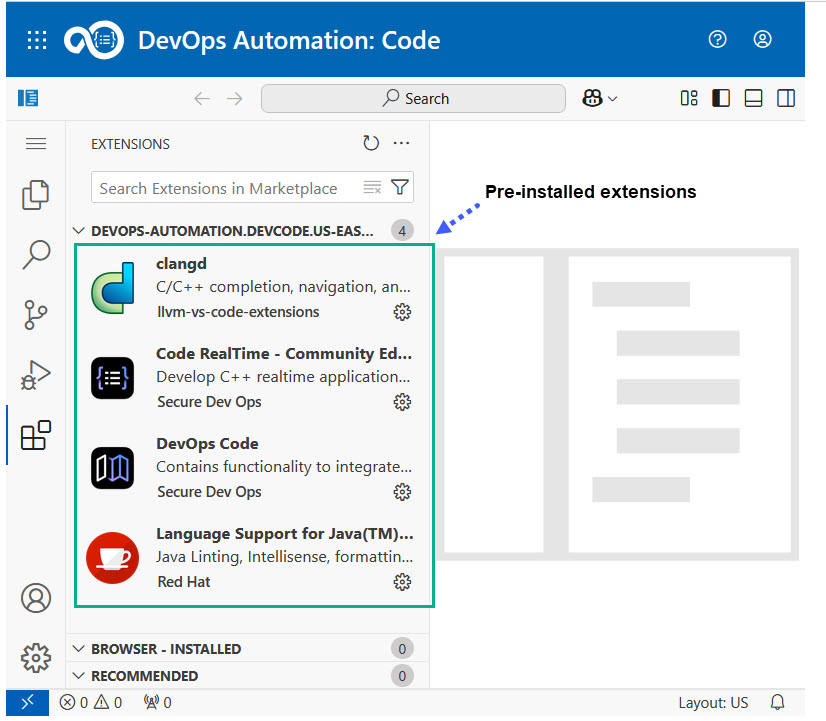
While working in your browser-based IDE, you can also perform the following tasks:
- Install additional extensions directly from the Open VSX Registry from the Extensions button in the left toolbar of the IDE.
- Install local VSIX files if needed.
- In an air-gapped environment, install extensions from your organization's configured local extension registry instead of the public Open VSX Registry. For more information, see Configuring extension registry and Installing extensions in air-gapped environment.