
Creating a development stream (Windows)
In the second page of the Join Project Wizard you will select a name for the development stream and identify the stream to which you will deliver your work. By default, this is the integration stream.
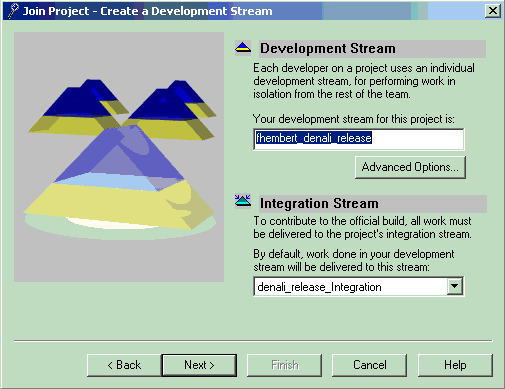
- In Development Stream, specify a name for your development
stream.
A useful naming convention is to include your username in the development stream's name. For example: jdoe_denali_release, where jdoe is a developer's username and denali_release is the name of the project you are joining.
- Identify the integration stream of the project you are joining and select it from the list.
Try it!
On the second page of the wizard, DevOps Code ClearCase® automatically completed the developer's stream field by providing a default name for your developer's stream.
In DevOps Code ClearCase®, notice the name format: your-username_project-name. In our exercise, this corresponds to your-username_denali_release. Accept the developer's stream.
- DevOps Code ClearCase® also
automatically completed the integration stream field with the name of the project's integration
stream.
In DevOps Code ClearCase®: denali_release_Integration.
- Accept the integration stream, and click Next.