
Extensions
DevOps Code (Code) includes extensions such as DevOps Code for change management, DevOps Code RealTime for event-driven C++ development, Clangd for C++ support, and Red Hat Java Support. These tools enhance coding, debugging, and version control, with options for additional extensions.
The following image shows the preinstalled extensions available in Code.
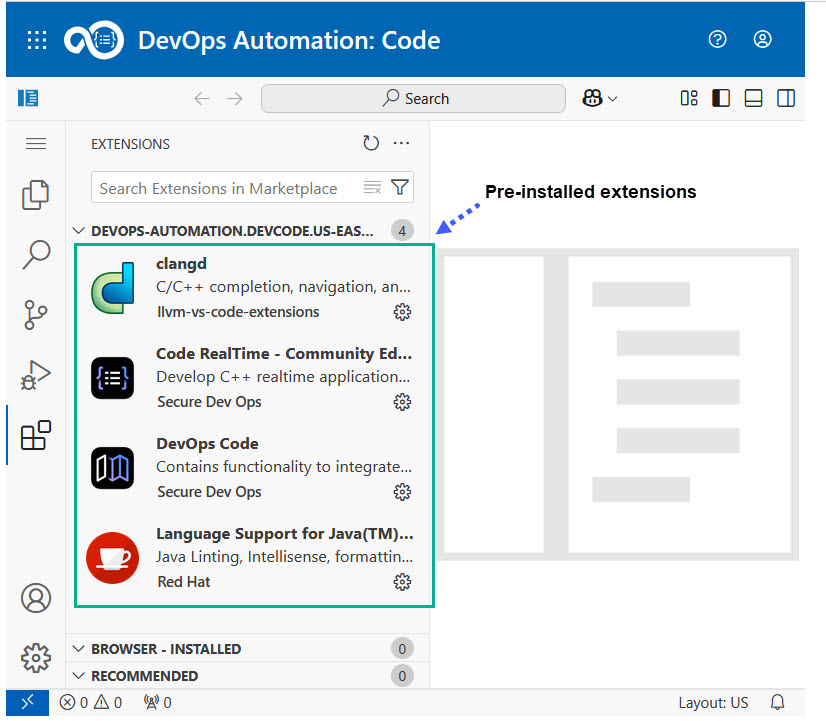
Code offers a range of preinstalled extensions from the Open VSX Registry, designed to enhance the development experience:
-
DevOps Code: This extension lets you create work items in HCL DevOps Plan (Plan), for example when you encounter defects while debugging your application. The DevOps Code extension allows integration with Plan, enabling you to create work items directly from your development environment.
-
DevOps Code RealTime: This extension supports the development of event-driven, stateful, applications in C++ using the Art language.
-
Clangd C++ Language Support: This extension supports C++ development, the clangd plugin. It enables a more efficient and error-free development process for C++ developers.
-
Red Hat Language Support for Java: This extension offers comprehensive language support for Java, making it easier to build robust and scalable Java applications.
These preinstalled extensions enhance your development environment by providing tools for coding, debugging, version control, and application development that are all within the same IDE. You can install additional extensions from the Open VSX registry. You can also install local VSIX files in the dev container. However, any extensions you install will be removed when you terminate the dev container. See Management of Dev Containers in Code.