Securing Redis traffic to Orient Me (Windows)
If your deployment runs HCL Connections™ on Windows, secure Redis traffic by creating a tunnel between Connections on Windows and the Orient Me services (running on Linux). This is an optional, but recommended, step.
Before you begin
These instructions explain how to create the SSH tunnel using PuTTY configured to run as a
service. To perform this task, you must install the following software:
- For Orient Me:
- Open SSH
- For Connections:
- PuTTY
- Redis client
Procedure
On Connections, set up the SSH connection:
-
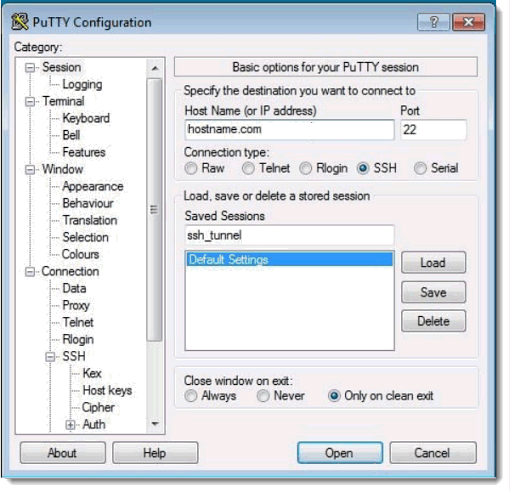
In PuTTY, enter the host name or IP address of the Kubernetes master node, make sure the
"Connection Type" is SSH, and enter a name of your choice in the "Saved Sessions" section.
-
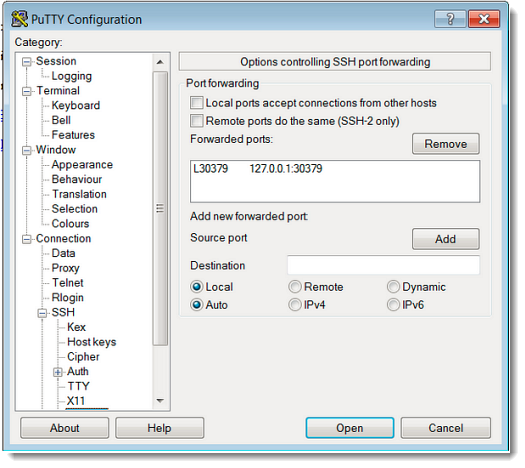
Click and select the ports for "Source" and "Destination".
The Source port will be 30379 (default Redisnode_port) and for convenience, this example uses the same port as the destination.
For "Source Port" enter the Redisnode_port and as the "Destination" enter 127.0.0.1:destination (in this case 127.0.0.1:30379). Press "Add" and you will see something like this:
-
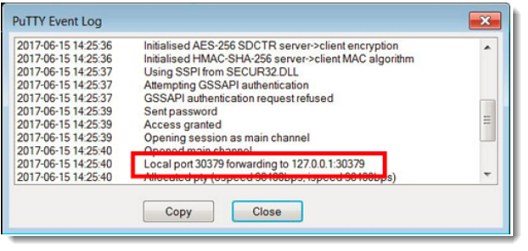
To test if the tunnel is working, right-click on the PuTTY window and select Event
Log.
If the tunnel has been set up correctly, the log will contain an entry informing you of local port forwarding.