Commerce+ Transaction Server production environment overview
- Transaction server Docker image
- This image contains the Transaction server, running on the Open Liberty Server. The Transaction server contains the transactional business logic and APIs that serve
the other servers of an Commerce+ Transaction Server application. By default, when you
deploy the container, the container is called
ts-app. - Transaction Web Server Docker image
- This image contains Transaction Web Server, which is used as the
web server to access the Commerce+ Transaction Server
tooling such as the Commerce Lab and
the Administration Console. By default
when you deploy the container, the container is
called
ts-web. - Customization server Docker image
- This image contains the Customization server, which runs custom code that you can create to extend
HCL provided xC extension points. This image utilizes Open Liberty Application Server
as its application server. By default when you deploy the container, the container is
called
xc-app. - Utility Server Docker image
- This image contains a utility project that holds scripts to service Commerce+ Transaction Server operations such as loading access control policies, loading store
data, and cleaning database of obsolete objects. By default when you deploy the
container, the container is called
ts-utils. - Tooling Web Docker image
- This image contains an Apache HTTP Server that serves the Angular-based tooling SPA
and front-end assets for Commerce+ Transaction Server and its the container is called
tooling-web. - Support Container Docker image
- This image contains deployment and operation python scripts for use in the
deployment of Commerce+ Transaction Server within a Kubernetes cluster. The Support
Container is primarily used for service dependency checks, to ensure that the various
Commerce applications are brought online properly, and in the expected order. In
addition, it is also used by some utility jobs, such as for TLS certificate generation
for secure ingress. By default when you deploy the container, the container is called
commerce/supportcontainer. - Cache Manager Docker image
- This image contains REST interfaces to operate and monitor the Remote HCL Cache stored in Redis. By default when you deploy the container, the
container is called
cache-app. - Store server Docker image
- This image contains the Store server to serve store assets including JSP files,
e-Marketing Spots, and images. This image utilizes Open Liberty as its application
server. By default when you deploy the container, the container is called
crs-app. - Store Web Docker image
- This image contains an Apache Web Server which hosts and serves the sample
React-based headless stores (NextJS store). By default when you deploy the container,
the container is called
store-web. - Next.js store Docker imag
-
This image contains the Ruby store which offers customizable features for storefronts using the Next.js framework. By default when you deploy the container, the container is called
nextjs-app. - Solr Search server Docker image
- This image contains the Search server to run the Solr search index. This image
utilizes Open Liberty as its application server. By default when you deploy the
container, the container is called
search-app.The Search server Docker image can be set as different search node types:- search-master
- Handles indexing from the staging or authoring node, and provides read/write capabilities. Multiple-node configurations are not supported for the search-master; there can be only one.
- search-repeater
- Triggers by index replication and synchronizes the index from the search-master. Search-repeater does not provide write capabilities.
- search-subordinate
- Synchronizes index from the search-repeater.
- Solr Search Orchestration server docker image
- This image is a middleware service designed to bridge the communication between
modern storefront applications and the Solr-based search infrastructure. It enables
organizations to continue using their existing Apache Solr search deployment while
adopting modern storefronts such as the Ruby or Next.js store, which natively
communicate using the Version 2 Search REST APIs. By default when you deploy the
container, the container is called
orchestration-app - Elasticsearch Query server Docker image
- This image contains the Query service application that provides the APIs for
Product, Category, as well as configuration endpoints for Search Profiles,
Matchmakers, and NLP NER (Name Entity Recognition). This image utilizes Open Liberty Application Server as its application server. By default when you deploy the
container, the container is called
search-query-app. - Elasticsearch Ingest server Docker image
- This image contains the Ingest service application that provides the APIs for
accessing and managing connectors deployed on the Apache NiFi application cluster.
This image utilizes Open Liberty Application Server as its application server. By
default when you deploy the container, the container is called
ingest-app. - Elasticsearch NiFi server Docker image
- This image contains the third party application, Apache NiFi. Apache NiFi is
designed to automate the flow of data between systems. Commerce+ Transaction Server Search
uses Apache NiFi as the data ingestion pipeline for all Stores and Product Catalog
business data. By default when you deploy the container, the container is called
nifi-app. - Elasticsearch NiFi registry server Docker image
- This image contains third party application, Apache NiFi Registry. It is a
complementary application that provides a central location for versioning components
assembling the NiFi pipeline. NiFi Registry acts as an internal intermediary flow
repository between NiFi and the permanent source control repository and is used for
coordinating flow updates in NiFi. By default when you deploy the container, the
container is called
registry-app. - Must-Gather Docker image
- This image contains the Must-Gather application that aids in the collection and
aggregation of Commerce+ Transaction Server troubleshooting information. The application can
only be used within a Kubernetes deployment. This image utilizes Open Liberty Application Server as its application server. By default, when you deploy the
container, the container is called
mustgather-app.For more information, see The Must-Gather application
- Sample PostgresQL Docker image
- This is a preconfigured database Docker image for development, testing, and
demonstration environments, this image is not for production. It contains a fully
initialized AUTH database with sample data, allowing developers and administrators to
quickly deploy an Commerce+ Transaction Server environment without performing a manual
database installation or data loading process. When you deploy the container, the
container is called
ts-postgres.
You can build on top of the HCL provided Docker images to include custom code, custom configurations, and additional third party certificates. With the Commerce+ Transaction Server application running on containers, you can deploy new containers separately as needed.
Commerce+ Transaction Server deployment scenarios
- Solr-based search with a remote Aurora-based storefront
- Solr-based search with a NextJS storefront
- Solr-based search with remote Aurora-based and NextJS storefront
- Elasticsearch-based Search with a remote Aurora-based storefront
- Elasticsearch-based Search with a remote NextJS storefront
- Elasticsearch-based Search with mixed store types
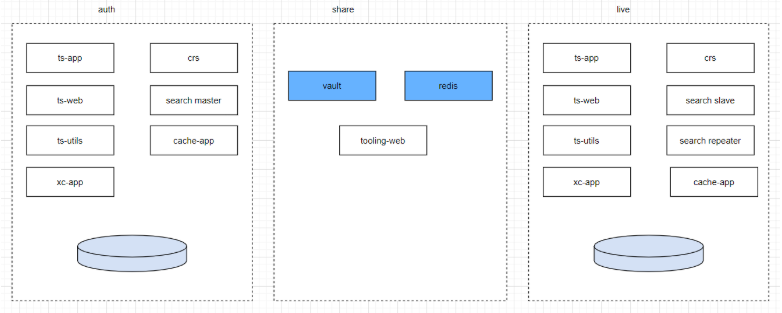
- Solr-based search with a remote Aurora-based storefront
- The Solr-based search environment uses a dedicated Search Master that runs in its
own Docker container or containers. It has repeaters and subordinates to balance the
load. You can deploy Solr based search and remote Aurora-based store in this
configuration.
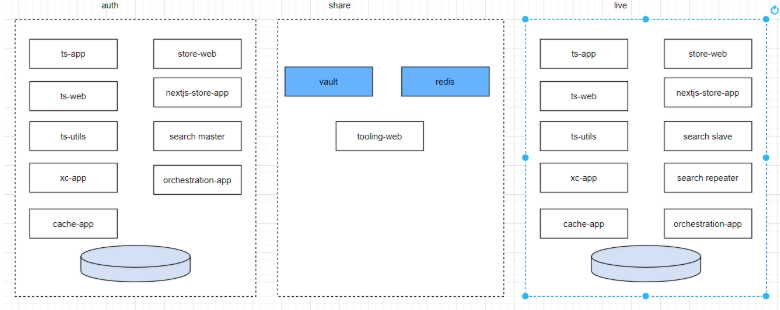
- Solr-based search with a NextJS storefront
- The Solr-based search environment uses a dedicated Search Master that runs in its
own Docker container or containers. It has repeaters and subordinates to balance the
load. You can deploy Solr-based search and a NextJS storefront in this
configuration.
- Solr-based search with remote Aurora-based and NextJS storefront
- The Solr-based search environment uses a dedicated Search Master that runs in its
own Docker container or containers. It has repeaters and subordinates to balance the
load. You can deploy Solr-based search, a remote Aurora-based storefront, and a NextJS
storefront in this configuration.
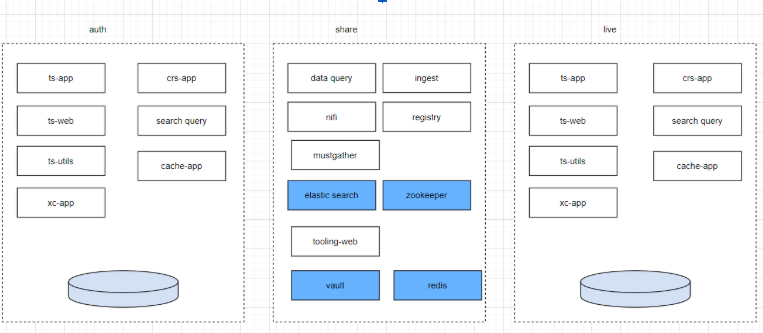
- Elasticsearch-based Search with a remote Aurora-based storefront
- If you want to use the Aurora storefront, you can do so with HCL Commerce+
Elasticsearch-based Search. The network topology is as follows:
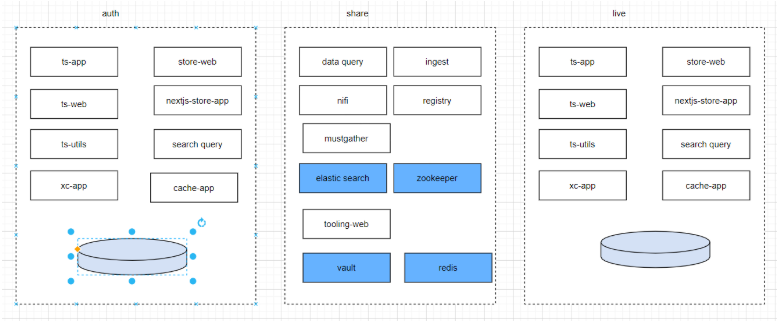
- Elasticsearch-based Search with a remote NextJS storefront
- By default, HCL Commerce Search uses the NextJS storefronts. For an introduction to
these stores and their features, see Reference React stores.
- Elasticsearch-based Search with mixed store types
- You can also combine Aurora-based and NextJS storefronts with Elasticsearch-based
search, using the following topology:
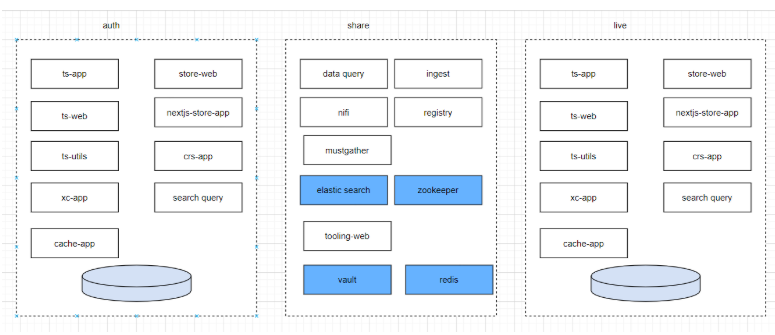
Commerce+ Transaction Server in production
Ensure that you have a strategy for managing and maintaining the container lifecycle of your production environment. For more information, see Preparing your Commerce+ Transaction Server environment.