Configuring and running the server deployment process
After you create the deployment package, you can deploy it using additional Ant scripts provided as part of the WebSphere Commerce Build and Deployment tool.
You can now deploy the deployment packages you have created. The following diagram illustrates the high-level server deployment process flow:
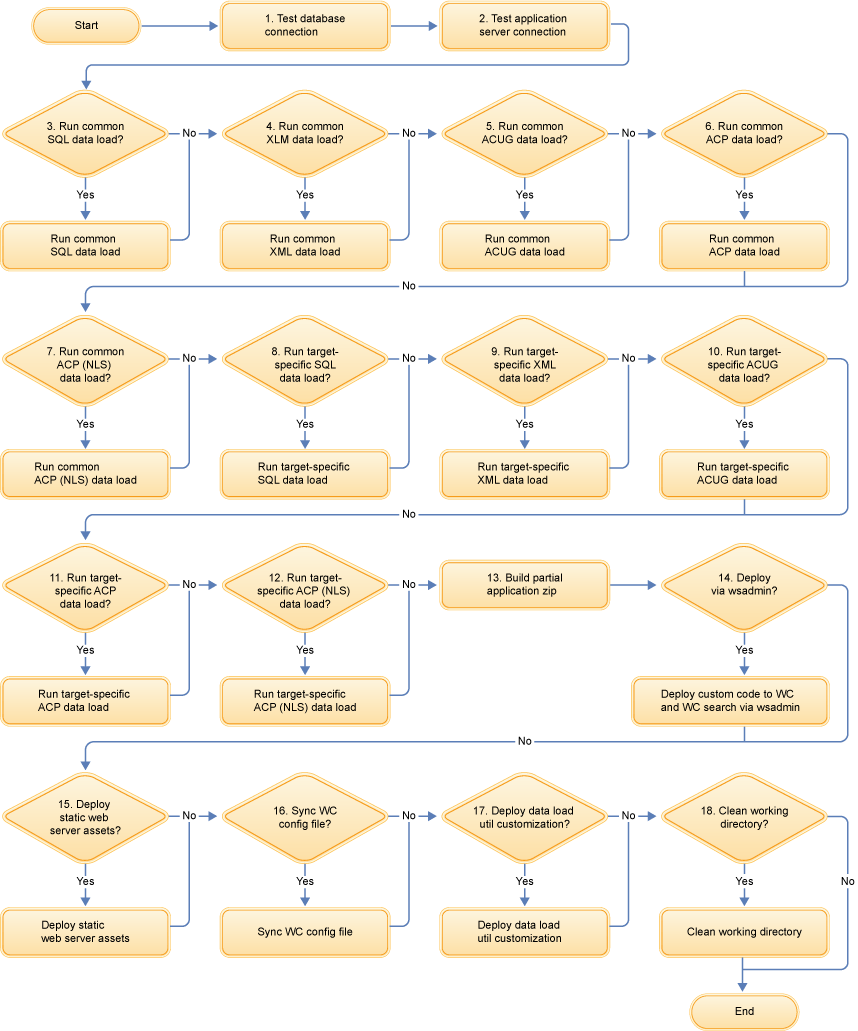
The deployment process steps are:
- Test the connection to the database and its validity if any of the dataload steps is set to run.
- Test the connection to the application server if the wsadmin step is set to run.
- If set to run, perform common SQL dataload.
- If set to run, perform common XML dataload. This result is identical to running the
idresgentool, then running themassloadtool. - If set to run, perform common ACUG dataload. This result is identical to running the
acugloadtool. - If set to run, perform common ACP dataload. This result is identical to running the
acploadtool. - If set to run, perform common ACP (NLS) dataload. This result is identical to running the
acpnlsloadtool. - If set to run, perform target-specific SQL dataload.
- If set to run, perform target-specific XML dataload. This result is identical to running the
idresgentool, then running themassloadtool. - If set to run, perform target-specific ACUG dataload. This result is identical to running the
acugloadtool. - If set to run, perform target-specific ACP dataload. This result is identical to running the
acploadtool. - If set to run, perform target-specific ACP (NLS) dataload. This result is identical to running
the
acpnlsloadtool. - Create a partial application zip file used for deployment of custom code to the WebSphere Commerce application and WebSphere Commerce search application , by consolidating EAR assets, Java utility modules set to include, and existing Web module code set to include.
- If set to run, deploy custom code to the WebSphere Commerce application and WebSphere Commerce search application by using the
wsadmintool. Connector modules set to include, EJB modules set to include, new Web modules set to include, and the partial application zip will be deployed. In a clustered environment, rollout update can be used to distribute the changes to all cluster members. - If set to run, deploy static Web server assets with the user-provided Ant script.
- If set to run, synchronize the WebSphere Commerce configuration file with the user-provided Ant script.
- If set to run, deploy the Data Load utility customization with the user-provided Ant script.
- If set to run, clean the working directory.