
Sign In
The Sign in page is the home page of the Elite starter store from which customers can log on to the store.
Customers can use this page to register their organization (if it is not already registered), register a new customer (if the organization is already registered, but a specific user is not registered), or log on to the Elite store. When a customer logs on to the Elite store, their organization name and logo is displayed in the header of all pages within the store.
Elements of the Sign In page
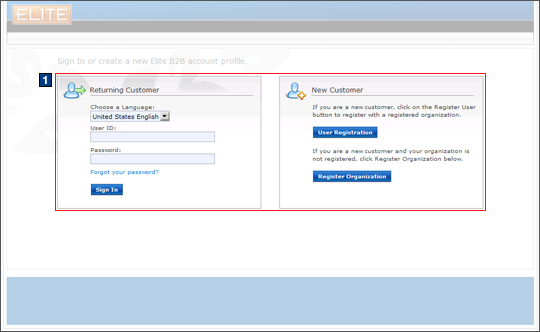
JSP files
- AccountDisplay.jsp represents the entire
page.Includes:
- 1 AccountDisplayContent.jspf, which displays the sign in or register options.
e-Marketing Spots
- There are no e-Marketing Spots on the Sign In page.
Store functions
- There are no options on the Sign In page.
Links and buttons
- When the Forgot your password? link is
clicked, the Logoff command
is called, redirects to LogOffView, and displays the Forgot Password
page.
- Double-click handling is implemented using JavaScript to prevent multiple requests from being sent.
- The cursor_wait() method is called and displays the progress bar if AJAX My Account is enabled.
- When the Sign In button is clicked, the Logon command
is called.
- Double-click handling is implemented using JavaScript to prevent multiple requests from being sent.
- The cursor_wait() method is called and displays the progress bar if AJAX My Account is enabled.
- When the User Registration button is clicked, the UserRegistrationForm command is called.
- When the Register Organization button is clicked, the OrganizationRegistrationAddForm command is called.