
BigFix Relays
For more information on Relays, see Managing relays.
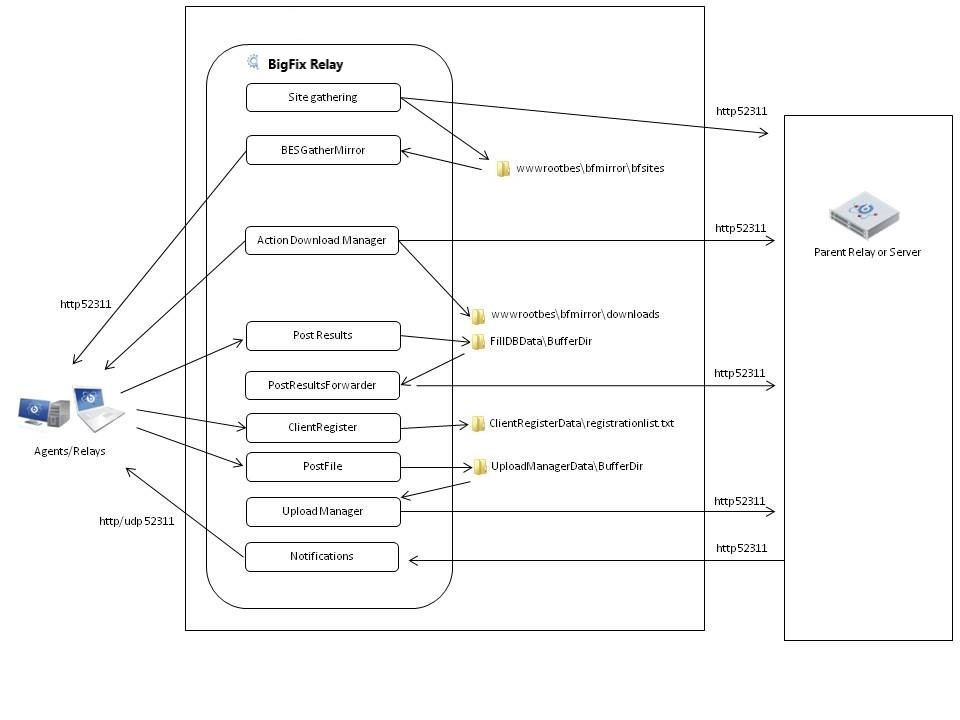
BigFix Relays allow an N-tier hierarchy to be created for the transmission of information from the BigFix Clients to the BigFix Server in the BigFix Enterprise. Following are Frequently Asked Questions about BigFix Relays.
What do BigFix Relays do?
- BigFix Relays "relay" information to and from the BigFix Client and another BigFix Relay or the BigFix Server.
- BigFix Relays enable BigFix Clients to gather the latest information about new Fixlet messages, new actions, or new downloads.
- BigFix Relays enable BigFix Clients to pass status messages to the BigFix Server including action results, retrieved properties, and relevant Fixlet messages.
- BigFix Relays enable BigFix Clients to register their last known IP address so they can be "pinged" later if there is new information to gather.
- BigFix Relays enable BigFix Clients to download patches and other files.
Do I need to find/buy a separate dedicated computer to be a BigFix Relay?
- No! BigFix Relays are specially designed to work on shared systems.
- Any BigFix Client (on a supported BigFix Relay OS) can be a BigFix Relay.
- Most customers will deploy BigFix fully without purchasing a single BigFix Relay (even the largest deployments with over 3000 BigFix Relays).
- It is very common to deploy the BigFix Relay on server computers that already exist in the enterprise infrastructure. AV distribution servers, file servers, print servers, Active Directory servers, and more are all commonly used as BigFix Relays. Server computers make a good choice because servers tend to exist in the same places you want to place a BigFix Relay and they are rarely turned off; however, a server class computer is not a requirement of a BigFix Relay.
- A BigFix Relay uses minimal computer resources and is idle most of the time and it is designed to have minimal impact on a computer so there are no conflicts with other applications/services running on the same computer.
- BigFix Relays do not need server-class fault-tolerant hardware because the nature of the BigFix architecture makes the system fault-tolerant (because BigFix Clients will automatically fail-over to other near-by BigFix Relays in the event of a problem).
- BigFix Relays can also be deployed on standard desktop computers with no problems. Examples from current customers include BigFix Relays on secretary's computers, kiosk computers in retail stores, IT administrators' computers, and deprecated old desktop hardware that would have been thrown away but instead were used as BigFix Relays.
- BigFix Relays require no additional 3rd party software (e.g., SQL Server, IIS, and other applications are not required for the BigFix Relay).
Why use BigFix Relays?
- Bandwidth Savings - Often the BigFix Clients are not in the same geographic location as the BigFix Server, and often the different locations are connected by thin network pipes. By downloading from a BigFix Relay instead of the main BigFix Server, the information about the action and -- more importantly -- any files associated with the actions only need to be transferred across the thin pipe one time to the BigFix Relay instead of one time per BigFix Client. The BigFix Relay then distributes the information over the LAN to the BigFix Clients. The result is a substantial bandwidth savings. Without BigFix Relays, it would often be impossible to administer remote computers because of the bandwidth limitations.
- BigFix Server Scaling - The BigFix Server has a database and a web server and is the central communication piece of the whole system. A single computer can only accept so many inbound connections from BigFix Clients, BigFix Consoles, etc. Without using BigFix Relays, even a very powerful computer could easily be overwhelmed by only a few thousand BigFix Clients. By using BigFix Relays, you effectively distribute the load from the BigFix Server to the BigFix Relays allowing for the BigFix Server to scale to handle many more BigFix Clients, use less expensive hardware, and be more efficient.
How do BigFix Relays work?
- BigFix Relays are BigFix Clients that are running two extra services (BESGather and BESRelay).
- BigFix Relays act as a mini BigFix-specific webserver.
- BigFix Clients connect using standard HTTP on the specified port number (default 52311).
- BigFix Clients will request downloads, the latest Fixlet sites, and the latest action sites from the BigFix Relay.
- If the BigFix Relay does not have the latest information, it gets the data from another BigFix Relay or from the BigFix Server.
- BigFix Clients will send action results and retrieved property reports to the BigFix Relay, which will bundle and compress them and send them to another BigFix Relay or to the BigFix Server (the bundling and compression also saves network bandwidth).
- BigFix Relays will cache downloaded files so that it will not have to re-download the files if they are needed later. BigFix Relays (default cache size is 1 GB, but is configurable) use a least-recently-used (LRU) cache replacement scheme for when the cache fills up.
How do you administer BigFix Relays?
- Installing BigFix Relays is done by using an "Install BigFix Relay" task in the BigFix Console to designate a BigFix Client as a relay.
- To uninstall the BigFix Relay, you simply run the "Uninstall BigFix Relay" task in the BigFix Console.
- BigFix Clients can be told which BigFix Relay to point to by using the BigFix Console to set a BigFix Client (or groups of BigFix Clients based on properties like subnet, location, etc.) to use a primary and secondary relay.
- BigFix Clients can also be set to automatically find their closest BigFix Relays based upon network hops.
- BigFix Relays can be manually set to create a hierarchy or the BigFix Relays can establish a hierarchy automatically.
How does the BigFix Client/BigFix Relay Auto Selection work?
- BigFix Clients will choose their closest BigFix Relay by periodically "pinging" each BigFix Relay to determine which relay is the closest based upon the number of network hops. The default BigFix Relay selection period is 6 hours and is configurable.
- Each BigFix Client will make a list of their closest BigFix Relays. If they cannot reach their closest BigFix Relay because it is off or down, they will try the second closest, and so on.
- If a BigFix Client cannot find any BigFix Relays or they are all down, the BigFix Client will connect directly with the main BigFix Server.
- If more than one BigFix Relays are the same distance away from a BigFix Client, the BigFix Client will randomly choose amongst them.
What are the system requirements to be a BigFix Relay?
For details about relay capacity planning, see BigFix Capacity Planning
Do you have a "best practices" list for maintaining a healthy BigFix Relay deployment?
Yes. See the Relay Health page for more information.