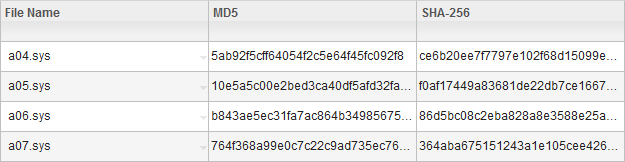
Viewing checksums in the user interface
 Available from 9.2.3. To view checksums in the user interface,
you must enable columns that show this data. It can be useful to verify checksums of single files.
For bigger amounts of files, use REST API that can retrieve all collected checksums at
once.
Available from 9.2.3. To view checksums in the user interface,
you must enable columns that show this data. It can be useful to verify checksums of single files.
For bigger amounts of files, use REST API that can retrieve all collected checksums at
once.
About this task
Notice:  Scanned File Data
renamed to File Evidence and moved under Software section (placed after Application
Evidence)
Scanned File Data
renamed to File Evidence and moved under Software section (placed after Application
Evidence)
Scanned File Data
renamed to File Evidence and moved under Software section (placed after Application
Evidence)Procedure
- Log in to BigFix Inventory.
- Go to .
-
Hover over the Manage Report View icon
 , and click Configure View.
- Select the MD5 or SHA-256 check
box, and then click OK.
Checksums for each file are shown in the appropriate columns.