
Integrating users with Web Reports
You can use the Web Reports component to allow your local Web Reports users to access BigFix Compliance.
Before you begin
Install the Web Reports component. The component is typically installed together with your BigFix server but you can also add it to your environment at any time. To do so, start the installation of BigFix and choose to install only Web Reports.
About this task
You can use the same credentials for the user as specified in Web Reports. To achieve this, create an entry for the user in BigFix Compliance using the username as in Web Reports and choose Web Reports as the authentication method. Whenever you change the credentials in Web Reports, they will also be valid in BigFix Compliance with no additional configuration.
The role of the user is managed in BigFix Compliance.
Only local Web Reports users are supported.
Procedure
-
Connect your BigFix Compliance server to the Web Reports database.
-
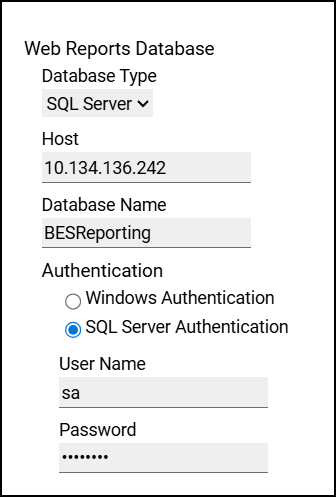
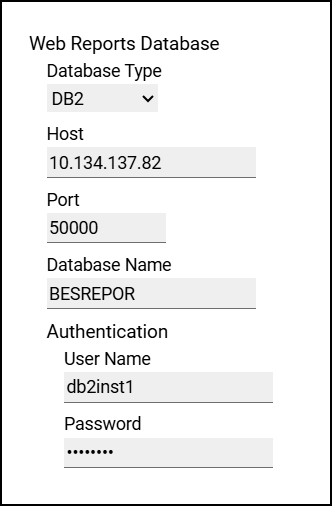
Click on your data source and fill in the connection parameters for the Web Reports
database. The required information will differ depending on the type of the database that you
use. For more information, see the following examples.
-
Click on your data source and fill in the connection parameters for the Web Reports
database. The required information will differ depending on the type of the database that you
use. For more information, see the following examples.
-
Each of your Web Reports users must be manually added to BigFix
Compliance. After you complete this action, the users will be linked with their
equivalents in Web Reports: