BigFix Insights for Vulnerability Remediation
Use this section to become familiar with infrastructure and key concepts necessary to understand how it works.
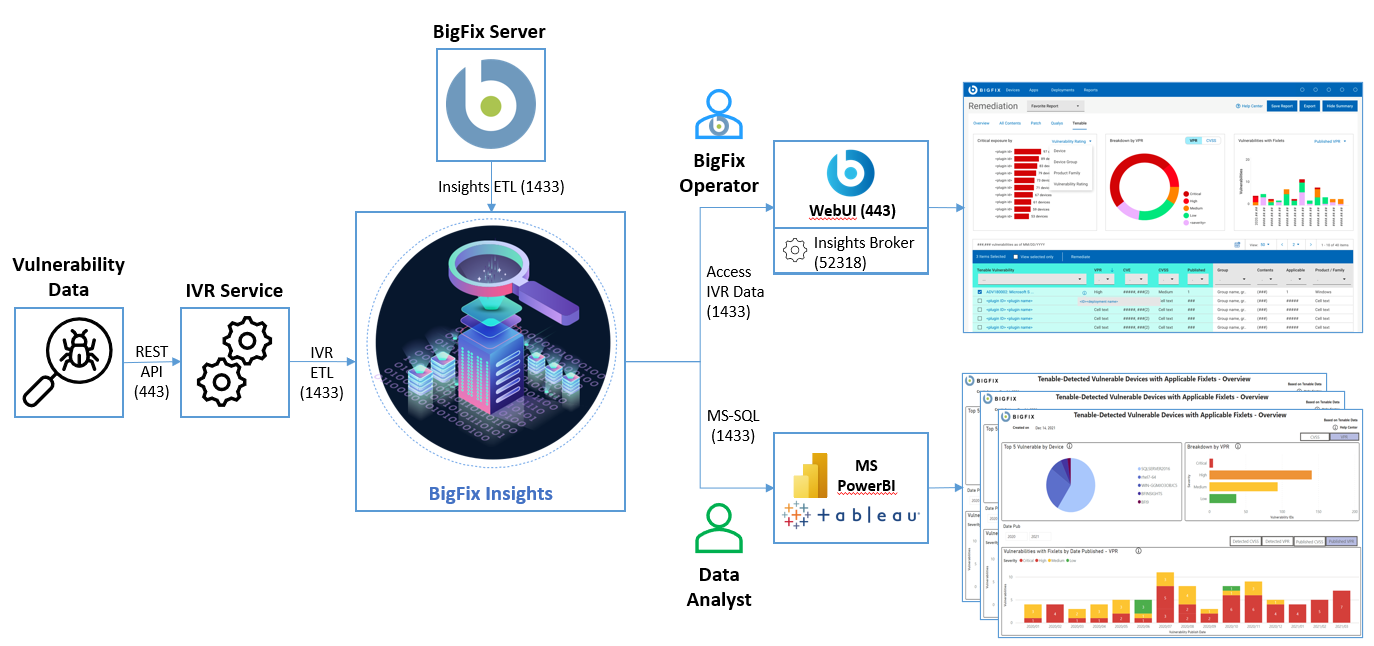
integrates with sources of vulnerability data. The purpose is to guide users on how to apply the best patch and configuration settings to remediate discovered vulnerabilities, and thus reduce risk and improve security.
uses advanced correlation algorithms to aggregate and process the vulnerability data with information from to drive analytics reports. The output of the analytics facilitates remediation through the Baseline Creation Wizard by recommending the latest available patches for the discovered vulnerabilities.
- WebUI IVR app - it is required to enable WebUI to access IVR data through Insights. For more information on installing IVR app, see Setting up IVR App.
- BI Tools for Data Analysis - existing IVR reports in PowerBI and Tableau. Refer to the link to find out more about IVR reports.
-
Only one source of vulnerability data for automatic ingestion is supported for a given BigFix Insights instance
-
One BigFix WebUI instance can manage only one BigFix Insights database. This limitation means that you cannot simultaneously connect or manage multiple instances of BigFix Insights through one WebUI instance.