
Running a scan
How to perform a scan to detect unmanaged computers and network devices.
Select the Setup node in the Asset Discovery navigation tree to find all the task available to "Run Nmap Scan".
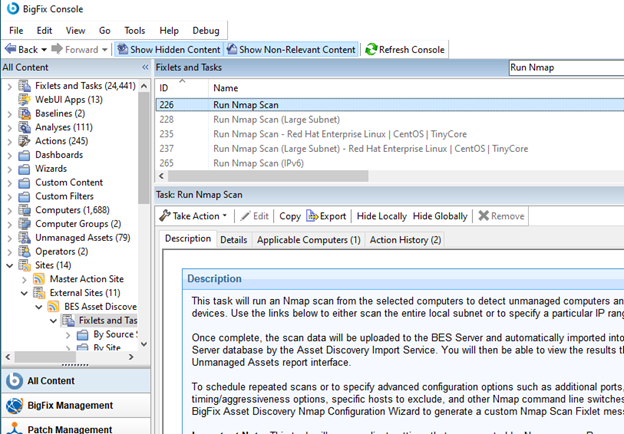
When the task opens in the work area, select one of the available links in the Actions box to initiate the Nmap scan. You can specify a local subnet:
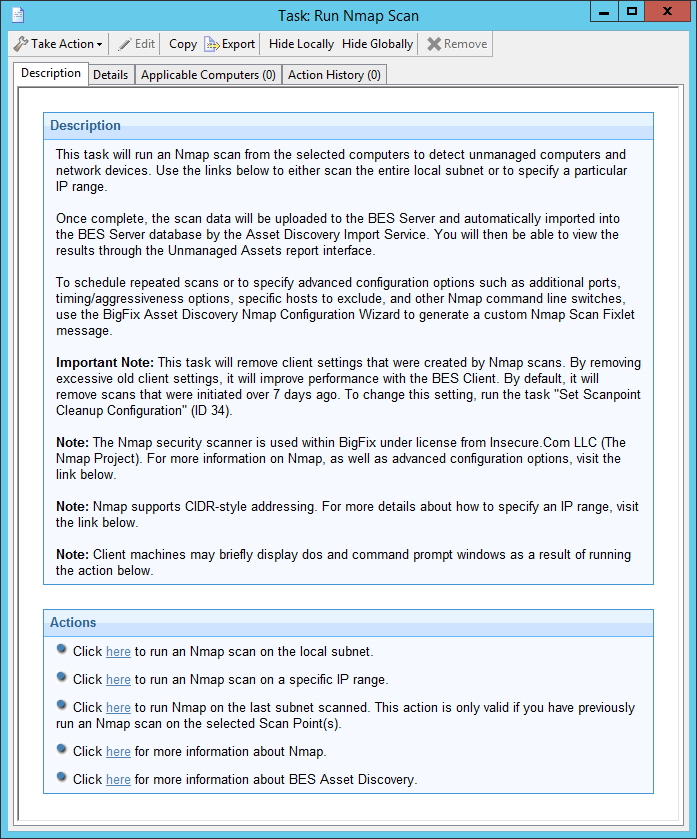
Or a large subnet:
.jpg)
To execute Nmap scan on IPv6, the tasks like “Run Nmap Scan (IPv6)” will be relevant only on Scan Points where IPv6 protocol is enabled.
Nmap scan does not yet support octet ranges for IPv6 so the target of your Nmap scan can be an IP subset, that is a list of fully qualified IPv6 addresses, in shortened or expanded notation, hostnames and subnets in CIDR-style, all separated by space.
Also, for IPv6, the Nmap Scan on the local subnet is available for subnets of no more than 1022 host addresses.
For IPv4, a scan on a class C network (255 IP addresses) usually takes anywhere from 10-30 minutes, depending on your network. You can also create your own custom Tasks to schedule and configure Nmap scans using the Asset Discovery Nmap Configuration Wizard.
When a Scan Point completes its local scan, the results are uploaded to the BigFix server and imported into the database by the Importer service. The scan results are then visible on the Unmanaged Asset tab in the BigFix console.
This completes the installation of the Asset Discovery service.